DeepModelingDefine the future of scientific computing together2026-05-21T16:00:00.000Zhttps://blogs.deepmodeling.com/DeepModelingHexoDPA4 Tops Matbench Discovery: A Single RTX 5090 Delivers SOTA-Level Large Atomic Models in One Dayhttps://blogs.deepmodeling.com/DPA4_05_22_2026/2026-05-21T16:00:00.000Z2026-05-21T16:00:00.000Z
Recently, the OpenLAM Team of the Beijing Academy of AISI, Peking University, DeepModeling Technology, and the Institute of Applied Physics and Computational Mathematics have jointly launched DPA4, a new-generation model architecture tailored for the era of Large Atomic Models (LAMs). DPA4 claimed the top spot worldwide with its comprehensive performance score (CPS) on Matbench Discovery, an authoritative global benchmark for materials discovery, emerging as the latest State-of-the-Art (SOTA) model.
DPA4’s highlight lies in its ultra-low training threshold: the prior leading eSEN needed over 300 GPU days for training, yet DPA4 reaches matching accuracy with merely one consumer RTX 5090 running for roughly one day, and its parameter volume is less than one-tenth of eSEN’s.
In short, the SOTA-level accuracy once reliant on costly supercomputing is now accessible via a single consumer graphics card. DPA4 reshapes the accuracy-efficiency Pareto frontier of large atomic models.
Official Screenshot of Matbench Discovery (Data as of May 22, 2026)
DPA4 adopts SO(2) equivariant linear operators paired with local-coordinate attention. It satisfies translation, rotation, permutation symmetries and energy conservation while cutting equivariant computation costs drastically. It also pioneers global compile-accelerated training for machine learning potentials, lifting training speed 2–3 times. It secured SOTA top rankings on two key benchmarks: Matbench Discovery and SPICE-MACE-OFF. It strikes a new balance of precision and training cost: a single RTX 5090 trains it in one day to match eSEN’s 300+ GPU-day accuracy; parameters are under 1/10 of eSEN; versus its predecessor DPA3, training efficiency is about 10x higher at equal accuracy.
DPA4 early access is open to the DeepModeling community. Its research paper and full official code will be open-sourced later; readers may join the article’s ending WeChat group for academic exchanges. Below is a condensed technical introduction.
1. DPA4 Model Architecture: SO(2) Equivariant Design in Local Coordinate Systems
Traditionally, SO(3) equivariant models rely on complex Clebsch–Gordan tensor products to retain rotational symmetry, whose computational complexity spikes sharply [about $$O(l_{max}^6)$$] with the increase of angular momentum order $$l_{max}$$— this is the core reason high-precision models demand massive computing resources.
DPA4’s core idea avoids expensive global SO(3) tensor calculations by simplifying symmetry processing to the SO(2) subgroup: it builds a local coordinate frame for each atomic bond, unifying bond orientations to a reference axis. Axial rotation symmetry only requires SO(2) processing, whose simple block-structured linear mappings replace heavy SO(3) tensor operations. Full rotational equivariance is preserved while angular computation overhead drops greatly.
On this basis, DPA4 further incorporates attention mechanisms to aggregate information from neighboring atoms. The model can adaptively focus on the most critical atomic interactions for the central atom according to local geometric and chemical environments, thus delivering strong expressive power with a compact parameter scale. The entire model strictly adheres to translation, rotation, permutation symmetries and energy conservation, ensuring full physical consistency.
Two major engineering optimizations further lift efficiency:
Native torch.compile compatibility: end-to-end acceleration without extra code edits
Embedded ZBL short-range repulsive potential: stabilizes simulations under high pressure, irradiation, defects and other extreme atomic configurations
DPA4 Model Structure Diagram
2. Benchmark Performance: Dual No.1 Titles
Matbench Discovery: Global Champion for Materials Discovery. Launched by UC Berkeley, Cambridge University and other top institutes, Matbench Discovery is the world’s leading dynamic benchmark for AI inorganic material prediction, widely accepted as the industry gold standard. Instead of static data fitting, it tests model capacity to forecast stability of hundreds of thousands of unknown crystals, mimicking real exploratory research. Final Comprehensive Performance Score (CPS) integrates energy/force accuracy, F1 score and discovery acceleration factors. Beating SOTA models from Meta, Microsoft and global universities, DPA4 claimed the top CPS rank.
SPICE-MACE-OFF: Top Small-Molecule Performance. DPA4 excels beyond inorganic crystals, setting a new SOTA record on the SPICE-MACE-OFF small-molecule benchmark. With smaller parameter size, it outperformed the former leading model eSEN to take the first place, proving its versatility as a universal potential energy surface model for crystals and organic small molecules alike.
Performance on SPICE-MACE-OFF
3. Efficiency Breakthrough: A New Precision-Cost Pareto Frontier
Top benchmark results confirm DPA4’s outstanding accuracy, yet its revolutionary value lies in minimal training cost. Conventional leading models always require larger parameters and heavier computation; DPA4 breaks this norm:
Training cost: 1 RTX 5090 (~1 day) = eSEN’s 300+ GPU days of precision
Parameter scale: <1/10 of eSEN at equivalent CPS
Generation upgrade: ~10× training efficiency vs DPA3 under equal prediction accuracy
DPA4 Redefining the Accuracy-Efficiency Pareto Frontier for Large Atomic Models
Multi-layer engineering optimizations enable such efficiency gains. Unlike standard AI models, potential training needs double backward calculation for force derivation, which long blocked torch.compile use and forced large batch sizes to boost GPU utilization. DPA4 is the world’s first machine learning potential supporting compile training. Paired with bf16 automatic mixed precision (AMP), it slashes VRAM usage drastically, enabling full training on a single graphics card.
Comparison of Training Time and Peak Video Memory Usage with DPA4’s Compile and AMP Enabled
This breakthrough accelerates model iteration for researchers; fixed computing budgets support larger-scale, longer-time microscopic simulations. DPA4 turns high-throughput atomic simulation from a high-cost luxury into accessible tools, supporting battery material R&D, catalyst design, semiconductor screening and other key industries.
Summary
DPA4 is a universal next-gen potential framework for the LAM era. Its local SO(2) equivariant operators plus attention maintain physical consistency while cutting computation costs; native compile acceleration and built-in ZBL potential further boost engineering performance.
It claimed dual top benchmark rankings, delivering matching or superior precision to prior costly large models with <1/10 parameters and one-day single-GPU training. DPA4 verifies high accuracy and high efficiency can be achieved simultaneously.
Early access is open to DeepModeling community members; papers and full open-source code will be released sequentially later. The team sticks to open collaboration in LAM research, inviting global scholars to follow progress and join the community.
Core Developers & Affiliated Institutions
Li Tiancheng (Peking University, AISI) Xue Jianming (Peking University) Zhang Linfeng (DP Technology, AISI) Zhang Duo (Peking University, AISI) Wang Han (Institute of Applied Physics and Computational Mathematics)
]]><p>Recently, the OpenLAM Team of the Beijing Academy of AISI, Peking University, DeepModeling Technology, and the Institute of Applied Physics and Computational Mathematics have jointly launched DPA4, a new-generation model architecture tailored for the era of Large Atomic Models (LAMs). DPA4 claimed the top spot worldwide with its comprehensive performance score (CPS) on Matbench Discovery, an authoritative global benchmark for materials discovery, emerging as the latest State-of-the-Art (SOTA) model.</p>
<p>DPA4’s highlight lies in its ultra-low training threshold: the prior leading eSEN needed over 300 GPU days for training, yet DPA4 reaches matching accuracy with merely one consumer RTX 5090 running for roughly one day, and its parameter volume is less than one-tenth of eSEN’s.</p>
<p>In short, the SOTA-level accuracy once reliant on costly supercomputing is now accessible via a single consumer graphics card. DPA4 reshapes the accuracy-efficiency Pareto frontier of large atomic models.</p>
<center><img data-src=https://dp-public.oss-cn-beijing.aliyuncs.com/community/Blog%20Files/DPA4_05_22_2026/DPA41.PNG pic_center width="60%" height="60%" /></center>
<h6 id="Official-Screenshot-of-Matbench-Discovery-Data-as-of-May-22-2026"><a href="#Official-Screenshot-of-Matbench-Discovery-Data-as-of-May-22-2026" class="headerlink" title="Official Screenshot of Matbench Discovery (Data as of May 22, 2026)"></a><em>Official Screenshot of Matbench Discovery (Data as of May 22, 2026)</em></h6>DeepFlame 2.0: Embracing the “Agent Era” of Combustion and Fluid Science Computinghttps://blogs.deepmodeling.com/DeepFlame2.0_28_1_2026/2026-01-27T16:00:00.000Z2026-01-27T16:00:00.000Z
Over the past two years, the DeepFlame community has witnessed the rapid development of AI for Science (AI4S) together with researchers and practitioners. Since advocating the co-construction of an AI4S open-source combustion platform in June 2022, and releasing more than twenty versions that realize full-process GPU heterogeneous solvers, we have consistently been committed to building a bridge between artificial intelligence, high-performance computing, and physical modeling.
However, in today’s era of explosive AI growth, why are many researchers’ daily routines still dominated by heavy code debugging and case configuration? True AI4S should not stop at “using AI to compute faster,” but should aim to “use AI to liberate researchers’ productivity.”
Today, we officially release DeepFlame 2.0. In this version, beyond functional updates and performance optimizations, more importantly, we formally introduce a brand-new scientific computing paradigm — AI-agent-driven scientific computing. By bringing AI agents into scientific computing workflows, researchers can leverage the power of intelligent agents to improve research efficiency and focus more on solving scientific problems themselves.
01 What Is the “Agent Ecosystem” of DeepFlame 2.0?
DeepFlame 2.0 is no longer merely a collection of solvers. It is evolving into an open, agent-friendly scientific computing foundation. We introduce AI agents that cover multiple stages of the workflow, from code development to case simulation, helping researchers enhance productivity.
02 Version Update Overview
Agent Ecosystem
1. GPU Programming Agent CoCo: High-Performance Computing Without Knowing CUDA
One of DeepFlame’s core competitive advantages lies in its efficient GPU heterogeneous solving capability. However, migrating CFD codes from traditional CPU architectures to GPUs often requires deep expertise in CUDA programming, which has become a major obstacle for many combustion or CFD experts.
To address this challenge, we collaborated with Shanghai Shuqian Technology to develop the code migration agent CoCo. It can not only understand the semantics of traditional C++ numerical algorithms, but also automatically generate, review, and test CUDA code according to the DeepFlame-GPU framework specifications.
The CoCo agent significantly lowers the barrier to high-performance computing development, allowing researchers to focus on high-level physical model design while delegating tedious code migration tasks to AI.
2. FlamePilot: DeepFlame’s CFD Simulation Agent
Another important application scenario of AI agents in scientific computing is serving as research partners that can run tools, autonomously correct errors, and learn from tasks.
To meet this need, we developed the FlamePilot agent, a “digital teammate” for DeepFlame combustion simulations. Its primary goal is to assist users in carrying out combustion simulations through natural language interaction, while autonomously diagnosing issues based on runtime feedback, proposing improvement hypotheses, executing corrective optimizations, until the results converge or align with expectations.
3. DFODE-kit Trainer: Neural Network Training for Combustion Chemistry
To lower the barrier for building and training combustion chemistry DNN models, DeepFlame 2.0 introduces the DFODE-kit Trainer agent. This agent aims to autonomously complete operating condition setup, data generation, model training, and validation for combustion chemistry simulations through natural language interaction.
Users only need to provide simple natural language instructions, and the Trainer agent can automatically execute complex training workflows, greatly improving the efficiency of developing combustion chemistry neural network models.
The upper-layer architecture of agents relies on the solid underlying foundation of DeepFlame. In DeepFlame 2.0, we introduce multiple new features to further enhance software usability and performance.
1. DFODE-kit: Deep Learning Solver for Combustion Chemistry [1]
DFODE-kit aims to accelerate combustion simulations by efficiently solving chemical reaction kinetics governed by high-dimensional stiff ordinary differential equations (ODEs). This software package integrates deep learning methods to replace traditional numerical integration, thereby significantly improving simulation speed and accuracy.
2. DeepFlame-GPU: Continuous Optimization of User Experience and Functional Capabilities [2–3]
Solvers: Completed GPU porting of df0DFoam and dfHighSpeedFoam
Turbulence models: Added LES subgrid-scale models including WALE, SIGMA, and kEqn
Boundary conditions: Added boundary conditions such as flowRateInletVelocity, waveTransmissive, and totalTemperature
Discretization schemes: Ported the KNT and KT schemes, supporting supersonic flow simulations
ODE solvers: Optimized user experience and fixed bugs for GPSODE
Standard cases: Substantially supplemented and improved standard cases for df0DFoam, dfLowMachFoam, and dfHighSpeedFoam
3. New Progress in Domestic High-Performance Adaptation
Based on the Kunpeng ecosystem, DeepFlame 2.0 has carried out multiple adaptation and optimization efforts, improving performance on domestically produced hardware.
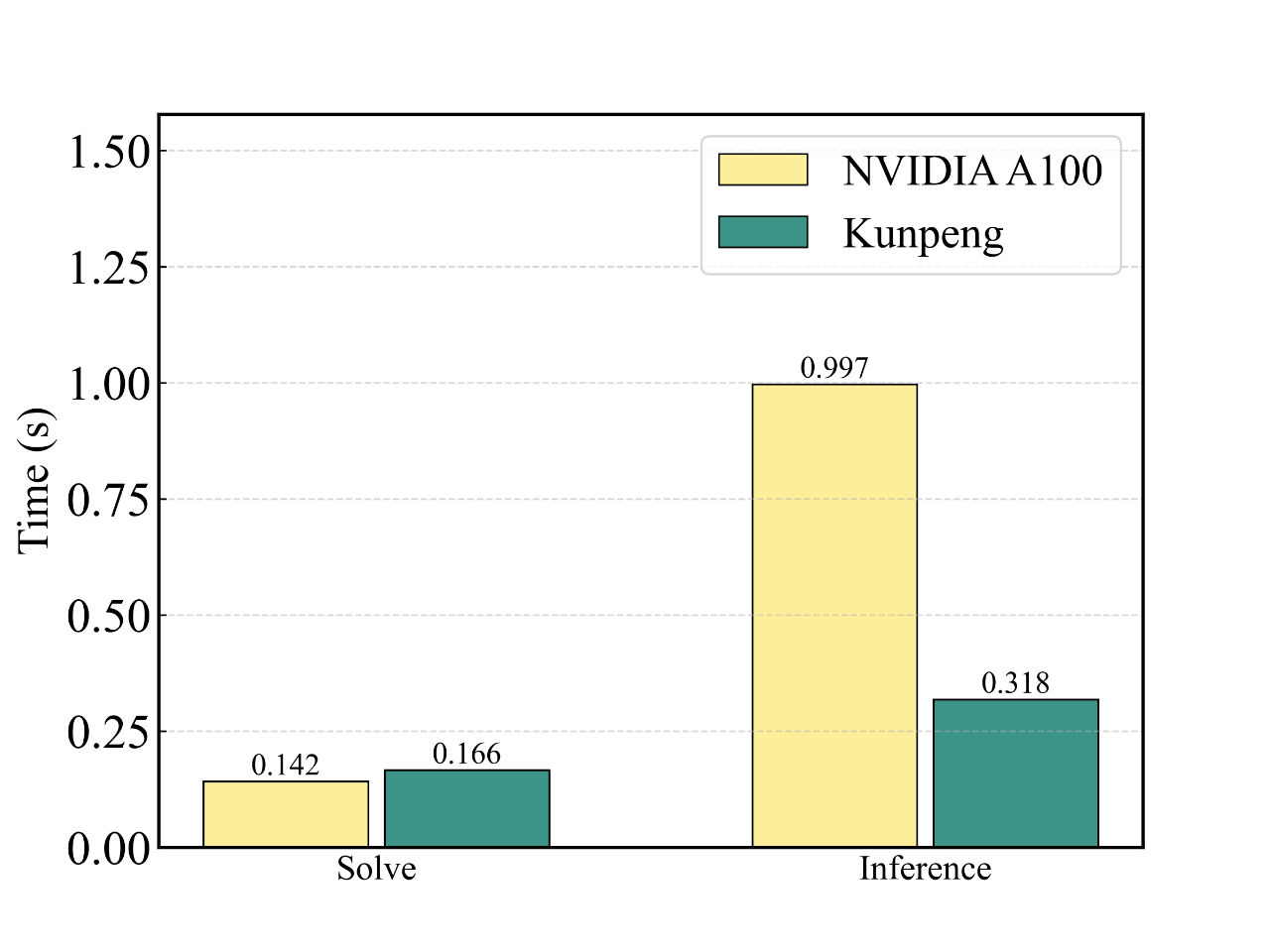
In terms of usability, the DeepFlame 2.0 software stack can be natively compiled for Kunpeng platforms and supports one-click deployment and execution via the Jarvis tool. In terms of performance, DeepFlame 2.0 achieves deep optimization for ARM architectures and full-stack performance breakthroughs: at the hardware level, fine-grained core binding and memory allocation strategies are introduced for the Kunpeng 920 Professional Edition’s many-core, multi-NUMA, on-chip memory architecture; at the software level, the codebase is refactored based on the BiSheng compiler, integrating the Kunpeng Math Library (KML) to accelerate GEMM computations while ensuring accuracy and robustness; at the algorithmic level, ARM-native mixed-precision solvers (FP64 sparse solving + FP16 inference) are designed to balance accuracy and speed. For AI–CFD integrated inference acceleration, lightweight neural network models are developed at the model layer to achieve high-accuracy inference and are adapted to the Kunpeng SME instruction set.
04 Quick Access to DeepFlame
The DeepFlame repository in the DeepModeling community is available at: https://github.com/deepmodeling/deepflame-dev
The release tag for DeepFlame version 2.0: https://github.com/deepmodeling/deepflame-dev/releases/tag/v2.0.0
]]><p>Over the past two years, the DeepFlame community has witnessed the rapid development of AI for Science (AI4S) together with researchers and practitioners. Since advocating the co-construction of an AI4S open-source combustion platform in June 2022, and releasing more than twenty versions that realize full-process GPU heterogeneous solvers, we have consistently been committed to building a bridge between artificial intelligence, high-performance computing, and physical modeling.</p>
<p>However, in today’s era of explosive AI growth, why are many researchers’ daily routines still dominated by heavy code debugging and case configuration? True AI4S should not stop at “using AI to compute faster,” but should aim to “use AI to liberate researchers’ productivity.”</p>
<p>Today, we officially release <strong>DeepFlame 2.0</strong>. In this version, beyond functional updates and performance optimizations, more importantly, we formally introduce a brand-new scientific computing paradigm — <strong>AI-agent-driven scientific computing</strong>. By bringing AI agents into scientific computing workflows, researchers can leverage the power of intelligent agents to improve research efficiency and focus more on solving scientific problems themselves.</p>CrystalFormer-CSP: “Fast Thinking” and “Slow Thinking” for Crystal Structure Predictionhttps://blogs.deepmodeling.com/cristalformer-CSP_13_01_2026/2026-01-12T16:00:00.000Z2026-01-12T16:00:00.000Z
Given a chemical formula, for example Cu₁₂Sb₄S₁₃, how should the atoms be arranged in space in order to form a stable crystal? This is the problem of crystal structure prediction (Crystal Structure Prediction, CSP), one of the fundamental challenges in materials science research. Recently, the Institute of Physics, Chinese Academy of Sciences released CrystalFormer-CSP to the DeepModeling community, adopting a strategy that combines “fast thinking” and “slow thinking” to address this challenge.
Fast Thinking and Slow Thinking
The Nobel Prize–winning economist Daniel Kahneman proposed a classic theory that human thinking is divided into two systems. System 1 (“fast thinking”) relies on intuition and experience, responds rapidly, but is prone to errors. For example, when seeing “1 + 1”, we can almost give the answer without thinking. System 2 (“slow thinking”), by contrast, relies on logical reasoning, operates more slowly, but produces reliable results; when solving a problem in advanced mathematics, one must carefully work through each step. CrystalFormer-CSP puts this idea into practice in the task of crystal structure prediction: a generative model is used to quickly “guess” candidate structures, and physical calculations are then used to slowly “verify” their stability.
System 1: Rapid Generation
CrystalFormer is a pre-trained crystal generative model that plays the role of System 1. By compressing databases of stable crystals, it learns a form of “chemical intuition”: which space groups, Wyckoff positions, and coordination relationships are more likely to form stable crystal structures. Given a chemical formula as input, the model can rapidly generate a large number of candidate structures. Its advantage lies in its speed and broad coverage, but the generation process does not rely on concepts of energy or force at all. Just like human intuition, it is fast, but not necessarily accurate.
System 2: Physical Verification
System 2 is responsible for energy relaxation and ranking. For each candidate structure, a machine-learning force field continuously adjusts atomic positions and lattice parameters, allowing the structure to “slide” along the energy surface toward lower energy. Ultimately, the stability of the structure is evaluated using the convex hull energy (E_hull). This stage follows physical principles and answers the core question: from an energetic perspective, can this structure exist stably? Its advantage is physical reliability, but the cost is slower computation.
Reinforcement Learning: Letting Slow Thinking Shape Fast Thinking
The “fast thinking and slow thinking” of crystal structure prediction is not merely an analogy. Based on the above understanding, this work further adopts a technical framework of reinforcement fine-tuning with large language models to continuously improve the system.
As shown in the figure below: on the blue potential energy surface, the orange points represent the initial guesses rapidly generated by System 1, and the dark blue arrows indicate the relaxation process of System 2, where the structures “slide” along the surface toward local minima (blue points). The gray dashed lines on the left represent the feedback loop of reinforcement learning: the energy information after relaxation is fed back to the generative model via policy gradient algorithms, enabling System 1 to no longer merely imitate training data, but to gradually learn to generate structures that are more physically stable.
The core challenge of crystal structure prediction lies in the need to find structures with sufficiently low energy while avoiding being trapped in a single configuration and missing other potentially stable phases. The reinforcement learning framework is naturally suited to this problem. By adjusting the relative weights of the energy term and the entropy term in the reward function, one can flexibly balance “energy minimization” and “structural diversity”. Experimental results show that for crystals that were previously predicted unsuccessfully, reinforcement fine-tuning leads to a significant improvement in success rate.
Why Does This Work?
Directly searching for the lowest-energy structure in atomic coordinate space means dealing with a rugged, high-dimensional potential energy surface full of local minima. One can imagine searching for the lowest point in a mountainous landscape: it is easy to get trapped in a small valley and fail to escape. Reinforcement learning changes the nature of the search. Instead of moving atoms one by one, it adjusts the “generation rules” themselves. In the model parameter space, a small update can simultaneously affect multiple atoms and symmetry sites, resulting in a non-local, highly structured search. This makes the method often more efficient than direct searches in configuration space when dealing with complex crystal structures.
Open Source and Usage
CrystalFormer-CSP is open-sourced under the Apache-2.0 license in the DeepModeling community:
CrystalFormer-CSP
The project includes models trained on the Alex20s dataset, and also provides a Google Colab version as well as MCP tools that support integration with large language models. If you encounter any issues during use, feedback is welcome via GitHub Issues.
Future Directions
The current framework focuses on stable structures at zero temperature and ambient pressure. In the future, it can be extended to finite-temperature and high-pressure conditions, moving from answering “what is the most stable structure?” to “under what conditions does a particular structure appear?”. At present, the method is mainly applicable to inorganic crystals; future work may explore extensions to organic crystals, metal–organic frameworks (MOFs), and disordered systems.
Takeaways
⚡ System 1: fast generation, chemical intuition, pattern matching
🐢 System 2: energy calculation, physical constraints, slow but accurate
🔄 Reinforcement learning: allowing slow thinking to in turn shape fast thinking
]]><p>Given a chemical formula, for example Cu₁₂Sb₄S₁₃, how should the atoms be arranged in space in order to form a stable crystal? This is the problem of crystal structure prediction (Crystal Structure Prediction, CSP), one of the fundamental challenges in materials science research. Recently, the Institute of Physics, Chinese Academy of Sciences released CrystalFormer-CSP to the DeepModeling community, adopting a strategy that combines “fast thinking” and “slow thinking” to address this challenge.</p>Uni-Lab-OS 1.0 Official Release: Connecting Devices with Intelligence, Connecting Us with Insighthttps://blogs.deepmodeling.com/Uni-Lab_30_12_2025/2025-12-29T16:00:00.000Z2025-12-29T16:00:00.000Z
In the era of AI for Science, where research workflows are being fundamentally reshaped, the ability to acquire high-throughput, high-quality data has become the key competitive edge. Yet today’s labs still face major challenges: heterogeneous hardware, closed protocols, and fragmented data flow force researchers to spend precious time on integration overhead—not scientific discovery.
An automated lab should not be a collection of expensive machines, but an extension of intelligent decision-making.
In December 2025, with the official merge of v0.10.13, Uni-Lab-OS enters version 1.0. We aim to provide a standardized digital infrastructure for the scientific community—breaking down device barriers and freeing innovation from tooling constraints.
I. Breaking the Deadlock: An “Operating System” for the Laboratory
Uni-Lab-OS is an AI-native, distributed operating system co-initiated by the DeepModeling open-source community and DP Technology. Inspired by ROS (Robot Operating System) in robotics, it bridges the gap between high-level experimental planning and low-level device execution through a software-hardware decoupled architecture.
The 1.0 release introduces a universal "laboratory semantic standard," enabling researchers to define automation workflows with intuitive, consistent logic—seamlessly translating intent into action.
II. Technical Deconstruction: Core Architecture of Uni-Lab-OS
Based on abstraction and refinement of a large number of scientific research scenarios, Uni-Lab-OS 1.0 achieves deep virtualization of the physical world at the architectural level, ensuring the generality and robustness of the system.
1. Everything Is an Object: The A / R / A&R Abstraction Model
To smooth out hardware differences across devices from different vendors and generations, Uni-Lab-OS introduces a strongly typed device abstraction layer, standardizing all laboratory entities into three categories of objects:
Resource (R): Material entities being operated on (such as sample vials and well plates), which only contain state information.
Action (A): Pure execution units (such as pumps and valves) that perform actions but do not hold materials.
Action & Resource (A&R): Composite entities that both store materials and perform actions (such as liquid-handling workstations and reactors).
This standardized abstraction design allows upper-layer applications to invoke device capabilities through standard APIs without needing to concern themselves with underlying hardware details, greatly lowering the development barrier.
To enable the portability of experimental protocols, Uni-Lab-OS maintains two distinct topological structures, achieving separation between logic and physical implementation:
Logical Resource Tree: Defines ownership and hierarchical relationships of resources (e.g., room–bench–tray–well), and is used for permission management and task scheduling.
Physical Graph: Defines the reachability of fluid pipelines and robotic arms, and is used for runtime path planning.
This design ensures that the same experimental logic can be flexibly adapted to different hardware connection schemes, truly realizing the “code-ification” and “migratability” of experimental workflows.
2. Data Integrity: The CRUTD Protocol
Unlike the traditional CRUD (Create, Read, Update, Delete) model of databases, Uni-Lab-OS introduces the Transfer operation and constructs the CRUTD protocol.
Transfer is defined as an atomic transaction with spatiotemporal attributes, ensuring full-process, high-fidelity data traceability throughout the experimental lifecycle, and providing a reliable foundation for downstream data analysis and modeling.
The system adopts a decentralized communication architecture based on ROS 2 and DDS (Data Distribution Service).
Peer-to-peer (P2P) communication and self-discovery mechanisms are supported among edge nodes. Even under extreme conditions such as external network outages, local laboratory workstations are still able to operate safely and stably, ensuring the continuity of experiments.
III. Evolution: The Open-Source Journey from v0.8 to v1.0
The maturity of Uni-Lab-OS is a technological long-distance run spanning 365 days, jointly completed by more than 20 developers.
2025.04 (v0.8.0): The project was officially open-sourced, establishing the direction of the underlying architecture.
2025.06 (v0.9.5): MoveIt2 motion planning and a virtual device system were introduced, realizing “virtual–physical interconnection.”
2025.10 (v0.10.7): Workstation templates and standardized installation procedures were released, enabling stable handling of various industrial-grade scenarios.
2025.12 (v0.10.13–v1.0): Post-processing workstations, visual feedback modules, and a full-stack driver library were added, comprehensively covering core scenarios such as liquid handling, materials characterization, and organic synthesis.
Looking ahead, version 1.0 is only a starting point. In subsequent version plans, we will focus on improving system usability and intelligence:
Lightweight Deployment: Deep optimization for non-ROS environments to lower deployment barriers, allowing the system to run smoothly on standard industrial control computers and even lightweight devices.
Operations-Friendly Design: The introduction of a more intuitive laboratory operations and maintenance management interface, enabling visualization of device status monitoring, consumables management, and task scheduling, so that the system evolves from “usable” to truly “easy to use.”
IV. Ecosystem: From Observers to Co-Creators
Open source is not merely about making code public; it is about the convergence of collective intelligence. Over the past year, the Uni-Lab-OS team has continuously engaged with universities and research institutes, hosting three offline developer workshops in Shanghai, Beijing, and Yibin.
We worked side by side with more than 150 developers from diverse backgrounds—including biomedicine, materials science, computational chemistry, and mechanical engineering—conducting code debugging and workflow validation directly alongside real laboratory equipment. We are pleased to witness a qualitative transformation within the community: from “users of tools” to “creators of tools.”
Automation is no longer a game reserved for a select few. In the past, many perceived laboratory automation as having prohibitively high barriers, excessive costs, and unclear pathways. Yet through repeated workshops, we have seen a different possibility emerge. When automation is no longer mysterious and tools become accessible, every laboratory can cultivate innovations of its own.
V. Conclusion
Building the laboratories of the future cannot rely on isolated efforts alone. We sincerely invite research groups from universities and research institutions to join us in jointly creating benchmarks for intelligent laboratories.
Connecting devices with intelligence, connecting people with insight—the future of automated laboratories is not somewhere else; it is in our own hands.
Accessing Uni-Lab-OS 1.0
Obtain the Uni-Lab-OS 1.0 source code: https://github.com/deepmodeling/Uni-Lab-OS
Learn more technical details about Uni-Lab-OS: https://arxiv.org/abs/2512.21766v1
]]><p>In the era of AI for Science, where research workflows are being fundamentally reshaped, the ability to acquire high-throughput, high-quality data has become the key competitive edge. Yet today’s labs still face major challenges: heterogeneous hardware, closed protocols, and fragmented data flow force researchers to spend precious time on integration overhead—not scientific discovery.</p>
<p>An automated lab should not be a collection of expensive machines, but an extension of intelligent decision-making.</p>
<p>In December 2025, with the official merge of v0.10.13, Uni-Lab-OS enters version 1.0. We aim to provide a standardized digital infrastructure for the scientific community—breaking down device barriers and freeing innovation from tooling constraints.</p>What Can DeePMD Do too? | AI Reveals the Secret of “High-Temperature Sweating” on Silicon Surfaceshttps://blogs.deepmodeling.com/DeePMD_19_11_2025/2025-11-18T16:00:00.000Z2025-11-18T16:00:00.000Z
You may not know this: a silicon wafer that looks perfectly smooth is, at the atomic scale, actually a dynamic stage—silicon atoms pair up into dimers, hydrogen atoms shuttle back and forth, and at high temperatures the surface even “pre-melts,” forming a quasi-liquid layer that resembles sweating. These microscopic behaviors directly affect the quality of chip manufacturing.
Recently, the research team led by Professor Li Pai and Professor Wei Xing from the Shanghai Institute of Microsystem and Information Technology, Chinese Academy of Sciences, published a study in Small. For the first time, they systematically revealed how the Si(001) surface evolves under different temperatures and hydrogen environments, and captured its pre-melting phenomenon before bulk melting occurs. All of this relies on a key tool: Deep Potential (DP).
Why is the Silicon Surface So “Changeable”?
Silicon is the “foundation” of chips, and the Si(001) facet—due to its well-ordered structure and controllability—is widely used in semiconductor processes. But its surface is far from static: when bare, silicon atoms pair to form dimers; when hydrogen is introduced, hydrogen atoms attach to the surface, altering atomic arrangements and even triggering etching.
Figure 1. Typical Si(001) surface structures under different hydrogen coverages. (a) Hydrogen-free c(4×2) phase; (b) half-hydrogenated (2×2)-Hhalf phase; (c) (2×1)-H phase; (d) (3×1)-H phase; (e,f) fully hydrogenated (1×1)-H phase and its tilted variant. White: H atoms; yellow: top-layer Si; purple: subsurface Si.
Multiple hydrogenated structures—such as (2×1)-H and (3×1)-H—have long been observed experimentally. However, a unifying theoretical explanation has been lacking: Under what conditions does each structure appear? How do temperature and hydrogen pressure affect surface stability?
Traditional first-principles methods (like DFT) are highly accurate but extremely expensive when simulating hundreds or thousands of atoms, especially for long-time dynamics at high temperatures. This is where DP becomes indispensable.
DP: Teaching AI Quantum Mechanics—Fast and Accurate
The researchers trained a DP machine-learning force field (MLFF) using DFT data, enabling it to “learn” interatomic interactions. Once trained, the DP model achieves DFT-level accuracy while improving computational speed by several orders of magnitude—meaning problems that were previously intractable can now be simulated with ease.
Using DP combined with grand canonical Monte Carlo (GCMC), the team constructed the first temperature–hydrogen-pressure phase diagram of the Si(001) surface. The diagram clearly reveals how surface structures evolve with environmental conditions:
Low temperature + moderate hydrogen pressure → (3×1)-H dominated
High temperature + high hydrogen pressure → fully hydrogenated, stable (2×1)-H phase
High temperature + low hydrogen pressure → full hydrogen desorption, returning to the bare c(4×2) dimer structure
This phase diagram not only explains long-standing experimental observations but also highlights typical process windows used in chip manufacturing (pink box in Figure 2), providing practical guidance for industry.
Figure 2. Temperature–hydrogen-pressure phase diagram of the Si(001) surface. Colors indicate hydrogen coverage; dashed lines mark phase boundaries. Insets show representative random hydrogen configurations in transition regions. Red dots correspond to experimental conditions where bare Si(001) was observed; blue dots correspond to conditions where monohydride surfaces were observed. The semi-transparent pink box marks typical (T, P) parameter windows used in thin-film deposition processes.
Silicon “Sweats” Too? DP Reveals the Truth Behind Surface Pre-Melting
Even more strikingly, the team used DP to perform high-temperature molecular dynamics simulations of a bare Si surface (with over a thousand atoms and nanosecond timescales). They found that:
At around 1400 K (≈1127°C), although the silicon bulk has not melted (melting point ≈1687 K), the surface already begins to soften—dimers dissociate, atoms move freely in-plane, and a liquid-like quasi-molten layer forms. This “surface melts before the bulk” behavior is known as premelting. Just like ice can exhibit a thin wet layer slightly below 0°C, premelting is a “warm-up” stage before full melting.
The DP-predicted premelting range (1300–1687 K) agrees well with experiments, and the latent heat (0.19 eV/atom) also matches experimental values (bulk ≈0.46 eV/atom). This work provides the first atomistic-resolution description of the Si surface premelting process—simulations that not only calculate, but visually “show” the phenomenon.
Figure 3. Evolution of potential energy and dimer order parameters of the bare Si(001) surface with temperature. The orange double-arrow highlights the experimentally measured premelting temperature range. Snapshots above correspond to atomistic configurations at various temperatures.
To facilitate experimental validation, the team also generated DP-based simulated scanning tunneling microscopy (STM) images and infrared (IR) spectra for different hydrogenated phases. For example:
The Si–H stretching mode of the (2×1)-H phase appears at 2185 cm⁻¹
The (3×1)-H phase produces a double peak around 2198 cm⁻¹
The fully hydrogenated (1×1)-H phase shifts further to 2220 cm⁻¹
These “fingerprint signals” match experimental spectra almost perfectly, effectively providing a structural identification handbook.
Figure 4. Simulated STM images and IR vibrational spectra of Si(001) surfaces under different hydrogen coverages. Red arrows indicate characteristic vibrational modes; corresponding frequencies are labeled below.
Summary: DP Is Redefining the Limits of Materials Simulation
This work again demonstrates that DP is not only an accelerator, but also an explorer:
It enables thermodynamic sampling of complex surfaces.
It uncovers atomic-scale evolution processes that are difficult to observe experimentally.
It bridges theory and experiment, providing atomistic insights for semiconductor manufacturing.
In the future, this approach will extend to Si(111), Si(110), and beyond, as well as more complex scenarios such as heterogeneous interfaces and defect dynamics. DP is becoming an indispensable “digital microscope” for next-generation materials research.
]]><p>You may not know this: a silicon wafer that looks perfectly smooth is, at the atomic scale, actually a <em>dynamic stage</em>—silicon atoms pair up into dimers, hydrogen atoms shuttle back and forth, and at high temperatures the surface even “pre-melts,” forming a quasi-liquid layer that resembles sweating. These microscopic behaviors directly affect the quality of chip manufacturing.</p>
<p>Recently, the research team led by Professor Li Pai and Professor Wei Xing from the Shanghai Institute of Microsystem and Information Technology, Chinese Academy of Sciences, published a study in <em>Small</em>. For the first time, they systematically revealed how the Si(001) surface evolves under different temperatures and hydrogen environments, and captured its pre-melting phenomenon before bulk melting occurs. All of this relies on a key tool: Deep Potential (DP).</p>What Can Uni-Mol Do too? | Full-Scale AI Design of Optoelectronic Materials from Molecules to Deviceshttps://blogs.deepmodeling.com/Uni-Mol_27_10_2025/2025-10-26T16:00:00.000Z2025-10-26T16:00:00.000Z
From the vivid colors of smartphone displays and the high efficiency of photovoltaic solar panels, to high–energy-density batteries and sharp bio-fluorescent imaging, organic optoelectronic molecules are indispensable. They serve as the “soul” and “modulator” of optoelectronic functions. With structural tunability at the molecular scale, they continuously enable the evolution of optoelectronic devices and their broad application scenarios.
However, to fully unlock the potential of organic optoelectronic materials, it is crucial to efficiently understand—across multiple scales—the intrinsic links between molecular structure, material properties, and device performance.
Recently, the Functional Molecular Design Team of AI for Science Institute (AISI), together with the DP Technology development team, in collaboration with Peking University, Sinopec Research Institute of Petroleum Processing, Shandong University, Henan Normal University, Shenzhen Institute of Synthetic Biology, and several other institutions, introduced OCNet—a pretraining framework for organic optoelectronic materials built upon the Uni-Mol architecture. OCNet is trained on tens of millions of conjugated molecules and their dimers.
OCNet achieves, for the first time, a unified virtual representation spanning molecules, mesoscale materials, and devices: it surpasses existing SOTA models by 20% on molecular-scale performance, enables cross-material generalizable mobility prediction in amorphous organic thin films for the first time, and delivers near-real-time, high-accuracy prediction of device-level photovoltaic efficiency. The work has been published in npj Computational Materials (doi: 10.1038/s41524-025-01788-y).
Methodological Highlights
The OCNet framework (Fig. 1) builds on Uni-Mol and performs a second-stage pretraining to comprehensively capture the optoelectronic and charge-transport behavior of organic conjugated systems, starting from the molecular scale. Its core innovations include:
Tens-of-Millions-Scale Database
A database of over ten million molecules and dimers is constructed for the first time, covering metal–organic complexes, fused-ring systems, and fragment-assembled structures. A large-scale dimer configuration set under thin-film environments is also generated, dramatically expanding the covered chemical space.
Two-Stage Pretraining Strategy
OCNet first learns structural information, then learns optoelectronic properties and charge-transfer dynamics at the tight-binding level, thereby gaining deep physical knowledge.
Expert-Knowledge-Enhanced Learning
By integrating expert descriptors such as electronic-structure features, OCNet improves both physical interpretability and predictive accuracy.
Cross-Scale Representation & Prediction
From molecular excited-state properties, to thin-film charge mobility, to device-level power conversion efficiency (PCE), OCNet achieves unified modeling across scales.
With this new strategy, OCNet delivers a multi-scale virtual representation and performance prediction pipeline for organic functional materials—from molecules to full devices—achieving universality, accuracy, and efficiency.
Figure 1. (a) The construction process of the OCNet pre-training dataset. (b) The realization of OCNet molecular and bimolecular representations. (c) The realization of OCNet downstream fine-tuning. (d) The multi-scale virtual representation scenarios supported by OCNet.
Results and Breakthroughs
Molecular Scale: Large Performance Gains Beyond SOTA
As shown in Fig. 2, OCNet demonstrates breakthrough performance in predicting molecular optoelectronic properties. For both theoretical properties—such as HOMO–LUMO gaps, excitation energies, and reorganization energies—and experimental observables including absorption/emission wavelengths and quantum efficiency, OCNet significantly outperforms state-of-the-art models:
Overall accuracy improves by more than 20%
Certain tasks, such as reorganization-energy prediction, improve by up to 60%
This enables researchers to obtain quantum-chemistry-level precision at much lower computational cost, providing strong support for large-scale candidate material screening.
Figure 2. The performance of OCNet on molecular property prediction. (a) The comparison between OCNet and the reported SOTA models on quantitative properties. (b) The comparison between OCNet and the reported SOTA models on experimental properties. (c) The comparison of prediction accuracy between OCNet and the original Uni-Mol pre-training weights. (d) The correlation of quantitative properties predicted by OCNet. (e) The correlation of experimental properties predicted by OCNet.
Mesoscale: First-Ever Thin-Film Mobility Prediction, Highly Consistent with DFT
On the mesoscale (Fig. 3a, b), OCNet achieves thin-film charge-transfer integral prediction and, through multi-scale modeling, accurately reconstructs charge mobility in organic semiconductors.
Compared with DFT benchmarks:
OCNet outputs show excellent agreement
The correlation coefficient R reaches 0.94 for log electron mobility
OCNet dramatically surpasses approximate tight-binding approaches (e.g., GFN-xTB), which suffer from systematic underestimation
This fills the long-standing gap in thin-film mobility prediction and lays the groundwork for high-throughput discovery of high-mobility organic semiconductors.
Figure 3. The prediction accuracy of OCNet on mesoscopic and macroscopic properties. (a) The comparison of prediction accuracy between OCNet and the DFT and TB methods for mobility prediction. (b) The correlation of mobility predicted by OCNet. (c) The correlation of PCE predicted by OCNet.
At the device level (Fig. 3c), OCNet delivers near-real-time prediction of organic photovoltaic device power conversion efficiency (PCE). Leveraging low-cost tight-binding electronic-structure features:
Correlation coefficient R reaches 0.84
Accuracy significantly surpasses models based solely on electronic-structure descriptors
Runtime per prediction: 0.005 seconds
In contrast, generating TDDFT-based descriptors requires thousands of CPU hours
This combination of high precision and high efficiency makes OCNet a truly practical tool for virtual device-performance characterization.
Future Outlook
OCNet breaks the traditional bottlenecks of optoelectronic materials research by achieving, for the first time, cross-scale virtual representations from molecules to devices—substantially improving both efficiency and accuracy in performance prediction.
In the future, OCNet will further integrate high-throughput experiments to form a closed loop of virtual characterization → experimental validation → intelligent iteration, accelerating the discovery and deployment of new materials.
More importantly, OCNet may accelerate patent and intellectual-property strategies across molecular databases, cross-scale modeling, and device-performance prediction, forming new technological barriers and enabling rapid transfer of research advances to industry.
This direction aligns strongly with China’s “AI+” national strategy. With supportive policies in AI-for-materials and AI-for-energy, OCNet will empower strategic emerging industries—including photovoltaics, displays, and sensing—and help drive independent innovation and global leadership in intelligent optoelectronics and materials design.
The Uni-Mol architecture demonstrates exceptional adaptability and domain application depth in this work. This is the first successful application of Uni-Mol to full-scale modeling of optoelectronic materials, establishing a new AI paradigm for designing organic optoelectronic molecules and accelerating the development of next-generation functional materials.
Paper:https://www.nature.com/articles/s41524-025-01788-y Code, model weights & data:https://github.com/545487677/OCNet
]]><p>From the vivid colors of smartphone displays and the high efficiency of photovoltaic solar panels, to high–energy-density batteries and sharp bio-fluorescent imaging, organic optoelectronic molecules are indispensable. They serve as the “soul” and “modulator” of optoelectronic functions. With structural tunability at the molecular scale, they continuously enable the evolution of optoelectronic devices and their broad application scenarios.</p>
<p>However, to fully unlock the potential of organic optoelectronic materials, it is crucial to efficiently understand—across multiple scales—the intrinsic links between <strong>molecular structure, material properties, and device performance</strong>.</p>
<p>Recently, the Functional Molecular Design Team of AI for Science Institute (AISI), together with the DP Technology development team, in collaboration with Peking University, Sinopec Research Institute of Petroleum Processing, Shandong University, Henan Normal University, Shenzhen Institute of Synthetic Biology, and several other institutions, introduced <strong>OCNet</strong>—a pretraining framework for organic optoelectronic materials built upon the Uni-Mol architecture. OCNet is trained on tens of millions of conjugated molecules and their dimers.</p>
<p>OCNet achieves, for the first time, a <strong>unified virtual representation spanning molecules, mesoscale materials, and devices</strong>: it surpasses existing SOTA models by <strong>20%</strong> on molecular-scale performance, enables <strong>cross-material generalizable</strong> mobility prediction in amorphous organic thin films for the first time, and delivers <strong>near-real-time, high-accuracy</strong> prediction of device-level photovoltaic efficiency. The work has been published in <em>npj Computational Materials</em> (doi: 10.1038/s41524-025-01788-y).</p>What Can ABACUS Do Too? | Accelerating Hybrid Functional Calculations with Numerical Atomic Orbital Basis Sets Using Space-Group Symmetryhttps://blogs.deepmodeling.com/ABACUS_30_09_2025/2025-09-29T16:00:00.000Z2025-09-29T16:00:00.000Z
Hybrid functionals (HDFs) overcome the shortcomings of local/semi-local functionals—such as the underestimation of band gaps—by incorporating exact exchange (EXX), but this comes at the cost of high computational expense. ABACUS combined with LibRI enables linear-scaling calculations of hybrid functionals, and on this basis, applying space-group symmetry can further reduce the computational load.
Prior to version 3.8.0, ABACUS already supported symmetry acceleration for local/semi-local functionals: it reduces the number of Kohn-Sham (KS) equations to be solved by reducing k-points to the irreducible Brillouin zone (IBZ). However, due to the lack of implementation for space-group transformations of the density matrix, symmetry acceleration was not supported for cases involving non-local Hamiltonians (e.g., hybrid functionals). On the other hand, symmetry reduction can also be applied to real-space two-electron integrals (ERIs) for the EXX term. Nevertheless, currently available software (such as CRYSTAL and Turbomole) only implements this for algorithms that directly compute four-center integrals, without further accelerating symmetry application based on the resolution of the identity (RI) method—a common approach to speed up ERI calculations.
Recently, researchers from the Institute of Physics, Chinese Academy of Sciences, and Peking University used symmetry to accelerate two key steps in hybrid functional calculations with ABACUS+LibRI: they not only reduced the time required for diagonalization to solve the Kohn-Sham equations by means of k-point reduction, but also reduced the real-space region using symmetry. This further accelerated the calculation of the real-space EXX Hamiltonian by several times, building on the linear scaling achieved by the local resolution of the identity (LRI) method [1]. This feature is supported in ABACUS v3.8.0, LibRI v0.2.0, and later versions.
The related work, titled “Applying Space-Group Symmetry to Speed Up Hybrid-Functional Calculations within the Framework of Numerical Atomic Orbitals”, was published in the Journal of Chemical Theory and Computation: https://pubs.acs.org/doi/10.1021/acs.jctc.5c00537 [2].
Figure 1: KSDFT workflow for hybrid functionals, where orange arrows indicate steps involving the application of symmetry.
Research Methods
For numerical atomic orbital basis sets, the transformation formulas of the k-space density matrix and real-space Hamiltonian under the space-group operation are:
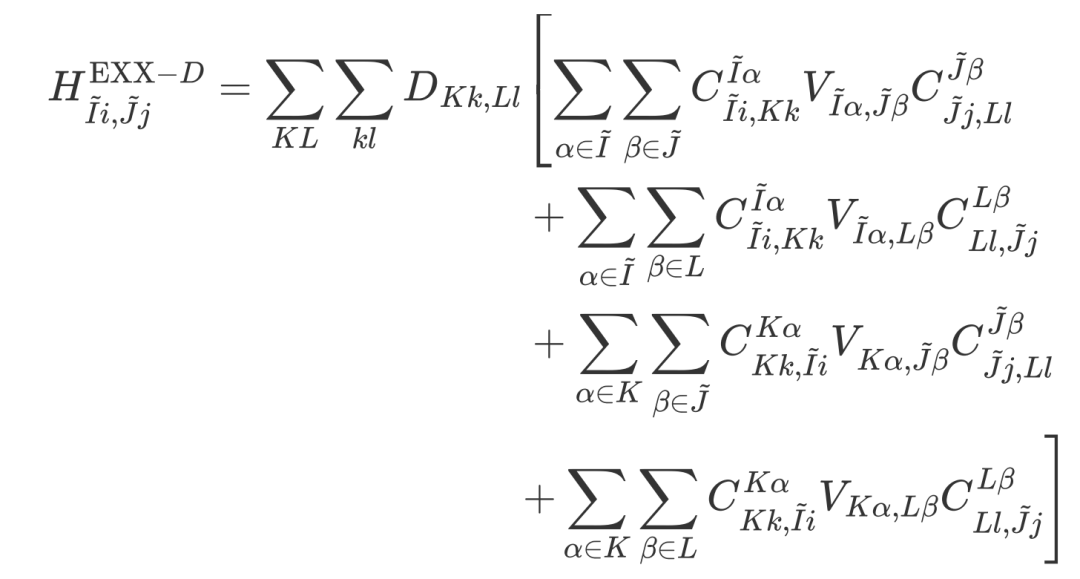
Here, T and M are the rotation matrices of symmetry operations in the atomic orbital and Bloch orbital representations, respectively, which can be derived using Wigner D-matrices (see the original paper [2] for details). After applying symmetry, only the EXX Hamiltonian for atomic pairs in the irreducible region needs to be computed in real space:
The formula for converting four-center integrals to two-center integrals using the local resolution of the identity (LRI) method is:
Where C is the coefficient for expanding atomic orbital products using auxiliary basis sets, and V is the Coulomb matrix in the auxiliary basis representation.
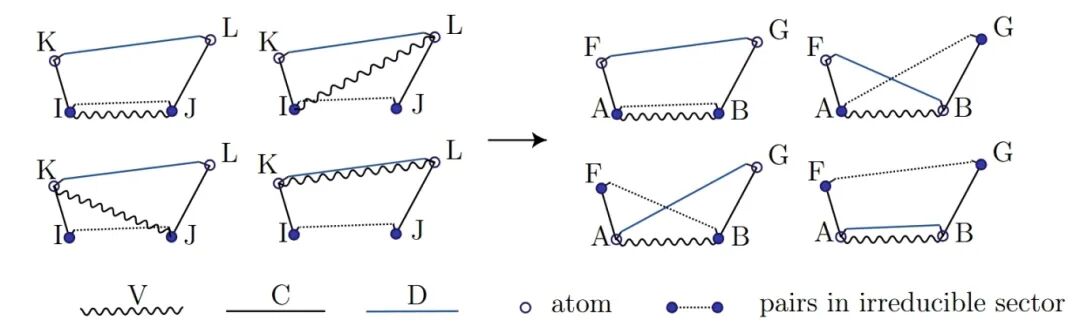
To reduce the redundancy of tensors across processes and save memory, LibRI computes the EXX Hamiltonian by switching from the "D perspective" to the "V perspective" [1] (as shown in Figure 2). However, when using symmetry to reduce the real-space region, this perspective switch causes the four types of terms computed simultaneously to contribute to different irreducible atomic pairs, introducing additional difficulties in screening the irreducible real-space region during code implementation.
Figure 2: When switching the Hamiltonian grouping method from the D perspective to the V perspective, irreducible atomic pairs of the four term types appear at different positions.
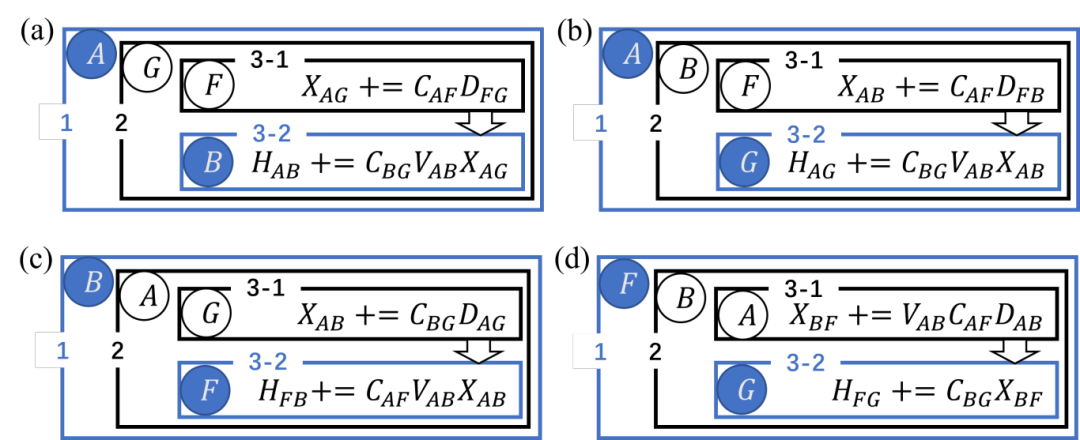
LibRI v0.2.0 [3] has improved the underlying algorithm by reducing four nested loops to three, which reduces the computation time by an order of magnitude while resolving this difficulty: the new algorithm uniformly iterates over atoms in the irreducible region in the outermost loop and the second innermost loop when computing all types of terms.
Figure 3: Schematic diagram of EXX Hamiltonian calculation with real-space irreducible region screening based on the new "loop3" algorithm in LibRI v0.2.0, where blue circles represent irreducible atomic pairs.
Results
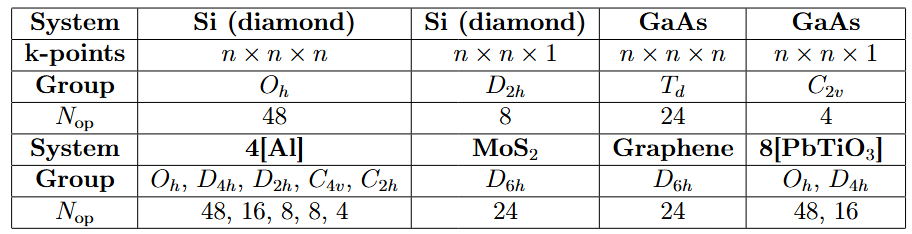
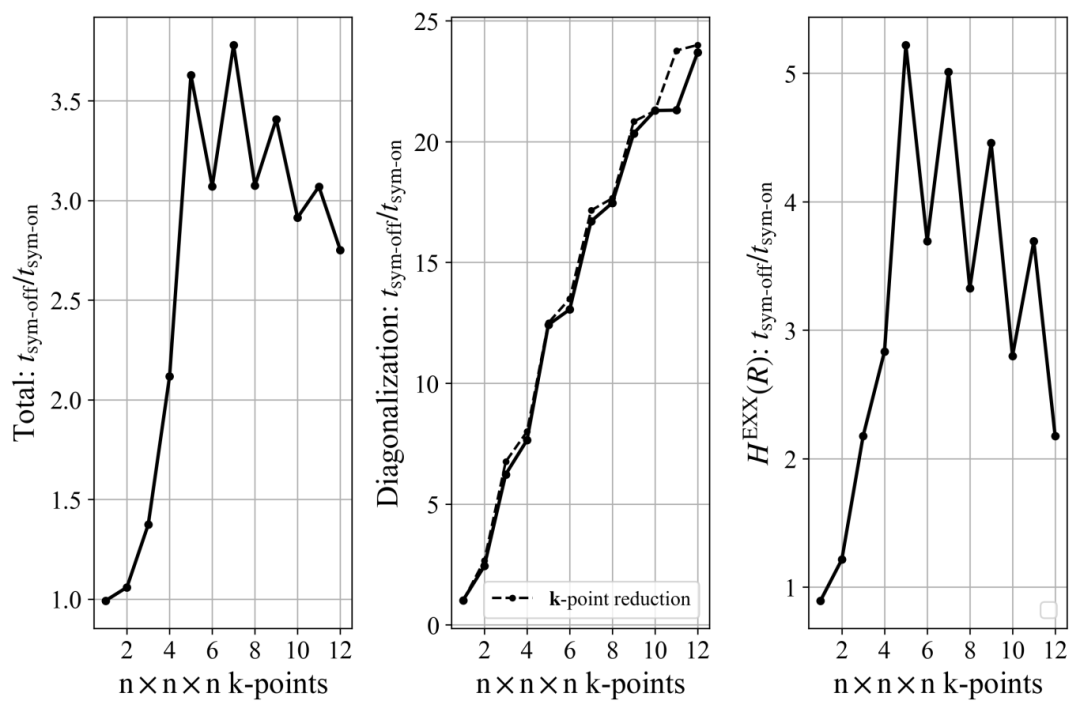
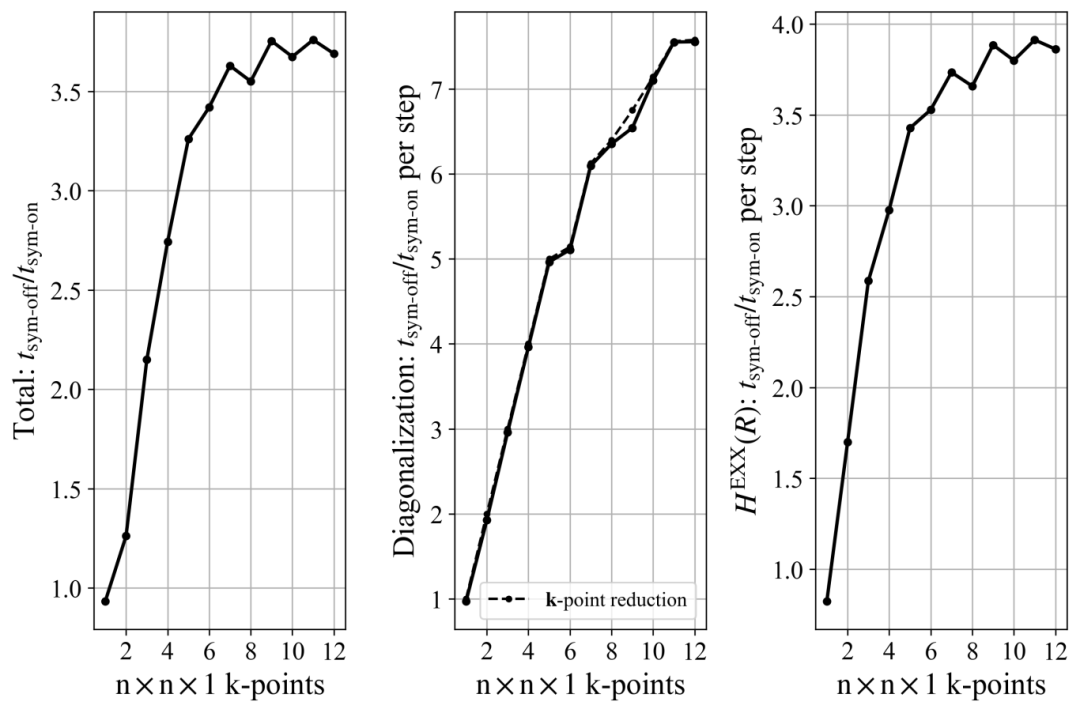
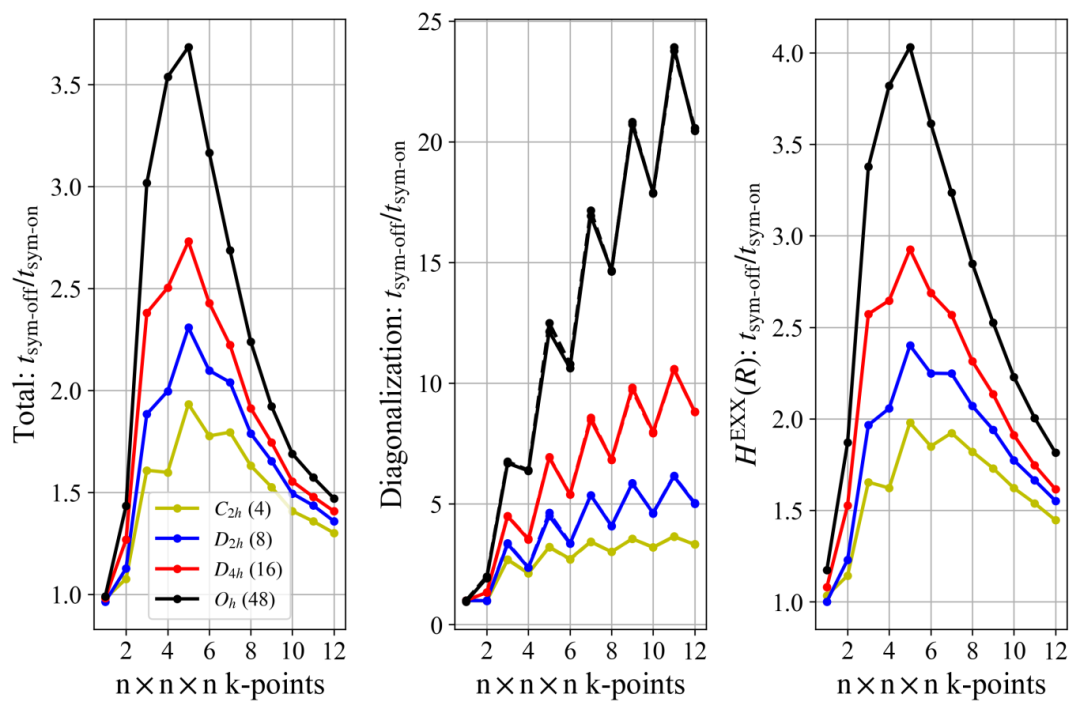
We tested systems with various symmetries (see Table 1). The results show that:
The acceleration ratio for diagonalization is consistent with the k-point reduction factor and increases with the increase in k-point density.
The acceleration ratio for calculating the real-space EXX Hamiltonian varies by system:
For 3D uniform k-point sampling: The acceleration ratio first increases and then decreases as k-points are densified. Due to the higher symmetry of the BvK supercell for odd k-points, the acceleration ratio for odd k-points is higher than that for even k-points (as shown in Figure 4).
For 2D uniform k-point sampling: The acceleration ratio first increases with the increase in k-points and then stabilizes, with no significant fluctuation between odd and even k-points (as shown in Figure 5).
Figure 6 compares the acceleration ratios of four similar structures with different symmetries. The highest symmetry (Oh) can accelerate the calculation of the real-space EXX Hamiltonian by 4–5 times.
Table 1: Symmetry (Point Groups of Space Groups) and Number of Operations for Tested Systems
Figure 4: HSE functional calculations for crystalline silicon (Oh group), showing the variation of the overall acceleration ratio, k-space diagonalization acceleration ratio, and real-space exact exchange potential acceleration ratio with 3D uniform k-point sampling density.
Figure 5: HSE functional calculations for MoS₂ crystals (D6h group), showing the variation of the overall acceleration ratio, k-space diagonalization acceleration ratio, and real-space exact exchange potential acceleration ratio with 2D uniform k-point sampling density.
Figure 6: Acceleration ratios for HSE calculations of 4-atom Al supercells with four types of symmetry.
Conclusion
By leveraging the transformation relationships of the density matrix and Hamiltonian under symmetry operations for numerical atomic orbital basis sets, the researchers restricted k-space and real-space calculations to irreducible regions. This significantly accelerated two major time-consuming bottlenecks in the ABACUS+LibRI hybrid functional calculation workflow: "diagonalization to solve the Kohn-Sham equations" and "calculation of the exact exchange Hamiltonian".
Notably, symmetry acceleration in real space was achieved for the first time on the basis of the linear-scaling acceleration of the LRI method. Furthermore, relying on LibRI's general program framework, this approach can be extended to methods beyond density functional theory, such as the GW method.
References
[1] Peize Lin, Xinguo Ren, and Lixin He. Journal of Chemical Theory and Computation 2021, 17 (1), 222–239, DOI: 10.1021/acs.jctc.0c00960 (https://pubs.acs.org/doi/10.1021/acs.jctc.0c00960)
[2] Yu Cao, Min-Ye Zhang, Peize Lin, Mohan Chen, and Xinguo Ren. Journal of Chemical Theory and Computation 2025, 21 (16), 8086–8105, DOI: 10.1021/acs.jctc.5c00537 (https://pubs.acs.org/doi/10.1021/acs.jctc.5c00537)
[3] https://github.com/abacusmodeling/LibRI
]]><p>Hybrid functionals (HDFs) overcome the shortcomings of local/semi-local functionals—such as the underestimation of band gaps—by incorporating exact exchange (EXX), but this comes at the cost of high computational expense. ABACUS combined with LibRI enables linear-scaling calculations of hybrid functionals, and on this basis, applying space-group symmetry can further reduce the computational load.</p>
<p>Prior to version 3.8.0, ABACUS already supported symmetry acceleration for local/semi-local functionals: it reduces the number of Kohn-Sham (KS) equations to be solved by reducing k-points to the irreducible Brillouin zone (IBZ). However, due to the lack of implementation for space-group transformations of the density matrix, symmetry acceleration was not supported for cases involving non-local Hamiltonians (e.g., hybrid functionals). On the other hand, symmetry reduction can also be applied to real-space two-electron integrals (ERIs) for the EXX term. Nevertheless, currently available software (such as CRYSTAL and Turbomole) only implements this for algorithms that directly compute four-center integrals, without further accelerating symmetry application based on the resolution of the identity (RI) method—a common approach to speed up ERI calculations.</p>UniMol_Tools v0.15: Open-Source Lightweight Pre-Training Framework for One-Click Reproduction of Original Uni-Mol Accuracy!https://blogs.deepmodeling.com/UniMol_Tools_v0.15_29_09_2025/2025-09-28T16:00:00.000Z2025-09-28T16:00:00.000Z
The official release of UniMol_Tools v0.15 introduces lightweight pre-training and a synchronized full-process command-line tool based on Hydra. Developers can complete the entire workflow from preprocessing → pre-training → fine-tuning → property prediction with just a few lines of code, and the reproduced results are nearly identical to those of the original Uni-Mol. This new version aims to provide an efficient and reproducible computing platform for research in materials science, medicinal chemistry, and molecular design.
Core Highlights
This release marks the first research tool on the market that simultaneously covers molecular representation, property prediction, and custom pre-training, offering an efficient and reproducible computing platform for studies in materials science, medicinal chemistry, and molecular design.
Lightweight Pre-Training The complete pipeline supports masking strategies, multi-task loss functions, metric aggregation, and distributed training, while being compatible with custom pre-trained models and dictionary paths.
One-Command Execution Hydra configuration management enables one-click execution of training, representation, and prediction workflows, making experimental reproduction more efficient.
Research-Friendly Optimizations Features dynamic loss scaling, mixed-precision training, distributed support, and checkpoint resumption, adapting to large-scale molecular data.
End-to-End Modeling Provides a one-stop solution for data preprocessing, model training, molecular representation generation, and property prediction.
Extensibility & Configurability Offers abundant configuration files and examples for quick onboarding and customization of personalized tasks.
Comparison Between UniMol_Tools v0.15 and the Original Uni-Mol
Capability
This Release
Original Uni-Mol
Pre-training Code Lines
Newly written, over 2,000 lines
Over 6,000 lines
Distributed Training
Natively supports DDP & mixed precision
Requires manual configuration
Data Formats
csv / sdf / smi / txt / lmdb
Only lmdb
Downstream Fine-Tuning
Weight zero conversion; direct use of unimol_tools.train/predict
Requires manual format modification
One-Command Pre-Training
The new version delivers an "out-of-the-box" training experience. Research users can complete the entire pre-training workflow from data preprocessing to model training with a single command, significantly lowering the barrier to experimentation.
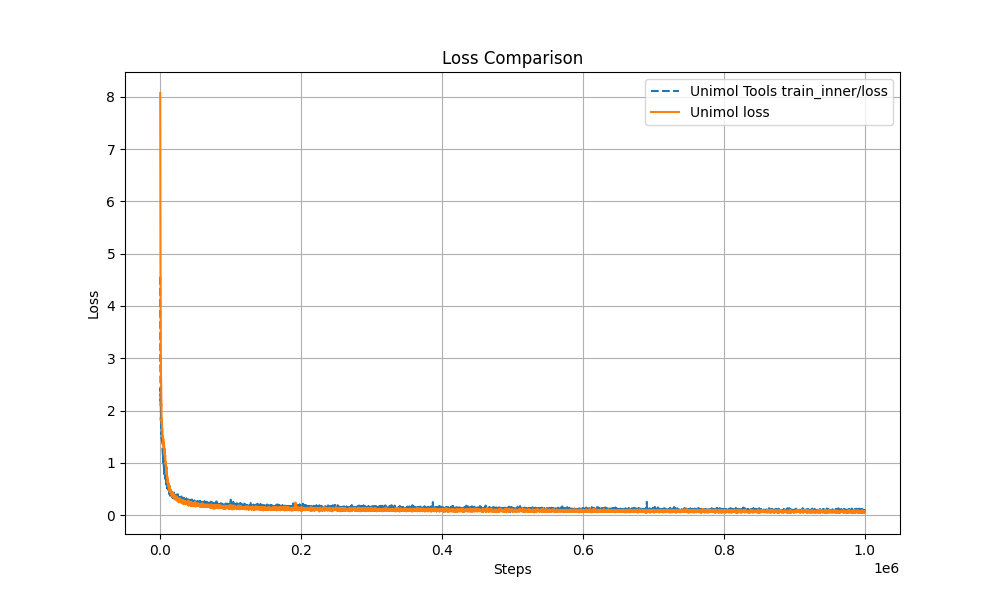
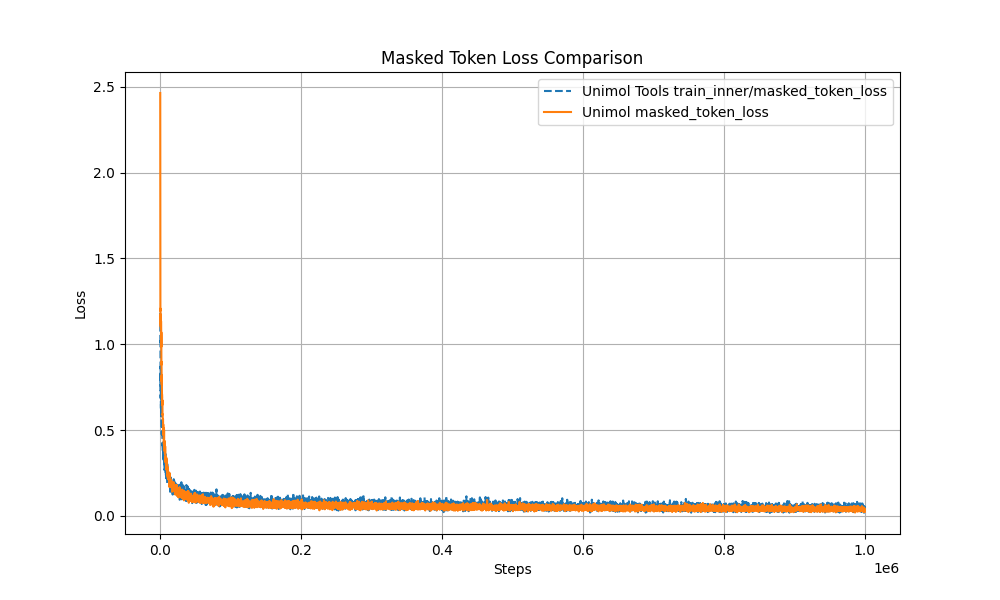
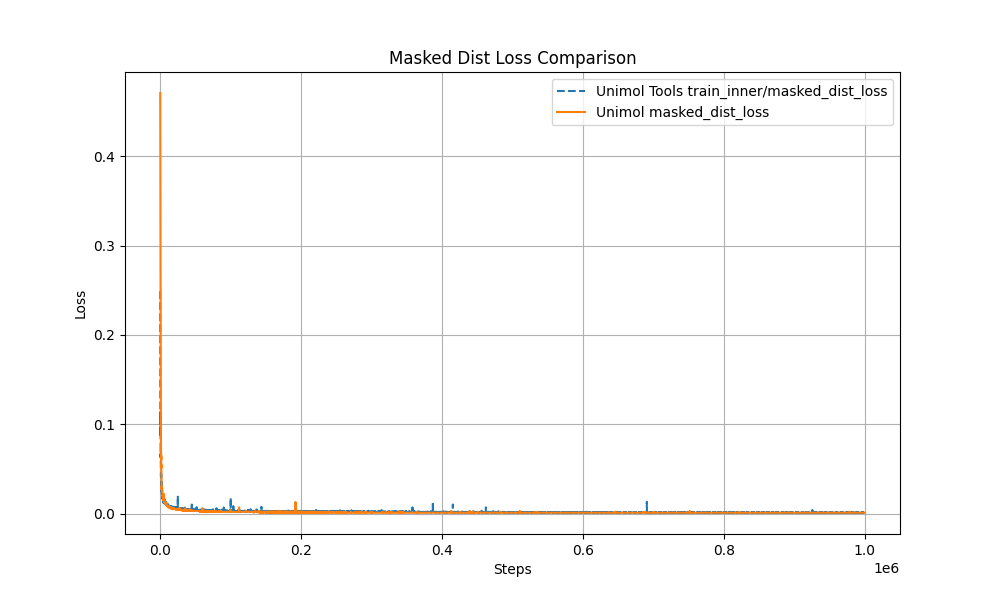
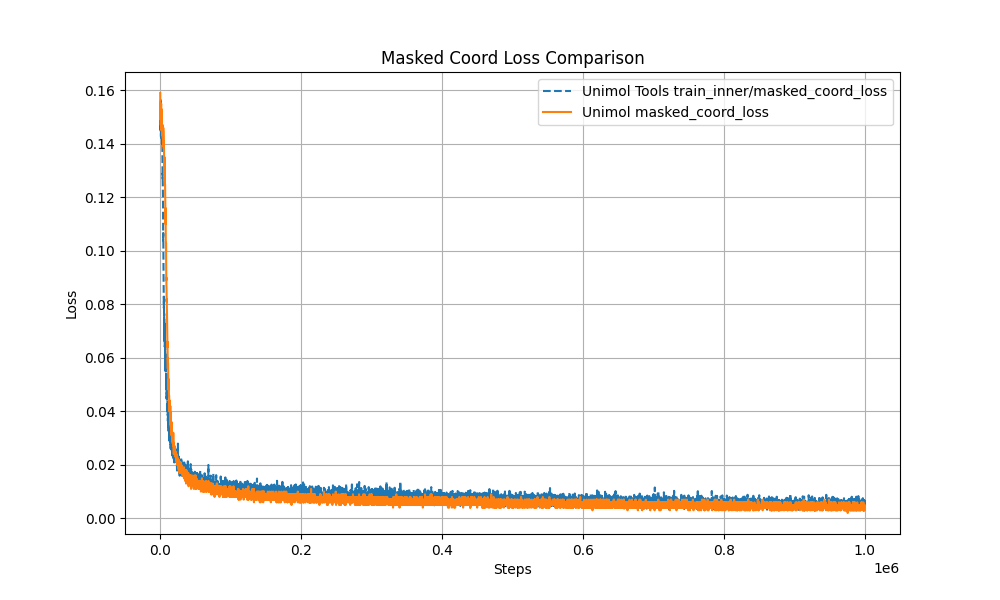
Multi-Target Masking Loss (Masked Token + 3D Coord + Dist Map) The pre-training curve overlaps with the original Uni-Mol by over 99%, ensuring stable performance.
Modular Design The complete workflow can be reproduced with just four files:
1 2 3 4 5
unimol_tools/pretrain/ ├── dataset.py # Masking + data pipeline ├── loss.py # Multi-target loss ├── trainer.py # Distributed training loop └── unimol.py # Model architecture
This minimizes the threshold for secondary development—modify just one line of configuration to run custom tasks.
Backward Compatibility
Existing APIs such as unimol_tools.train / predict / repr remain unchanged;
Supports passing custom pretrained_model_path and dict_path—old scripts only need two additional parameters to load new weights;
Overvoew of Updates
Lightweight pre-training module: The complete pipeline supports masking strategies, multi-target loss for 3D coordinates and distance matrices, metric aggregation, and distributed training;
Hydra full-process CLI: One command to run training, representation, and prediction; parameters can be quickly adjusted;
Enhanced data processing: Supports csv / sdf / smi / txt / lmdb, flexibly adapting to formats commonly used by research users;
Modular design: The complete workflow can be reproduced with only four core files, facilitating secondary development;
Compatibility with old-version APIs: Load new pre-trained weights without modifications, supporting custom models and dictionary paths;
Performance and reproducibility guarantee: Pre-training curve is highly consistent with the original Uni-Mol;
Open-Source Community
UniMol_Tools is one of the open-source projects under the DeepModeling community. Developers interested in the project are welcome to participate long-term:
The Issue section welcomes feedback on problems, suggestions, and feature requests;
New users can refer to the Readme and documentation for quick onboarding. If you encounter any issues during use, please submit an Issue on GitHub or contact us via email.
About Uni-Mol
Uni-Mol is a widely acclaimed molecular pre-training model in recent years, dedicated to building a universal 3D molecular modeling framework. As its derivative toolkit, UniMol_Tools aims to lower the application threshold of the model and improve development efficiency.
]]><p>The official release of UniMol_Tools v0.15 introduces lightweight pre-training and a synchronized full-process command-line tool based on Hydra. Developers can complete the entire workflow from preprocessing → pre-training → fine-tuning → property prediction with just a few lines of code, and the reproduced results are nearly identical to those of the original Uni-Mol. This new version aims to provide an efficient and reproducible computing platform for research in materials science, medicinal chemistry, and molecular design.</p>What Can Uni-Mol Do Too? | Facilitating AI-Powered Design of Lipid Nanoparticleshttps://blogs.deepmodeling.com/Uni-Mol_22_08_2025/2025-08-21T16:00:00.000Z2025-08-21T16:00:00.000Z
In recent years, with the rapid advancement of mRNA vaccines and nucleic acid drugs, lipid nanoparticles (LNPs) have emerged as one of the most crucial drug delivery tools. However, the performance of LNPs depends on various lipid components and their proportions. Experimental optimization is not only time-consuming and labor-intensive but also struggles to cover the vast design space. Recently, the work led by Alvin Chan and his team was published in Nature Nanotechnology under the title "Designing lipid nanoparticles using a transformer-based neural network". The study proposes a transformer-based neural network model called COMET, which integrates molecular structures and formulation parameters to predict LNP performance. A key component of this process is the use of Uni-Mol as the core tool for molecular representation learning.
Challenges in LNP Design
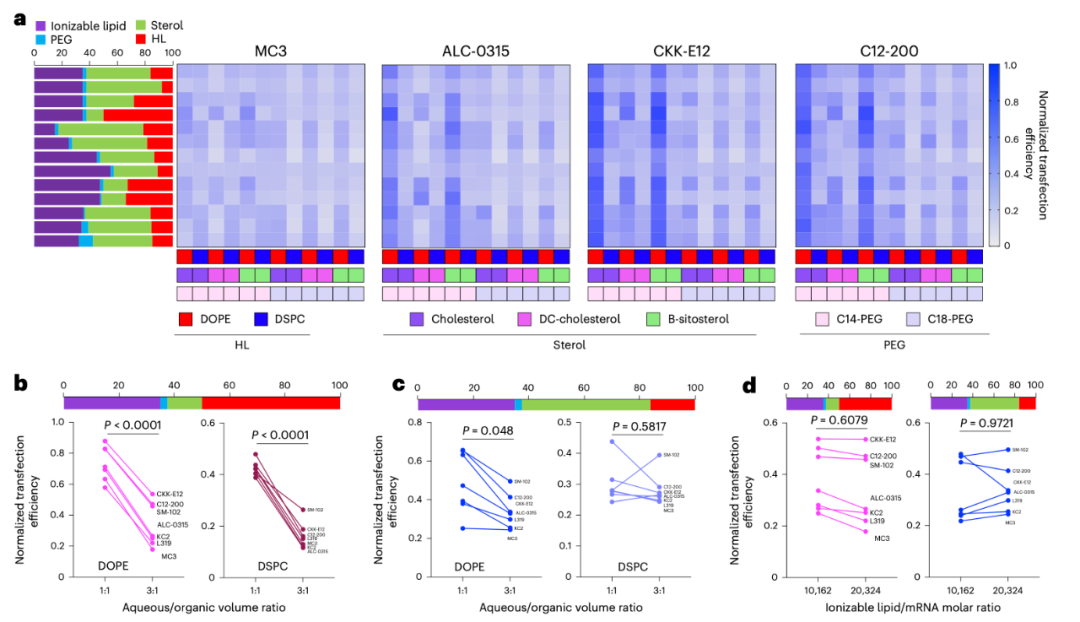
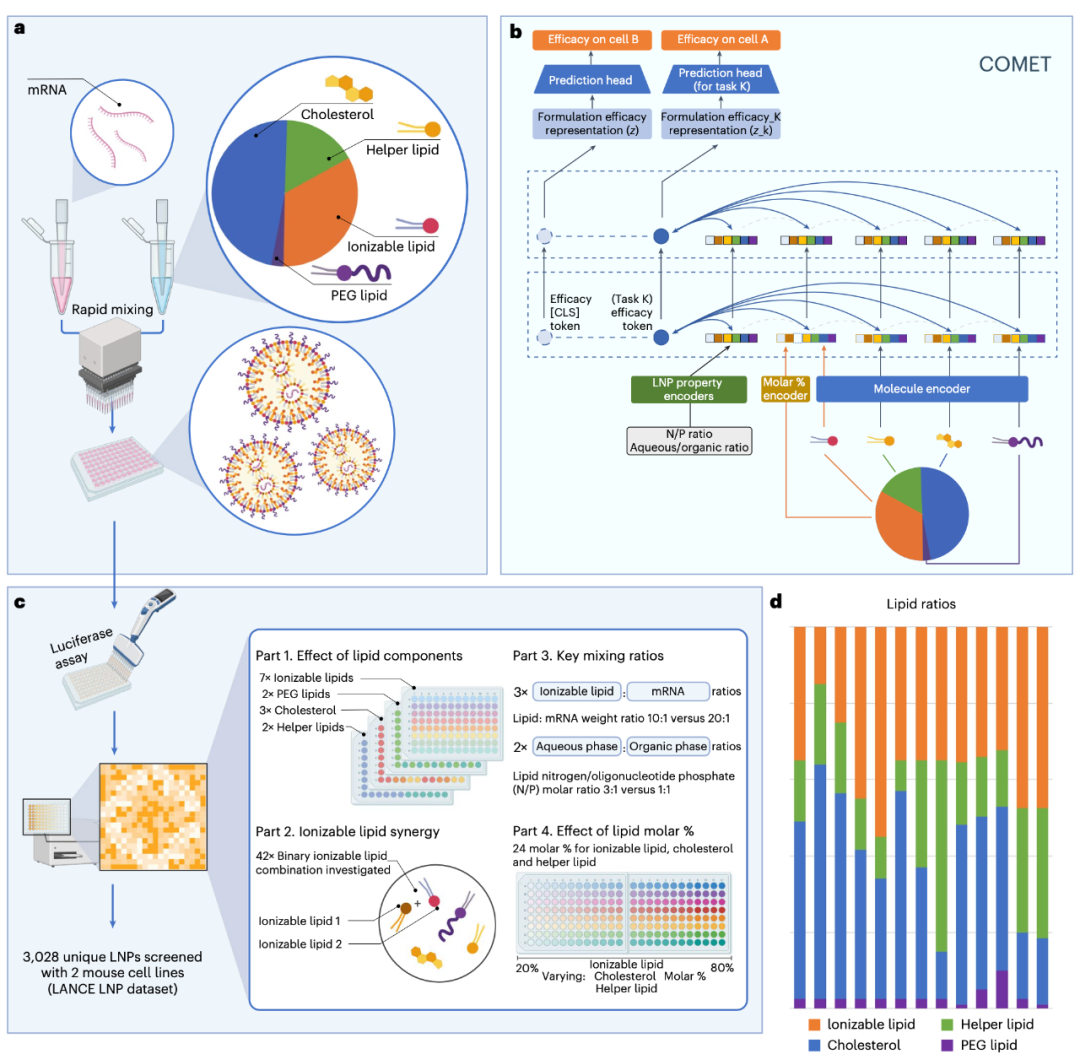
The core of an LNP consists of four types of lipids: ionizable lipids, cholesterol, helper lipids, and PEG lipids. These molecules not only have complex structures themselves but also exhibit vastly different performances under varying proportions and mixing conditions. For instance, altering the N/P ratio (nitrogen-to-phosphorus ratio) or adjusting the mixing ratio of organic and aqueous phases can significantly impact transfection efficiency (see Figure 1). In such a highly multi-factor coupled system, it is nearly impossible to exhaust all possible combinations solely through experiments.
To address this, the research team constructed an unprecedentedly large experimental dataset named LANCE. This dataset systematically collects data on over 3,000 LNP formulations and their transfection efficiencies in mouse cells. In addition to conventional single-ionizable lipid combinations, the dataset also includes dual-ionizable lipids, different cholesterol derivatives, and polymeric materials, providing abundant training materials for the AI model.
Figure 1: a. Effect of lipid selection and proportion on the transfection efficiency of LNPs in DC2.4 cells (HL stands for helper lipid).b-c. Effect of aqueous/organic phase volume ratio on the transfection efficiency of LNPs with a high proportion of helper lipids (b) and a low proportion of helper lipids (c) in DC2.4 cells.d. Effect of ionizable lipid/mRNA weight ratio on the transfection efficiency in DC2.4 cells.
The COMET Model: Understanding Formulations Like a "Language Model"
Building on this foundation, the research team designed the COMET (Composite Material Transformer) model. The unique feature of this model lies in treating each lipid molecule as a "token" and encoding different proportions and experimental parameters (such as N/P ratio and mixing ratio) into "tokens" as well, which are ultimately fed into the transformer model for modeling (see Figure 2).
The Uni-Mol model (a general 3D molecular representation learning framework) is employed in this process, which can convert the 3D structure of each lipid molecule into a vector representation. Unlike traditional models that rely on handcrafted features, Uni-Mol can directly extract information from atomic coordinates, enabling the COMET model to "interpret" complex molecular structures. It can be said that without Uni-Mol, seamlessly integrating information at the molecular structure level into the formulation prediction process would be extremely challenging.
Figure 2:a. The synthesis of LNPs is achieved by mixing nucleic acids (e.g., mRNA) with a lipid solution that typically contains four types of lipids. Their key properties (such as transfection efficiency) depend not only on the lipid structure but also are closely related to the relative proportions of each component and mixing parameters (e.g., N/P ratio, aqueous/organic phase volume ratio).b. The COMET platform can predict the performance of composite materials based on component materials (e.g., lipids composing LNPs), proportion parameters, and other conditions.c. Through high-throughput screening technology, the training data of COMET covers four complementary LNP formulation space modules.d. Thirteen main lipid molar proportion schemes used in the training dataset.
From Prediction to Discovery: AI Screening for Novel LNPs
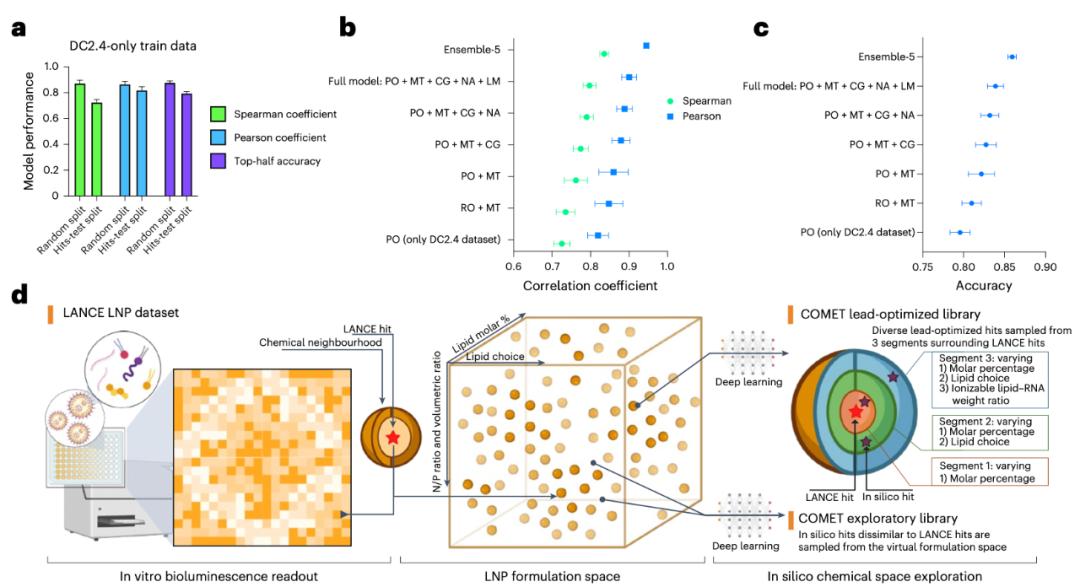
The COMET model performed exceptionally well on the LANCE dataset, accurately predicting LNP efficacy with a Spearman correlation coefficient close to 0.9. More excitingly, the model can conduct exploration in a "virtual space" — the research team used it to screen nearly 50 million virtual LNP combinations, ultimately selecting dozens of high-scoring candidate formulations, which were then verified through experiments (see Figure 3). The results showed that these "AI-discovered" formulations not only outperformed clinically approved LNPs (such as SM-102 and MC3) in in vitro experiments but also demonstrated stronger mRNA delivery capabilities in in vivo mouse experiments.
In this process, Uni-Mol played a crucial role: it provided reliable molecular structure representations for the COMET model, enabling the model to "distinguish" subtle differences between different lipids and thereby discover novel formulations that are difficult to predict using traditional methods.
Figure 3: a. Performance of COMET under different test dataset partitions after training on LNP efficacy data from DC2.4 cells.b-c. Results of ablation experiments showing the contribution of each module to the ranking performance (b) and prediction accuracy (c) of COMET in the 'hits-test' dataset of DC2.4 cells.d. Schematic diagram of the computer-aided screening process: starting from a large virtual LNP library, virtual screening is conducted via COMET, followed by filtering based on properties such as efficacy and diversity.Abbreviation notes: MT = Multi-task Learning, RO = Regression Objective, PO = Pairwise Ordering Objective, CG = CAGrad Algorithm, NA = Noise Augmentation, LM = Label Margin.
Beyond LNPs: The Generalization Ability of the Model
Furthermore, the researchers tested the scalability of the COMET model. The results showed that the model can not only handle traditional LNPs but also be extended to the following scenarios:
Dual-ionizable lipid formulations: It can capture the synergistic effects between lipids, significantly improving delivery efficiency;
Novel polymeric materials (e.g., PBAEs, poly(β-amino esters)): It can incorporate entirely new structures such as poly(β-amino esters) into modeling and successfully optimize formulations with higher efficacy (see Figures 4a and 4b);
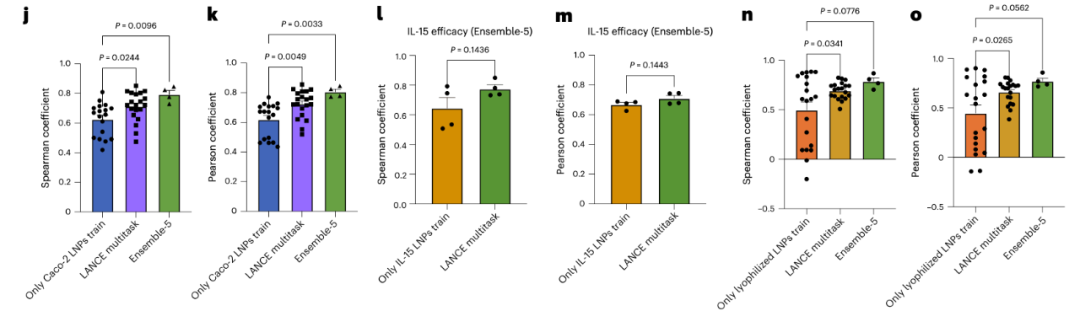
New cell types and new RNA cargos: For example, predicting the mRNA delivery efficiency in human-derived Caco-2 cells and HepG2 cells (see Figures 4j-m);
Lyophilization stability: It can predict the efficacy decay of LNPs after lyophilized storage, providing references for the practical application of drugs (see Figures 4n-o). These results fully demonstrate that relying on the molecular representations provided by Uni-Mol, the COMET model possesses strong adaptability and scalability, truly enabling AI to participate in the "full-process" design of drug delivery systems.
Figure 4: a. Structural characteristics of branched PBAEs (poly(β-amino esters)).b. Strategy for integrating PBAE and LNP properties in the inference process of COMET.j-k. Performance evaluation of COMET in predicting the efficacy of LNPs in Caco-2 cells.l-m. Performance evaluation of COMET in predicting the IL-15 mRNA delivery efficacy in HepG2 cells.n-o. Performance evaluation of COMET in predicting the efficacy decay of LNPs after lyophilization.Except for Ensemble-5, which used 4 replicates, the evaluations in j-o all adopted 20 replicate experiments. Error bars represent standard errors. For j, k, n, and o, one-way ANOVA with post-hoc Dunnett’s test was used; for l-m, unpaired two-tailed t-tests were used.
Conclusion
This study demonstrates the role of deep learning in addressing the complex formulation design challenges in the field of drug delivery. With the 3D molecular representations provided by Uni-Mol, the COMET model can not only comprehensively integrate molecular structures and formulation parameters but also quickly screen out truly efficient and scalable candidate systems from the vast combinatorial space. This approach provides a new paradigm for the development of nucleic acid drugs and vaccines, and also highlights the core value of AI in future drug design and material innovation.
]]><p>In recent years, with the rapid advancement of mRNA vaccines and nucleic acid drugs, lipid nanoparticles (LNPs) have emerged as one of the most crucial drug delivery tools. However, the performance of LNPs depends on various lipid components and their proportions. Experimental optimization is not only time-consuming and labor-intensive but also struggles to cover the vast design space. Recently, the work led by Alvin Chan and his team was published in Nature Nanotechnology under the title "Designing lipid nanoparticles using a transformer-based neural network". The study proposes a transformer-based neural network model called COMET, which integrates molecular structures and formulation parameters to predict LNP performance. A key component of this process is the use of Uni-Mol as the core tool for molecular representation learning.</p>What Can Uni-Mol Do Too? | Demonstrating Excellent Predictive Performance in Tsinghua's MoleculeCLA Evaluationhttps://blogs.deepmodeling.com/Uni-Mol_04_08_2025/2025-08-03T16:00:00.000Z2025-08-03T16:00:00.000Z
AI-driven drug discovery relies on the accurate characterization of molecular features. The newly launched MoleculeCLA dataset by Professor Lanyan Yan's team at the Institute for Intelligent Industry, Tsinghua University, provides a new, multi-dimensional evaluation platform for molecular representation by generating large-scale computationally docked chemical, physical, and biological properties with no experimental noise. On this benchmark, Uni-Mol performed exceptionally well in end-to-end fine-tuning, achieving an average Pearson correlation coefficient of 0.68, ranking first among all pre-trained deep models and traditional molecular descriptors. This fully demonstrates its advantages in molecular feature extraction and prediction tasks. The preprint of the research paper entitled "MoleculeCLA: Rethinking Molecular Benchmark via Computational Ligand-Target Binding Analysis" has been published on arXiv.
MoleculeCLA Evaluation Process
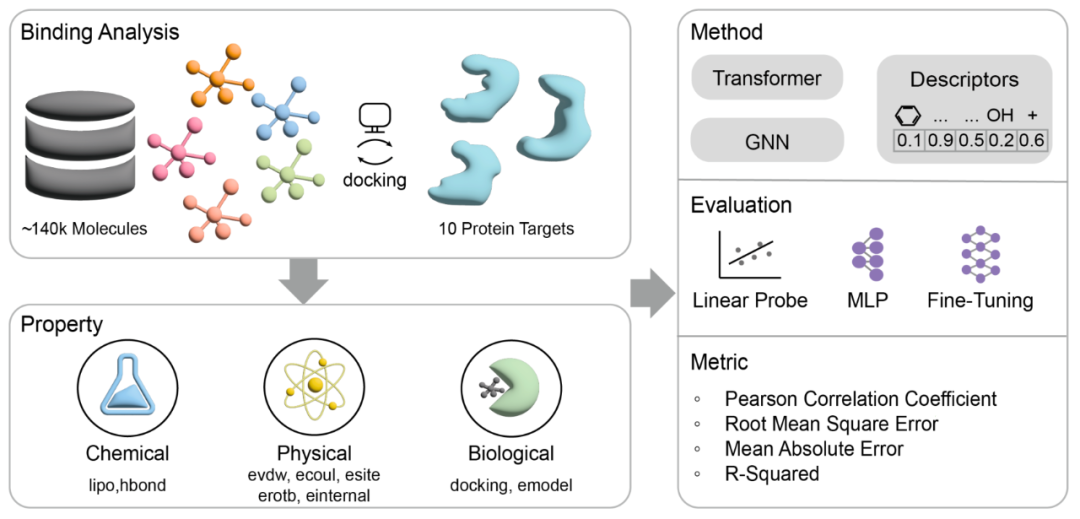
The evaluation process of MoleculeCLA consists of three core stages to ensure comprehensive testing of the model in multi-dimensional property prediction tasks:
1.Docking Simulation
Perform standard chemical preprocessing and grid generation for approximately 140,000 structurally diverse small molecules and 10 representative protein targets (kinase ABL1, GPCR ADRB2, ion channel GluA2, nuclear receptor PPARG, epigenetic enzyme HDAC2, CYP2C9, SARS-CoV-2 3CL protease, HIV protein, KRAS, PDE5);
Use Schrödinger Glide for high-throughput molecular docking to obtain stable and reproducible binding conformations.
2.Property Extraction
Extract 9 key indicators from the docking outputs:
Chemical properties: hydrophobicity (lipo), hydrogen bond formation tendency (hbond);
Physical properties: van der Waals energy (evdw), Coulomb energy (ecoul), polar site contribution (esite), rotatable bond energy (erotb), internal torsion energy (einternal);
Biological properties: docking score (docking_score), model energy (emodel);
These properties cover chemical, physical, and biological aspects, enabling in-depth assessment of the model's ability to characterize molecular-target interactions.
3.Model Fine-Tuning Methods
Linear Probe: Freeze the pre-trained encoder and only train the linear regression head to quickly measure the linear separability of features;
MLP fine-tuning: Attach a small multi-layer perceptron after the encoder output to test the gain effect of simple non-linear models;
Fine-Tune (full-parameter fine-tuning): Perform end-to-end training on all parameters of the model to test the ultimate performance in real downstream tasks.
Figure 1 Overview of the MoleculeCLA method. The full process from molecular-target docking, to the extraction of three types of properties, to the three model fine-tuning methods: Linear Probe, MLP, and Fine-Tune.
Introduction to MoleculeCLA Dataset Benchmark
The following is the specific composition and splitting strategy of the MoleculeCLA dataset:
1.Selection of Molecules and Targets
140,000 structurally diverse small molecules: sourced from commercial compound libraries, ensuring diversity through chemical fingerprinting and clustering;
10 representative protein targets: covering kinases (ABL1), GPCRs (ADRB2), ion channels (GluA2), nuclear receptors (PPARG), epigenetics (HDAC2), CYP2C9, SARS-CoV-2 3CL protease, HIV protein, KRAS, PDE5, catering to both classical and emerging drug discovery needs.
2.Data Splitting Strategy
Adopting scaffold split: Divide the dataset into training, validation, and test sets based on molecular scaffolds to ensure the chemical structural independence of the three and avoid data leakage;
Scale: 112,557 training samples, 14,070 validation samples, and 14,070 test samples, ensuring large-scale model training while fully evaluating generalization ability.
3.Chemical Space and Property Diversity
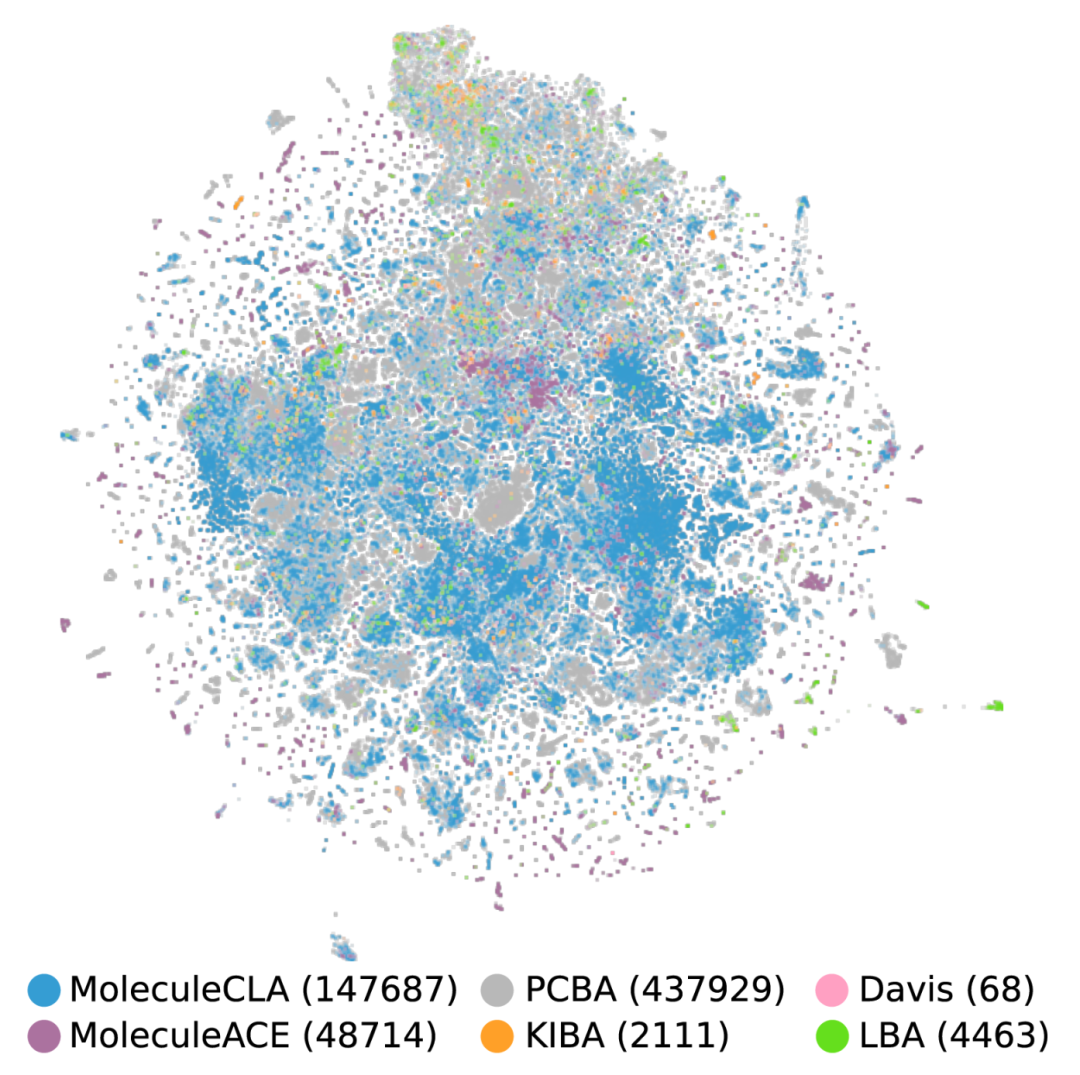
Chemical coverage: Comparable to the PCBA dataset in t-SNE visualization of chemical space, but with a scale of only one-third, reflecting efficient representativeness;
Property dimensions: The 9 extracted properties generally have low correlation (|r| < 0.3), forcing the model to perform well in the three dimensions of chemistry, physics, and biology.
Figure 2 t-SNE visualization of chemical space covered by MoleculeCLA (147,687) and other datasets (PCBA (437,929), Davis (68), MoleculeACE (48,714), KIBA (2,111), LBA (4,463)).
Model Fine-Tuning Methods and Uni-Mol's Performance
On MoleculeCLA, we adopted three model fine-tuning methods: Linear Probe, MLP fine-tuning, and full-parameter fine-tuning (Fine-Tune) to systematically evaluate the model's performance in 9 chemical/physical/biological property prediction tasks.
1.Linear Probe
Linear Probe test involves freezing the pre-trained encoder and only training the linear regression head to evaluate the linear separability of latent vectors. If the linear head can achieve good results, it indicates that the pre-trained features already contain key information required for downstream tasks, without relying on complex non-linear heads or full-parameter fine-tuning. Among them, Uni-Mol achieved an average Pearson correlation coefficient of 0.582, proving that its pre-training stage has efficiently captured the linear laws of molecular-target interactions. However, traditional molecular descriptors (Descriptor2D/2D&3D) had average Pearson coefficients of 0.646 and 0.647, respectively, still leading all deep models, indicating that manually designed molecular fingerprints still have irreplaceable advantages under the "zero fine-tuning" condition.
Table 1 Linear Probe Results. Average Pearson correlation coefficients of 10 protein targets. Cells are blue if the Pearson correlation coefficient is above 0.5 and yellow if it is below 0.5. The Avg column displays the average result across all 9 tasks.
2.Fine-Tune (Full-Parameter Fine-Tuning)
Fine-Tune refers to end-to-end training of all model parameters to meet the ultimate performance requirements of real tasks. Uni-Mol achieved an average Pearson correlation coefficient of 0.68 for 5 downstream tasks, ranking first in the tasks of hydrogen bond formation tendency (hbond), electrostatic interaction (ecoul), and polar site contribution (esite), and second in the prediction tasks of molecular docking affinity (docking) and model energy (emodel).
Table 2 Fine-Tuning Results. Average RMSE and Pearson correlation coefficients for 10 protein targets. The best result is shown in bold, and the second-best result is underlined.
3.Drug-Target Interaction (DTI)
The drug-target interaction experiment embeds the pre-trained model into BindNet to realize end-to-end fine-tuning for PDBBind ligand binding affinity (LBA) prediction tasks, using a 30%/60% data split. In the LBA 30% task, Uni-Mol's RMSE, Pearson coefficient, and Spearman coefficient were comprehensively better than other models; in the LBA 60% task, Uni-Mol's RMSE of 1.23 was better than other models, and its Pearson and Spearman coefficients were second only to the best model. Although the MoleculeCLA benchmark is generated by computational simulation, it can effectively predict binding affinity in real experiments; Uni-Mol's excellent performance in the DTI task verifies the wide applicability and reliability of its pre-training and fine-tuning strategies.
Through these three rounds of tests, Uni-Mol has shown leading performance in fine-tuning and drug-target interaction tasks, verifying its advantages in molecular representation and property prediction. As a pre-trained model, Uni-Mol can exhibit excellent predictive performance after fine-tuning due to the following points:
3D prior alignment: Uni-Mol's pre-training tasks enhance sensitivity to three-dimensional geometry and force field features, naturally fitting force field-related tasks in MoleculeCLA such as Coulomb energy (ecoul) and van der Waals energy (evdw);
Large-scale coverage: Massive conformation samples and diverse chemical spaces in the pre-training stage enable the model to quickly adapt to the multi-dimensional property distribution of 140,000 molecules during fine-tuning;
High-capacity architecture: The Transformer architecture has both long-range dependency and local chemical bond information capture capabilities, and multi-scale feature fusion helps to finely fit downstream tasks;
Two-stage paradigm: First, learn general representations in massive data in a "breadth-first" manner, then "deeply focus" on specific tasks, and amplify pre-training advantages through Fine-Tune to achieve the best balance of "pre-training + fine-tuning".
Summary
On MoleculeCLA, a new large-scale, experimental noise-free benchmark, Uni-Mol has achieved stable and leading results in end-to-end fine-tuning, demonstrating its generalization ability and practical value in molecular property prediction tasks.
]]><p>AI-driven drug discovery relies on the accurate characterization of molecular features. The newly launched MoleculeCLA dataset by Professor Lanyan Yan's team at the Institute for Intelligent Industry, Tsinghua University, provides a new, multi-dimensional evaluation platform for molecular representation by generating large-scale computationally docked chemical, physical, and biological properties with no experimental noise. On this benchmark, Uni-Mol performed exceptionally well in end-to-end fine-tuning, achieving an average Pearson correlation coefficient of 0.68, ranking first among all pre-trained deep models and traditional molecular descriptors. This fully demonstrates its advantages in molecular feature extraction and prediction tasks. The preprint of the research paper entitled "MoleculeCLA: Rethinking Molecular Benchmark via Computational Ligand-Target Binding Analysis" has been published on arXiv.</p>What Can DP Do too? | Soliton domain wall inertial motion with ultra-low damping in sliding ferroelectricshttps://blogs.deepmodeling.com/DeePMD_25_07_2025/2025-07-24T16:00:00.000Z2025-07-24T16:00:00.000Z
On July 21, 2025, a research paper by the Ningbo Institute of Materials Technology and Engineering, Chinese Academy of Sciences was published online in Phys. Rev. B, entitled "Soliton-like domain wall motion in sliding ferroelectrics with ultralow damping". The first authors of the paper are doctoral students Dr. Yubai Shi and Dr. Gaoxiang Yu. The corresponding authors are Associate Researcher He Ri and Professor Zhong Zhicheng. The paper was selected as Editors' Suggestion.
Ferroelectric materials have important applications in the fields of non-volatile data storage, neuromorphic computing, and signal sensing due to their switchable spontaneous polarization properties under an applied electric field. Recently, research based on van der Waals layered materials has proposed a new ferroelectric mechanism that is completely different from traditional ionic ferroelectrics: sliding ferroelectricity, that is, ferroelectric polarization reversal is achieved through interlayer sliding. The team and experimental collaborators previously used Deep Potential to demonstrate that this non-intrinsic ferroelectricity can exhibit ultrafast polarization reversal mechanics and excellent anti-fatigue properties [Science 385, 57-62 (2025); Acta Mater. 262, 119416 (2024)].
Recently, the authors theoretically studied the dynamic properties of domain walls in sliding ferroelectric 3R-MoS₂ by combining Deep Potential and field theory analysis. The research results show that, unlike the strong damping of traditional ferroelectric domain wall motion, the domain wall motion in sliding ferroelectrics exhibits ultra-low damping characteristics, which is consistent with the ultra-slip characteristics of domain walls observed in h-BN sliding ferroelectrics by the team of Liu Shi from Westlake University [published in PRL 135, 046201 (2025) on the same day], jointly proving that ultra-low damping domain wall motion is universal in sliding ferroelectric materials. Due to the ultra-low damping property, the sliding ferroelectric domain wall shows uniformly accelerated motion under an external field, so the sliding ferroelectric domain wall is a free soliton that follows Newton's second law. In addition, calculations show that the velocity of the bilayer MoS₂ domain wall can reach a relativistic-like limit (4000 m/s) under continuous external field driving, which is the group velocity of the in-plane transverse acoustic branch. More importantly, after removing the external field, the sliding ferroelectric domain wall maintains uniform inertial motion, which is completely different from the motion stopping observed in traditional ferroelectrics. This work provides a theoretical basis for the application of sliding ferroelectric domain walls in microelectronic devices (such as racetrack memories and neuromorphic devices).
Figure 1. (a) Stacking mode and sliding barrier of 3R-MoS₂ unit cell. (b) Polarization intensity change during unit cell sliding. (c) Static domain wall structure of 3R-MoS₂. The pink dots are the distribution of sliding distances in real space after atomic relaxation, and the blue solid line and green dashed line are the sliding distance and energy distribution fitted by the field theory model, respectively.
Figure 2. (a) Motion trajectories of left domain wall and (b) right domain wall in 3R-MoS₂ under different constant external electric fields. (c) Schematic diagram of domain wall motion in real space. (d) Acceleration of left and right domain walls under different constant external electric fields. The acceleration has a linear relationship with the field strength. (e) Domain wall velocity-time curve under high electric field, showing relativistic-like effects when the domain wall velocity is close to vc.
Figure 3. Motion trajectories of domain walls in 3R-MoS₂ at (a) 1 K and (b) 300 K, and (c) motion trajectories of domain walls in PbTiO₃ at 300 K, with the external electric field removed after 20 ps. (d) Evolution of domain wall velocities in 3R-MoS₂ and PbTiO₃. After removing the external electric field at 20 ps, the domain wall in MoS₂ can still maintain uniform inertial motion, while the domain wall in PbTiO₃ is stationary.
]]><center>
<img data-src="https://dp-public.oss-cn-beijing.aliyuncs.com/community/Blog%20Files/DeePMD_25_07_2025/p1.png">
</center>
<p>On July 21, 2025, a research paper by the Ningbo Institute of Materials Technology and Engineering, Chinese Academy of Sciences was published online in Phys. Rev. B, entitled "Soliton-like domain wall motion in sliding ferroelectrics with ultralow damping". The first authors of the paper are doctoral students Dr. Yubai Shi and Dr. Gaoxiang Yu. The corresponding authors are Associate Researcher He Ri and Professor Zhong Zhicheng. The paper was selected as Editors' Suggestion.</p> What Can DP Do too?| Unveiling the Secrets of Radiation Damage Resistance and Intergranular Fracture in Superconducting Materials Using Deep Learning Potentialshttps://blogs.deepmodeling.com/DeePMD_09_07_2025/2025-07-08T16:00:00.000Z2025-07-08T16:00:00.000Z
Niobium (Nb), a superconducting metal, plays an indispensable role in cutting-edge technological fields such as superconducting radio frequency cavities and nuclear fusion reactors due to its excellent superconducting properties, corrosion resistance, and high melting point. However, in these extreme service environments, niobium inevitably faces challenges from high-energy particle irradiation and microcrack propagation, which can severely damage its performance and even lead to catastrophic failure. Therefore, how to suppress irradiation damage and resist crack propagation is crucial to ensuring the safe and stable operation of related equipment.
Recently, the research group of Professor Yong Huadong and Associate Professor Zhang Yajun from Lanzhou University published a research paper entitled "Suppression of irradiation defects and crack propagation in niobium via grain boundary engineering: A deep potential molecular dynamics study" in the internationally renowned journal Materials & Design. This study systematically revealed the intrinsic mechanism of improving the irradiation resistance and fracture toughness of superconducting niobium materials through "grain boundary engineering" using deep learning potentials (DP), providing a solid theoretical basis for the design of highly reliable polycrystalline niobium materials.
Research Background
Materials in irradiation environments generate a large number of point defects (vacancies and interstitial atoms), and the continuous accumulation of these defects leads to the deterioration of material properties. Theoretically, grain boundaries (GBs) inside materials can act as "defect absorption sinks" to effectively capture and annihilate these defects. However, there are many types of grain boundaries with different structures, and their ability to absorb defects varies greatly. Which kind of grain boundary has the best "healing" effect? This is an urgent question to be answered. To address this bottleneck, this study developed and applied a high-precision DP potential function that balances accuracy and efficiency. Figure 1 shows the prediction of some defect structures by this model, which is highly consistent with the DFT results.
Figure 1. Comparison of energies and forces predicted by DP and DFT for the test set deviating from equilibrium.
High-Precision DP Model: The Key to Unlocking Large-Scale Accurate Simulations
The constructed DP model has been specially optimized and combined with the ZBL (Ziegler-Biersack-Littmark) potential to accurately describe the interaction between atoms during high-energy collisions. As shown in Table 1, this model can not only accurately reproduce the basic physical properties such as lattice constants and elastic constants calculated by experiments and DFT but also precisely predict the point defect formation energy, stacking fault energy, and grain boundary energy, which are crucial for our research. Its comprehensive performance is significantly better than the traditional EAM and MEAM potential functions. This "key" allows us to explore the internal secrets of niobium materials with unprecedented accuracy on a larger spatiotemporal scale.
Table 1. Comparison of basic material properties of Nb calculated by DFT method, MD combined with machine learning potential, and MD combined with empirical potential with experiments.
Figure 2. Number of residual defects after irradiation in different types of bicrystal models simulated by the DP-ZBL model.
In Figure 2, the performance of different types of grain boundaries in suppressing irradiation defects is systematically compared. By simulating the 10 keV particle bombardment process, all models containing grain boundaries (symmetric tilt grain boundaries STGB, asymmetric tilt grain boundaries ATGB, twist grain boundaries TWGB) show stronger irradiation resistance compared to the perfect single crystal bulk material. This proves the universal effectiveness of grain boundary engineering.
Among the best: Among various grain boundaries, STGB Σ3{112}, ATGB Σ11{225}/{441}, and TWGB Σ3{111} perform particularly well, as they can absorb and annihilate irradiation-induced defects to the greatest extent.
Suppressing Crack Propagation: How Do Grain Boundaries Improve Material Toughness?
Irradiation not only generates point defects but also makes materials brittle and more prone to cracking. Our research further reveals the key role of grain boundaries in resisting crack propagation.
Negative effects of irradiation: Irradiation reduces the strength of niobium materials regardless of the presence of grain boundaries, which is a common consequence of irradiation damage.
Positive role of grain boundaries: Compared with single crystal materials, models containing specific grain boundaries (especially ATGB and TWGB) can withstand greater deformation before fracture, showing higher strength and fracture toughness.
Excellent performance of twist grain boundaries (TWGB): We found that the model containing TWGB Σ3{111} exhibits the best comprehensive mechanical properties both before and after irradiation, playing a crucial role in enhancing material strength and toughness. It dissipates energy by promoting dislocation emission at the crack tip, thereby effectively preventing the fatal propagation of cracks.
Figure 3(d). Distribution of internal defects and crack tips under different strain states in the TWGB model under irradiated and unirradiated conditions.
Conclusions and Prospects
This study systematically clarified the mechanism of grain boundary engineering and strain engineering in suppressing irradiation damage and crack propagation in superconducting niobium using high-precision deep learning potential functions. We screened out several specific grain boundary types with excellent performance in improving material irradiation resistance and fracture toughness, especially the twist grain boundary TWGB Σ3{111}. These findings not only deepen our understanding of the damage behavior of superconducting niobium but also provide important theoretical guidance and design ideas for the future design and manufacture of high-performance and high-reliability niobium materials used in extreme environments such as superconductivity and nuclear energy. This research was funded by the National Natural Science Foundation of China, and the relevant computing work was completed relying on the Supercomputing Center of Lanzhou University.
Paper link: https://doi.org/10.1016/j.matdes.2025.114292
]]><p>Niobium (Nb), a superconducting metal, plays an indispensable role in cutting-edge technological fields such as superconducting radio frequency cavities and nuclear fusion reactors due to its excellent superconducting properties, corrosion resistance, and high melting point. However, in these extreme service environments, niobium inevitably faces challenges from high-energy particle irradiation and microcrack propagation, which can severely damage its performance and even lead to catastrophic failure. Therefore, how to suppress irradiation damage and resist crack propagation is crucial to ensuring the safe and stable operation of related equipment.</p>DeepFlame 1.6 Released: 'Optimized Thermal Modeling, New Steady-State Solver, and Significantly Improved Engineering Performance'https://blogs.deepmodeling.com/DeepFlamev1.6_26_06_2025/2025-06-25T16:00:00.000Z2025-06-25T16:00:00.000Z
DeepFlame is an open-source platform for combustion fluid computation developed in the era of AI for Science, aiming to promote the application of combustion fluid simulation technology in scientific research and industry [1–4]. Since its release, the platform has attracted extensive attention from academia and industry, and continues to attract outstanding developers and user communities to participate in its construction.
In this update, DeepFlame further expands the platform's engineering steady-state computing capabilities and the flexibility of thermochemical calculations. The new version of DeepFlame provides an option for sensible enthalpy (hs) in energy transport and computation, which can be selected during solver compilation. On this basis, DeepFlame has added temperature calculation capabilities independent of Cantera, supporting local thermodynamic state solving based on Newton iteration. Users can switch with one click through environment variables during compilation to meet the integration needs of different users. In addition, the DeepFlame 1.6 version introduces the steady-state solver dfSteadyFoam, which adds component transport and chemical reactions based on rhoSimpleFoam. It is suitable for calculating various subsonic reactive flow steady-state problems, broadening the engineering application scenarios of DeepFlame. Furthermore, we have optimized the build script, which can display system architecture information after the build is completed, improving the transparency of platform deployment. At the same time, DeepFlame has been adapted and optimized based on the domestic Kunpeng platform, achieving significant performance improvements in the inference and solving parts. The documentation system has also been upgraded to sphinx-book-theme, and with the new Python and operating system environments, the documentation interface is more modern and the organization is clearer. We have also added a 2D Riemann case as a test case for various flux splitting in dfHighSpeedFoam, further enriching the verification cases for high-speed reactive flow solvers.
Version Update Overview
Based on rhoSimpleFoam, the dfSteadyFoam steady-state compressible reactive flow solver is launched, suitable for calculating various subsonic steady-state cases.
The energy calculation provides a sensible enthalpy (hs) option, and can complete temperature calculation as well as enthalpy and specific heat capacity solving independently of Cantera. Users can freely switch the solving mode through the environment variable CANTERA_THERMO.
The installation script is optimized, and the system architecture is automatically displayed after the build is completed, facilitating deployment and debugging.
The documentation system is upgraded to sphinx-book-theme, improving documentation compatibility and reading experience.
The problem of repeated initialization of Cantera Reactor is solved by calling syncState(), achieving an acceleration effect of 8% to 10%.
A 2D Riemann case is added as a test case for various flux splitting in dfHighSpeedFoam.
New Feature 1: Steady-State Compressible Flow Solver dfSteadyFoam and Flexible Thermodynamic Modeling
This version introduces a new steady-state solver dfSteadyFoam. Based on the SIMPLE algorithm, this solver adds multi-component transport equations and chemical reaction solving, and is suitable for steady-state calculation of compressible subsonic reactive flows. It can be widely applied to steady-state problem solving and industrial engineering scenarios, expanding the applicability of DeepFlame in engineering problems.
Figure1 Steady-state fuel field obtained from 2D non-reactive single-nozzle case calculated using dfSteadyFoam
Figure2 Steady-state temperature field obtained from 2D non-reactive single-nozzle case calculated using dfSteadyFoam
The above figures show the results obtained from the 2D non-reactive single-nozzle case calculated using dfSteadyFoam. The flow field reaches relative stability after approximately 3500 iterations, and the results are basically consistent with those calculated by the steady-state solver constructed based on reactingFoam and rhoSimpleFoam in OpenFoam, thus verifying the accuracy of the solver. At the same time, it can be found that this solver cannot capture the detailed structures of the flow field, such as the instability at the mixing of fuel and oxidizer. However, using the steady-state solver to calculate the relatively stable flow field of this cold-state case on 20 cores takes less than 3 hours, which is about 4 times faster than the transient solver. Therefore, it is more suitable for calculating large-scale engineering problems and the initial field of transient problems to accelerate the simulation.
New Feature 2: Providing Sensible Enthalpy as an Option for Energy Calculation, and Capability to Complete Temperature Calculation Independently of Cantera
In terms of thermophysical properties, the energy model of DeepFlame now supports sensible enthalpy (hs) as an option for energy transport, alongside the original absolute enthalpy (ha) and absolute energy (ea). Users can select it through the function CanteraMixture::setEnergyName in createFields.H.
In addition, users can independently complete the calculation of temperature, enthalpy, and specific heat capacity without calling Cantera through the Newton iteration method implemented in DeepFlame. Users can control the calculation method through the environment variable CANTERA_THERMO (setting it to 1 during compilation means using Cantera for calculation, and 0 means using the Newton iteration calculation implemented by DeepFlame itself), which significantly improves the portability and control flexibility of the platform.
New Feature 3: New Progress in Domestic High-Performance Adaptation
DeepFlame has completed full-stack in-depth optimization based on the domestic Kunpeng platform. Firstly, the compilation and dependency library calling links are reconstructed based on the Kunpeng high-performance suite, realizing efficient and seamless migration from x86 to ARM architecture. In addition, DeepFlame makes full use of the unique matrix acceleration unit and high-bandwidth memory architecture of the Kunpeng platform, realizes hardware-level acceleration for core operations such as dense matrix multiplication, and dynamically adjusts parameters such as BatchSize, process/thread count involved in neural network inference, greatly improving the inference performance. Finally, for the multi-threaded code in the solving part, by reconstructing the task scheduling strategy, optimizing thread pinning and resource isolation, the inter-core competition problem is effectively avoided, and the solving efficiency of each control equation is significantly improved.
Figure3 Time comparison between Kunpeng Professional Edition and NVIDIA A100 in solving and inference parts
Demonstration of Newly Added Cases
To further verify the ability of DeepFlame to resolve shock wave structures and contact discontinuities under high-speed compressible flows, this version adds a 2D Riemann problem case [4]. This problem includes multi-shock interaction and strong shear characteristics, and is an important test for the robustness and low-dissipation characteristics of high-order schemes.
In this case, a flow field with significantly different initial conditions in four regions is set in a 1 m×1 m computational domain, and a high-resolution mesh of 2000×2000 is used for solving. The initial shock intersection point triggers complex wave system evolution, including reflected shocks, Mach stems, and shear layers.
Figure4 Density contours and isopleths of Riemann problem under different numerical schemes
As shown in the figure, the comparison of simulation effects under different numerical schemes shows that the new numerical scheme has lower numerical dissipation compared with the traditional KNP scheme, and can more clearly capture small-scale structures near the contact surface, such as shear layer unstable ripples.
Other New Features and Optimizations
To improve the user's deployment experience on multiple platforms, the installation script install.sh is optimized in this version. After the compilation process is completed, the script will automatically detect and display the system architecture used for the current build (such as x86_64, aarch64, etc.), facilitating users to quickly confirm the target platform, improving the visibility and debugging efficiency of the build process, and is especially suitable for multi-architecture cross-compilation scenarios.
The documentation system of DeepFlame has also been upgraded. The theme is switched to the more modern sphinx-book-theme, and the documentation build environment is upgraded to Ubuntu 24.04 and Python 3.12 to adapt to the continuous development of the Python package ecosystem. The new documentation structure is clearer, supports multi-level directories and code block folding, and has stronger Jupyter compatibility, bringing users a smoother reading and learning experience.
Quick Access to DeepFlame
The GitHub repository address of DeepFlame in the DeepModeling community is:
Documentation (including installation methods, input/output parameter introduction, function introduction, case introduction, developer notes, etc.):
https://deepflame.deepmodeling.com/en/latest/
List of Feature Updates and Bug Fixes
v1.6.0
Added steady-state compressible flow solver dfSteadyFoam by @pkuLmq in #559, which supports turbulence and efficiently calculates steady-state solutions using the SIMPLE algorithm.
Extended the energy model by @user20250420 in #556, supporting sensible enthalpy (hs) in addition to the original absolute enthalpy (ha) and internal energy (ea). In addition, the calculation of temperature (T), enthalpy (h), and specific heat capacity at constant pressure (cp) can now be completed independently of Cantera. This change improves the flexibility of the platform and removes the dependency on external dependencies. Users can control the calculation method by setting the environment variable CANTERA_THERMO in bashrc, where CANTERA_THERMO=1 (currently default) uses Cantera, and CANTERA_THERMO=0 uses the built-in calculation method of DeepFlame.
Optimized the installation script install.sh by @seeudong in #546, which will automatically display system architecture information (such as x86_64) after the build is completed, facilitating users to confirm the build platform. At the same time, the transplantation and optimization of DeepFlame have been carried out on domestic software and hardware platforms, achieving comprehensive performance improvement under the Arm architecture.
Switched the documentation system to sphinx-book-theme and updated the build environment to Ubuntu 24.04 and Python 3.12 by @njzjz in #547, improving the aesthetics and build compatibility of the documentation interface.
Solved the problem of repeated initialization of Cantera Reactor by calling syncState() by @xiao312 in #563.
Added 2D Riemann case as a test case for dfHighSpeedFoam by @circlexiang in #560.
References
Mao R, Lin M, Zhang Y, et al. DeepFlame: A deep learning empowered open-source platform for reacting flow simulations. Computer Physics Communications, 291: 108842. (2023)
Mao R, Zhang M, Wang Y, Li H, et al. An integrated framework for accelerating reactive flow simulation using GPU and machine learning models. Proceedings of the Combustion Institute, 40(1-4), 105512. (2024)
Mao R, Dong X, Bai X, et al. DeepFlame 2.0: A new version for fully GPU-native machine learning accelerated reacting flow simulations under low-Mach conditions. Computer Physics Communications, 312: 109595. (2025)
Zhang M, Mao R, Li H, An Z, Chen ZX. Graphics processing unit/artificial neural network-accelerated large-eddy simulation of swirling premixed flames. Physics of Fluids, 36(5). (2024)
Chen H, Zhao M, Hua Q, Zhu Y. Implementation and verification of an OpenFOAM solver for gas-droplet two-phase detonation combustion. Physics of Fluids, 36(8). (2024)
]]><p>DeepFlame is an open-source platform for combustion fluid computation developed in the era of AI for Science, aiming to promote the application of combustion fluid simulation technology in scientific research and industry [1–4]. Since its release, the platform has attracted extensive attention from academia and industry, and continues to attract outstanding developers and user communities to participate in its construction.</p>ABACUS Installation Tutorial - Toolchain (2-Intel)https://blogs.deepmodeling.com/ABACUS_24_06_2025/2025-06-23T16:00:00.000Z2025-06-23T16:00:00.000Z
1. Preface
ABACUS has released the 3.10 - LTS stable version and is still being continuously iterated. Many users hope to deploy the ABACUS software on their own machines to experience the computing efficiency improvement brought by ABACUS. However, compiling ABACUS in different server and workstation environments and achieving the highest computing efficiency in these specific environments always presents some challenges.
The ABACUS Toolchain is a set of bash script collections built into the ABACUS repository. It can help users compile and install the software dependencies required by ABACUS online or offline, automatically handle the environment variables of each dependency library, and quickly complete the ABACUS source code compilation process based on these dependency libraries, realizing an efficient, high - performance, easy - to - modify, and easy - to - port automated ABACUS compilation solution.
This tutorial is written based on the ABACUS Toolchain of the 2025 - 02 version. At present, the ABACUS Toolchain supports the following compilation and installation functions:
GNU Toolchain, that is, the Toolchain method of compiling and installing ABACUS dependency libraries and the ABACUS body from scratch starting from a sufficient version of the GNU compilation suite (gcc, g++, gfortran, collectively referred to as GCC).
Intel Toolchain, that is, the Toolchain method of compiling and installing ABACUS dependency libraries and the ABACUS body based on Intel's compiler, mathematical library, and parallel library (usually packaged in Intel - OneAPI or Intel - parallel - xe - studio).
AMD Toolchain, that is, the method of compiling and installing ABACUS based on AMD's compiler and mathematical library, which is subdivided into GCC - AOCL Toolchain and AOCC - AOCL Toolchain.
At the same time, the ABACUS Toolchain also supports a series of advanced functions including functional plug - in support and packaged offline installation.
In general, the vision that the ABACUS Toolchain hopes to achieve is:
To facilitate users to efficiently compile the ABACUS most suitable for the current server environment from the source code, and to quickly test the computing efficiency of ABACUS compiled by different dependency library types of Toolchain.
To establish a standard process for ABACUS source code compilation. ABACUS developers can directly control the version and compilation method of each ABACUS dependency library in the Toolchain without having to compile and manually add various compilation options by themselves.
There has been a previous tutorial introducing how to use the GNU Toolchain to simply and directly compile ABACUS from scratch: ABACUS Installation Tutorial - Toolchain (1 - GNU). This solution has the best compatibility, but the compiled ABACUS may not be the most efficient, especially for many Intel - CPU servers configured with the corresponding Intel OneAPI suite. This tutorial will focus on how to use the Intel Toolchain to make the compiled ABACUS obtain higher performance.
1.1 Compiling and Installing ABACUS Based on Intel Toolchain
The following will take the Intel Toolchain as an example to show the process of installing the LTS - 3.10.0 version of ABACUS. Among them, according to the characteristics of different servers, we need to adjust the various scripts of the Intel Toolchain in a targeted manner. The tutorial author is used to using vim for adjustment and will teach based on vim. The specific operations can adopt any method of editing files on a Linux server. This tutorial defaults that the Intel dependency library is in Intel OneAPI. For the parallel_xe_studio library, users only need to handle their relevant environment variables by themselves.
Note: Before using the Toolchain for source code installation, be sure to ensure that you have correctly loaded the corresponding Intel OneAPI environment or other relevant environment variables!
1 2 3 4
# load intel - oneapi environment via source source /path/to/intel/oneapi/setvars.sh # load intel - oneapi environment via module - env if exists module load mkl mpi compiler
1.2 Directly Installing ABACUS Under the Dependence of Intel OneAPI 2024+
If the Intel OneAPI version of your server is above version 2024.0, generally speaking, you can directly carry out the compilation and installation of ABACUS through the following steps. (The 202502 version of Toolchain has supported the OneAPI 2025+ version by pulling the latest version of the dependency library.)
Download the ABACUS Repository
It can be downloaded through git clone, which allows users to quickly update or switch versions through the git package manager. It can also pull the ABACUS repository compression package through wget, so that the obtained ABACUS repository has no git - related information and the file volume is smaller.
1 2 3 4 5
# via github git clone https://github.com/deepmodeling/abacus - develop.git - b LTS # via wget from github by codeload: can be used under CN Internet wget https://codeload.github.com/deepmodeling/abacus - develop/tar.gz/LTS - O abacus - LTS.tar.gz tar - zxvf abacus - LTS.tar.gz
Enter the toolchain Directory
1 2 3
cd abacus - develop/toolchain # if you download abacus via wget from codeload cd abacus - develop - LTS/toolchain
Run the toolchain_intel.sh Script
1
sh ./toolchain_intel.sh
In this way, the compilation and installation of ABACUS dependency libraries based on the Toolchain can be started. Taking the default settings of the Intel Toolchain as an example, the following operations will be done:
Check the version of your system GNU compiler (new function of the 2025 - 02 version of Toolchain), and link the Intel compiler, and output something similar to:
MPI is detected and it appears tobe Intel MPI Checking system GCC versionfor gcc, intel and amd toolchain Your System gcc/g++/gfortran version should be consistent Minimum required version: 5 Your gcc version: 11.3.0 Your g++ version: 11.3.0 Your gfortran version: 11.3.0 Your GCC version seems tobe enough for ABACUS installation. Using MKL, so openblas is disabled. Compiling with 16 processes for target native. Step gcc took 0.00 seconds. ==================== Finding Intel compiler from system paths ==================== path to icx is /opt/intel/oneapi/compiler/2025.1/bin/icx path to icpx is /opt/intel/oneapi/compiler/2025.1/bin/icpx path to ifx is /opt/intel/oneapi/compiler/2025.1/bin/ifx CC is /opt/intel/oneapi/compiler/2025.1/bin/icx CXX is /opt/intel/oneapi/compiler/2025.1/bin/icpx FC is /opt/intel/oneapi/compiler/2025.1/bin/ifx Step intel took 0.00 seconds. Step amd took 0.00 seconds.
Note: Compiling ABACUS and its related dependencies has a minimum version requirement for the system C++ compiler. The GCC version must be at least not less than 5, even when using Intel or AMD related dependency libraries and compilers for compilation and installation. However, some old supercomputers still maintain the CentOS kernel and the GCC version 4.8.5. Therefore, if strange errors occur during the compilation process of the Intel Toolchain, it is very likely that the GCC version of the server is too low, making the Intel compiler unable to normally compile the ABACUS related programs. At this time, please contact the server administrator.
Download OpenBLAS (even the Intel Toolchain will perform this operation), and use the genarch program built into OpenBLAS to identify the system instruction set and architecture. The different outputs on different servers are as follows:
1 2 3 4 5 6 7 8 9 10 11 12 13 14 15
# Run toolchain on Intel - CPU Machine ==================== Getting proc arch info using OpenBLAS tools ==================== wget https://codeload.github.com/OpenMathLib/OpenBLAS/tar.gz/v0.3.29 - O OpenBLAS - 0.3.29.tar.gz --no - check - certificate --2025 - 05 - 06 16:58:40-- https://codeload.github.com/OpenMathLib/OpenBLAS/tar.gz/v0.3.29 Resolving codeload.github.com (codeload.github.com)... 20.205.243.165 Connecting to codeload.github.com (codeload.github.com)|20.205.243.165|:443... connected. HTTP request sent, awaiting response... 200 OK Length: unspecified [application/x - gzip] Saving to: ‘OpenBLAS - 0.3.29.tar.gz’ OpenBLAS - 0.3.29.tar.gz [ <=> ] 23.53M 6.75MB/s in 3.5s 2025 - 05 - 06 16:58:45 (6.75 MB/s) - ‘OpenBLAS - 0.3.29.tar.gz’ saved [24671913] OpenBLAS - 0.3.29.tar.gz: OK Checksum of OpenBLAS - 0.3.29.tar.gz Ok OpenBLAS detected LIBCORE = skylakex OpenBLAS detected ARCH = x86_64
If a prompt appears here: ./f_check: 100: [: Illegal number:, it should be known that it is only a problem that may occur in running the OpenBLAS genarch program and does not affect the Toolchain compilation process.
Automatically download the CMake compilation library.
Locate and link the Intel MPI parallel library and the Intel MKL mathematical library from the environment variables.
==================== Finding Intel MPI from system paths ==================== path to mpiexec is /opt/intel/oneapi/mpi/2021.15/bin/mpiexec path to mpiicx is /opt/intel/oneapi/mpi/2021.15/bin/mpiicx path to mpiicpx is /opt/intel/oneapi/mpi/2021.15/bin/mpiicpx path to mpiifx is /opt/intel/oneapi/mpi/2021.15/bin/mpiifx Found lib directory /opt/intel/oneapi/mpi/2021.15/lib libmpi is found in ld search path libmpicxx is found in ld search path I_MPI_CXX is icpx I_MPI_CC is icx I_MPI_FC is ifx MPICXX is /opt/intel/oneapi/mpi/2021.15/bin/mpiicpx MPICC is /opt/intel/oneapi/mpi/2021.15/bin/mpiicx MPIFC is /opt/intel/oneapi/mpi/2021.15/bin/mpiifx Step intelmpi took 0.00 seconds. ==================== Finding MKL from system paths ==================== MKLROOT is found to be /opt/intel/oneapi/mkl/2025.1 libm is found in ld search path libdl is found in ld search path Step mkl took 0.00 seconds.
Automatically download and compile and install:
Mathematical library: ELPA
Functional library: LibXC
Libraries required for other functions: CEREALRapidJSON (optional: LibRI, LibComm, LibTorch, Libnpy)
The complete output is as follows: (This case is completed based on the Bohr container)
MPI is detected and it appears to be Intel MPI Checking system GCC version for gcc, intel and amd toolchain Your System gcc/g++/gfortran version should be consistent Minimum required version: 5 Your gcc version: 11.3.0 Your g++ version: 11.3.0 Your gfortran version: 11.3.0 Your GCC version seems to be enough for ABACUS installation. Using MKL, so openblas is disabled. Compiling with 16 processes for target native. Step gcc took 0.00 seconds. ==================== Finding Intel compiler from system paths ==================== path to icx is /opt/intel/oneapi/compiler/2025.1/bin/icx path to icpx is /opt/intel/oneapi/compiler/2025.1/bin/icpx path to ifx is /opt/intel/oneapi/compiler/2025.1/bin/ifx CC is /opt/intel/oneapi/compiler/2025.1/bin/icx CXX is /opt/intel/oneapi/compiler/2025.1/bin/icpx FC is /opt/intel/oneapi/compiler/2025.1/bin/ifx Step intel took 0.00 seconds. Step amd took 0.00 seconds. ==================== Getting proc arch info using OpenBLAS tools ==================== wget https://codeload.github.com/OpenMathLib/OpenBLAS/tar.gz/v0.3.29 - O OpenBLAS - 0.3.29.tar.gz --no - check - certificate --2025 - 05 - 09 17:15:04-- https://codeload.github.com/OpenMathLib/OpenBLAS/tar.gz/v0.3.29 Resolving ga.dp.tech (ga.dp.tech)... 10.255.254.18, 10.255.254.37, 10.255.254.7 Connecting to ga.dp.tech (ga.dp.tech)|10.255.254.18|:8118... connected. Proxy request sent, awaiting response... 200 OK Length: unspecified [application/x - gzip] Saving to: 'OpenBLAS - 0.3.29.tar.gz' OpenBLAS - 0.3.29.tar.gz [ <=> ] 23.53M 4.64MB/s in 5.5s 2025 - 05 - 09 17:15:11 (4.30 MB/s) - 'OpenBLAS - 0.3.29.tar.gz' saved [24671913] OpenBLAS - 0.3.29.tar.gz: OK Checksum of OpenBLAS - 0.3.29.tar.gz Ok. / f_check: 100: [: Illegal number: OpenBLAS detected LIBCORE = skylakex OpenBLAS detected ARCH = x86_64 ==================== Installing CMake ==================== wget https://cmake.org/files/v3.31/cmake - 3.31.7 - linux - x86_64.sh - O cmake - 3.31.7 - linux - x86_64.sh --no - check - certificate --2025 - 05 - 09 17:15:16-- https://cmake.org/files/v3.31/cmake - 3.31.7 - linux - x86_64.sh Resolving ga.dp.tech (ga.dp.tech)... 10.255.254.37, 10.255.254.7, 10.255.254.18 Connecting to ga.dp.tech (ga.dp.tech)|10.255.254.37|:8118... connected. Proxy request sent, awaiting response... 200 OK Length: 55005854 (52M) [text/x - sh] Saving to: 'cmake - 3.31.7 - linux - x86_64.sh' cmake - 3.31.7 - linux - x86_64.sh 100%[=====================================>] 52.46M 7.10MB/s in 8.7s 2025 - 05 - 09 17:15:25 (6.04 MB/s) - 'cmake - 3.31.7 - linux - x86_64.sh' saved [55005854/55005854] cmake - 3.31.7 - linux - x86_64.sh: OK Checksum of cmake - 3.31.7 - linux - x86_64.sh Ok Installing from scratch into /opt/abacus - develop - LTS/toolchain/install/cmake - 3.31.7 Step cmake took 11.00 seconds. ==================== Finding Intel MPI from system paths ==================== path to mpiexec is /opt/intel/oneapi/mpi/2021.15/bin/mpiexec path to mpiicx is /opt/intel/oneapi/mpi/2021.15/bin/mpiicx path to mpiicpx is /opt/intel/oneapi/mpi/2021.15/bin/mpiicpx path to mpiifx is /opt/intel/oneapi/mpi/2021.15/bin/mpiifx Found lib directory /opt/intel/oneapi/mpi/2021.15/lib libmpi is found in ld search path libmpicxx is found in ld search path I_MPI_CXX is icpx I_MPI_CC is icx I_MPI_FC is ifx MPICXX is /opt/intel/oneapi/mpi/2021.15/bin/mpiicpx MPICC is /opt/intel/oneapi/mpi/2021.15/bin/mpiicx MPIFC is /opt/intel/oneapi/mpi/2021.15/bin/mpiifx Step intelmpi took 0.00 seconds. ==================== Finding MKL from system paths ==================== MKLROOT is found to be /opt/intel/oneapi/mkl/2025.1 libm is found in ld search path libdl is found in ld search path Step mkl took 0.00 seconds. ==================== Installing LIBXC ==================== wget https://gitlab.com/libxc/libxc/-/archive/7.0.0/libxc - 7.0.0.tar.bz2 - O libxc - 7.0.0.tar.bz2 --no - check - certificate --2025 - 05 - 09 17:15:27-- https://gitlab.com/libxc/libxc/-/archive/7.0.0/libxc - 7.0.0.tar.bz2 Resolving ga.dp.tech (ga.dp.tech)... 10.255.254.18, 10.255.254.7, 10.255.254.37 Connecting to ga.dp.tech (ga.dp.tech)|10.255.254.18|:8118... connected. Proxy request sent, awaiting response... 200 OK Length: unspecified [application/octet - stream] Saving to: 'libxc - 7.0.0.tar.bz2' libxc - 7.0.0.tar.bz2 [ <=> ] 49.98M 7.63MB/s in 7.5s 2025 - 05 - 09 17:15:36 (6.68 MB/s) - 'libxc - 7.0.0.tar.bz2' saved [52408700] libxc - 7.0.0.tar.bz2: OK Checksum of libxc - 7.0.0.tar.bz2 Ok Installing from scratch into /opt/abacus - develop - LTS/toolchain/install/libxc - 7.0.0 Step libxc took 42.00 seconds. Step fftw took 0.00 seconds. Step scalapack took 0.00 seconds. ==================== Installing ELPA ==================== wget https://elpa.mpcdf.mpg.de/software/tarball - archive/Releases/2025.01.001/elpa - 2025.01.001.tar.gz - O elpa - 2025.01.001.tar.gz --no - check - certificate --2025 - 05 - 09 17:16:09-- https://elpa.mpcdf.mpg.de/software/tarball - archive/Releases/2025.01.001/elpa - 2025.01.001.tar.gz Resolving ga.dp.tech (ga.dp.tech)... 10.255.254.18, 10.255.254.7, 10.255.254.37 Connecting to ga.dp.tech (ga.dp.tech)|10.255.254.18|:8118... connected. Proxy request sent, awaiting response... 200 OK Length: 2169795 (2.1M) [application/gzip] Saving to: 'elpa - 2025.01.001.tar.gz' elpa - 2025.01.001.tar.gz 100%[=====================================>] 2.07M 7.64KB/s in 4m 4s 2025 - 05 - 09 17:20:15 (8.69 KB/s) - 'elpa - 2025.01.001.tar.gz' saved [2169795/2169795] elpa - 2025.01.001.tar.gz: OK Checksum of elpa - 2025.01.001.tar.gz Ok Installing from scratch into /opt/abacus - develop - LTS/toolchain/install/elpa - 2025.01.001/cpu Step elpa took 535.00 seconds. ==================== Installing CEREAL =======================> Notice: This version of CEREAL is downloaded in GitHub master repository <=== wget https://codeload.github.com/USCiLab/cereal/tar.gz/master - O cereal - master.tar.gz --no - check - certificate --2025 - 05 - 09 17:25:04-- https://codeload.github.com/USCiLab/cereal/tar.gz/master Resolving ga.dp.tech (ga.dp.tech)... 10.255.254.18, 10.255.254.7, 10.255.254.37 Connecting to ga.dp.tech (ga.dp.tech)|10.255.254.18|:8118... connected. Proxy request sent, awaiting response... 200 OK Length: unspecified [application/x - gzip] Saving to: 'cereal - master.tar.gz' cereal - master.tar.gz [ <=> ] 377.35K --.-KB/s in 0.1s 2025 - 05 - 09 17:25:05 (2.73 MB/s) - 'cereal - master.tar.gz' saved [386409] Installing from scratch into /opt/abacus - develop - LTS/toolchain/install/cereal - master Step cereal took 1.00 seconds. ==================== Installing RAPIDJSON =======================> Notice: This version of rapidjson is downloaded in GitHub master repository <=== wget https://codeload.github.com/Tencent/rapidjson/tar.gz/master - O rapidjson - master.tar.gz --no - check - certificate --2025 - 05 - 09 17:25:05-- https://codeload.github.com/Tencent/rapidjson/tar.gz/master Resolving ga.dp.tech (ga.dp.tech)... 10.255.254.18, 10.255.254.7, 10.255.254.37 Connecting to ga.dp.tech (ga.dp.tech)|10.255.254.18|:8118... connected. Proxy request sent, awaiting response... 200 OK Length: unspecified [application/x - gzip] Saving to: 'rapidjson - master.tar.gz' rapidjson - master.tar.gz [ <=> ] 1.06M 1.94MB/s in 0.6s 2025 - 05 - 09 17:25:06 (1.94 MB/s) - 'rapidjson - master.tar.gz' saved [1116059] Installing from scratch into /opt/abacus - develop - LTS/toolchain/install/rapidjson - master Step rapidjson took 1.00 seconds. Step libtorch took 0.00 seconds. Step libnpy took 0.00 seconds. Step libri took 0.00 seconds. Step libcomm took 0.00 seconds. ========================== usage ========================= Done! To use the installed tools and libraries and ABACUS version compiled with it you will first need to execute at the prompt: source /opt/abacus - develop - LTS/toolchain/install/setup To build ABACUS by gnu - toolchain, just use: ./build_abacus_gnu.sh To build ABACUS by intel - toolchain, just use: ./build_abacus_intel.sh To build ABACUS by amd - toolchain in gcc - aocl, just use: ./build_abacus_gcc - aocl.sh To build ABACUS by amd - toolchain in aocc - aocl, just use: ./build_abacus_aocc - aocl.sh or you can modify the builder scripts to suit your needs.
After the compilation is successful, according to the output prompt, run build_abacus_intel.sh
1
sh ./build_abacus_intel.sh
Then the compilation and installation of the ABACUS body can be completed. The approximate output is as follows:
--TheCXX compiler identification isIntelLLVM2025.1.1 --DetectingCXX compiler ABI info --DetectingCXX compiler ABI info - done --Checkfor working CXX compiler: /opt/intel/oneapi/compiler/2025.1/bin/icpx - skipped --DetectingCXX compile features --DetectingCXX compile features - done --RapidJSON found. Headers: --FoundGit: /usr/bin/git (found version "2.34.1") --Found git: attempting to get commit info... fatal: not a git repository (or any of the parent directories): .git fatal: not a git repository (or any of the parent directories): .git CMakeWarning at CMakeLists.txt:104 (message): Failed to get git commit info --FoundCereal: /opt/abacus - develop -LTS/toolchain/install/cereal - master/include/cereal --CouldNOT find PkgConfig (missing: PKG_CONFIG_EXECUTABLE) --ELPA : We need pkg - config to get all information about the elpa library --FoundELPA: /opt/abacus - develop -LTS/toolchain/install/elpa - 2025.01.001/cpu/lib/libelpa_openmp.so --PerformingTestELPA_VERSION_SATISFIES --PerformingTestELPA_VERSION_SATISFIES-Success --FoundMPI_CXX: /opt/intel/oneapi/mpi/2021.15/lib/libmpicxx.so (found version "3.1") --FoundMPI: TRUE (found version "3.1") --PerformingTestCMAKE_HAVE_LIBC_PTHREAD --PerformingTestCMAKE_HAVE_LIBC_PTHREAD-Success --FoundThreads: TRUE --FoundOpenMP_CXX: - fiopenmp (found version "5.1") --FoundOpenMP: TRUE (found version "5.1") --Lookingfor a CUDA compiler --Lookingfor a CUDA compiler -NOTFOUND --MKL_VERSION: 2025.1.0 --MKL_ROOT: /opt/intel/oneapi/mkl/2025.1 --MKL_ARCH: intel64 --MKL_SYCL_LINK: None, set to ` dynamic` by default --MKL_LINK: None, set to ` dynamic` by default --MKL_SYCL_INTERFACE_FULL: intel_lp64 --MKL_INTERFACE_FULL: intel_lp64 --MKL_SYCL_THREADING: None, set to ` tbb_thread` by default --MKL_THREADING: None, set to ` intel_thread` by default --MKL_MPI: None, set to ` intelmpi` by default --Experimental oneMKL DataFittingSYCLAPI does not support LP64 on CPU --Found/opt/intel/oneapi/mkl/2025.1/lib/libmkl_scalapack_lp64.so --Found/opt/intel/oneapi/mkl/2025.1/lib/libmkl_cdft_core.so --Found/opt/intel/oneapi/mkl/2025.1/lib/libmkl_intel_lp64.so --Found/opt/intel/oneapi/mkl/2025.1/lib/libmkl_intel_thread.so --Found/opt/intel/oneapi/mkl/2025.1/lib/libmkl_core.so --Found/opt/intel/oneapi/mkl/2025.1/lib/libmkl_blacs_intelmpi_lp64.so --Found/opt/intel/oneapi/mkl/2025.1/lib/libmkl_sycl_blas.so --Found/opt/intel/oneapi/mkl/2025.1/lib/libmkl_sycl_lapack.so --Found/opt/intel/oneapi/mkl/2025.1/lib/libmkl_sycl_dft.so --Found/opt/intel/oneapi/mkl/2025.1/lib/libmkl_sycl_sparse.so --Found/opt/intel/oneapi/mkl/2025.1/lib/libmkl_sycl_data_fitting.so --Found/opt/intel/oneapi/mkl/2025.1/lib/libmkl_sycl_rng.so --Found/opt/intel/oneapi/mkl/2025.1/lib/libmkl_sycl_stats.so --Found/opt/intel/oneapi/mkl/2025.1/lib/libmkl_sycl_vm.so --Found/opt/intel/oneapi/mkl/2025.1/lib/libmkl_tbb_thread.so --Found/opt/intel/oneapi/compiler/2025.1/lib/libiomp5.so --CouldNOT find PkgConfig (missing: PKG_CONFIG_EXECUTABLE) --FoundLibxc: version 7.0.0 --Configuring done (1.3s) --Generating done (0.2s) --Build files have been written to: /opt/abacus - develop -LTS/build_abacus_intel [ 0%] BuildingCXX object source/CMakeFiles/driver.dir/driver.cpp.o... [100%] Built target io_basic [100%] BuildingCXX object CMakeFiles/abacus.dir/source/main.cpp.o [100%] LinkingCXX executable abacus [100%] Built target abacus --Install configuration: "" --Installing: /opt/abacus - develop -LTS/bin/abacus ========================== usage ========================= Done! To use the installed ABACUS version You need to source /opt/abacus - develop -LTS/toolchain/abacus_env.sh first !
The above output means that the compilation and installation of ABACUS is completed. Note that the environment variables read from the system will not be written into the install/setup file corresponding to abacus_env.sh. Therefore, when actually using this abacus, in addition to sourcing abacus_env.sh, you also need to load the corresponding Intel - OneAPI environment.
1 2
# after load intel - OneAPI env via source or module - load source abacus_env.sh
In this way, all dependency library environments and the ABACUS body of ABACUS can be loaded. At this time, you can confirm that ABACUS has been correctly installed and loaded through the abacus --version command:
1.3 Installing ABACUS Based on the Older Intel - OneAPI
In many cases, we are forced to use the old version of OneAPI, such as:
Compiling ABACUS with GPU support using the Intel library (at this time, only the icpc compiler can be used to compile ABACUS)
Compiling ABACUS using Intel - OneAPI on an AMD - CPU server (at this time, only the icpc compiler can be used to compile ELPA)
The server only has the old version of OneAPI (but it is best to be above version 2023) or parallel_xe_studio
Note: The computing performance of ABACUS compiled by using Intel - OneAPI on an AMD - CPU server will be lower than that of other solutions.
At this time, we can complete the compilation of ABACUS based on the Toolchain by editing the key scripts. The key scripts for user - level operations include toolchain_*.sh and build_abacus_*.sh. For the Intel Toolchain, the corresponding scripts are toolchain_intel.sh and build_abacus_intel.sh. Open toolchain_intel.sh through vim.
#!/bin/bash #SBATCH - J install #SBATCH - N 1 #SBATCH - n 16 #SBATCH - o compile.log #SBATCH - e compile.err # JamesMisaka in 2025 - 05 - 05 # install abacus dependency by intel - toolchain # use mkl and intelmpi # but mpich and openmpi can also be tried # libtorch and libnpy are for deepks support, which can be = no # gpu - lcao supporting modify: CUDA_PATH and --enable - cuda # export CUDA_PATH = / usr / local / cuda # module load mkl mpi compiler ./install_abacus_toolchain.sh \ -- with - intel = system \ -- math - mode = mkl \ -- with - gcc = no\ -- with - intelmpi = system \ -- with - cmake = install \ -- with - scalapack = no\ -- with - libxc = install \ -- with - fftw = no\ -- with - elpa = install \ -- with - cereal = install \ -- with - rapidjson = install \ -- with - libtorch = no\ -- with - libnpy = no\ -- with - libri = no\ -- with - libcomm = no\ -- with - intel - classic = no\ | tee compile.log # for using AMD - CPU or GPU - version: set -- with - intel - classic = yes # to enable gpu - lcao, add the following lines: # -- enable - cuda \ # -- gpu - ver = 75 \ # one should check your gpu compute capability number
Enter :34 to switch to line 34, and press the i key or a key to enter the editing mode (curious friends can observe the difference between the two), and modify --with-intel-classic=no to --with-intel-classic=yes, presenting the effect as:
1 2 3 4 5 6 7 8 9 10 11 12 13 14 15 16 17 18
./install_abacus_toolchain.sh \ -- with - intel = system \ -- math - mode = mkl \ -- with - gcc = no\ -- with - intelmpi = system \ -- with - cmake = install \ -- with - scalapack = no\ -- with - libxc = install \ -- with - fftw = no\ -- with - elpa = install \ -- with - cereal = install \ -- with - rapidjson = install \ -- with - libtorch = no\ -- with - libnpy = no\ -- with - libri = no\ -- with - libcomm = no\ -- with - intel - classic = yes\ | tee compile.log
Note: It can be found that the toolchain*.sh script actually completes the compilation by calling the main script install_abacus_toolchain.sh, but sets different compilation options for different toolchains to facilitate users to use out of the box and edit simply. It should be noted that when using bash commands in this way, the various options are actually connected together, that is, there should be no spaces or other characters after the line break symbol "", and there should be no comments between the various line breaks.
Press the ESC key to exit the editing mode, and enter :wq to save and exit. In this way, the Toolchain will identify the traditional Intel compiler (icc, icpc, ifort) and its MPI library for dependency library compilation at runtime. When running toolchain_intel.sh, there will be different outputs from before:
==================== Finding Intel compiler from system paths ==================== path to icc is /mnt/sg001/opt/intel/oneapi/compiler/2022.2.1/linux/bin/intel64/icc path to icpc is /mnt/sg001/opt/intel/oneapi/compiler/2022.2.1/linux/bin/intel64/icpc path to ifort is /mnt/sg001/opt/intel/oneapi/compiler/2022.2.1/linux/bin/intel64/ifort CC is /mnt/sg001/opt/intel/oneapi/compiler/2022.2.1/linux/bin/intel64/icc CXX is /mnt/sg001/opt/intel/oneapi/compiler/2022.2.1/linux/bin/intel64/icpc FC is /mnt/sg001/opt/intel/oneapi/compiler/2022.2.1/linux/bin/intel64/ifort Step intel took 0.00 seconds. Step amd took 0.00 seconds. ==================== Getting proc arch info using OpenBLAS tools ==================== OpenBLAS detected LIBCORE = skylakex OpenBLAS detected ARCH = x86_64 ==================== Finding CMake from system paths ==================== path to cmake is /mnt/sg001/home/fz_pku_jh/software/cmake/3.31.7/bin/cmake Step cmake took 0.00 seconds. ==================== Finding Intel MPI from system paths ==================== path to mpiexec is /mnt/sg001/opt/intel/oneapi/mpi/2021.7.1/bin/mpiexec path to mpiicc is /mnt/sg001/opt/intel/oneapi/mpi/2021.7.1/bin/mpiicc path to mpiicpc is /mnt/sg001/opt/intel/oneapi/mpi/2021.7.1/bin/mpiicpc path to mpiifort is /mnt/sg001/opt/intel/oneapi/mpi/2021.7.1/bin/mpiifort Found lib directory /mnt/sg001/opt/intel/oneapi/mpi/2021.7.1/lib/release libmpi is found in ld search path libmpicxx is found in ld search path I_MPI_CXX is icpc I_MPI_CC is icc I_MPI_FC is ifort MPICXX is /mnt/sg001/opt/intel/oneapi/mpi/2021.7.1/bin/mpiicpc MPICC is /mnt/sg001/opt/intel/oneapi/mpi/2021.7.1/bin/mpiicc MPIFC is /mnt/sg001/opt/intel/oneapi/mpi/2021.7.1/bin/mpiifort Step intelmpi took 1.00 seconds. ==================== Finding MKL from system paths ==================== MKLROOT is found to be /mnt/sg001/opt/intel/oneapi/mkl/2022.2.1 libm is found in ld search path libdl is found in ld search path Step mkl took 0.00 seconds.
Thinking: Why is cmake from the system in the above compilation output? Which other compilation option did I modify? The answer to this question will be revealed in the next part.
After editing and running toolchain_intel.sh in this way, further open build_abacus_intel.sh through vim.
After saving and exiting, run build_abacus_intel.sh to complete. There may be a large number of ICC - related warnings during compilation. This is just a reminder that old version Intel compilers such as icpc will not be supported in the new version of Intel - OneAPI, and there is no need to pay attention to them. Through this method, ABACUS can be compiled based on the old version of Intel - OneAPI.
Some Intel - OneAPI are in the transition period (such as Intel - OneAPI 2023.2), which may have both icpxand mpiicpc but not mpiicpx. For this situation, another compilation option --with-intel-mpi-clas=yes can be used. Edit toolchain_intel.sh to make the install_abacus_toolchain.sh part present as follows:
1 2 3 4 5 6 7 8 9 10 11 12 13 14 15 16 17 18 19
./install_abacus_toolchain.sh \ -- with - intel = system \ -- math - mode = mkl \ -- with - gcc = no\ -- with - intelmpi = system \ -- with - cmake = install \ -- with - scalapack = no\ -- with - libxc = install \ -- with - fftw = no\ -- with - elpa = install \ -- with - cereal = install \ -- with - rapidjson = install \ -- with - libtorch = no\ -- with - libnpy = no\ -- with - libri = no\ -- with - libcomm = no\ -- with - intel - classic = no\ -- with - intel - mpi - clas = yes\ | tee compile.log
Then the icpx and mpiicpc can be used to compile the ABACUS dependency software. When compiling the ABACUS body, modify the compiler in build_abacus_intel.sh in a similar way to the above:
Great! You have learned to customize the toolchain by editing toolchain_intel.sh and build_abacus_intel.sh to compile ABACUS with Intel dependencies under different machine conditions. This customization can also be used to introduce related ABACUS functional plug - ins, such as the hybrid functional library LibRI or the Torch dependency required for DeePKS support.
2 Introducing ABACUS Functional Plugins Based on Intel Toolchain
In the previous content, we viewed and edited the two core toolchain scripts toolchain_*.sh and build_abacus_*.sh. By editing these two scripts, we can easily achieve the compilation of ABACUS with different requirements based on the Toolchain.
Among them, toolchain_*.sh mainly completes by calling the install_abacus_toolchain.sh main script, involving several compilation options. These compilation options and their functions are divided into several categories:
--with-PKG=[install, system, no, [abspath]], when installing a specific dependency library, download and install it through the downloaded software package / read the corresponding dependency library from the system environment variables / do not use the corresponding dependency library / [advanced] identify the corresponding dependency library from the absolute path.
--math-mode=[mkl, openblas, aocl], specify the type of mathematical library used by the Toolchain. The default is openblas, but if the environment variable $MKLROOT is recognized, it will switch to MKL (so the OneAPI environment cannot be loaded when using the GNU Toolchain).
--with-option=[yes, no] and other compilation options, used to specify different versions for specific dependency libraries, such as --with-intel-classic=[yes, no] for the Intel Toolchain, or --with-openmpi4=[yes, no] for the GNU Toolchain. More relevant information can be obtained through the README or by running install_abacus_toolchain.sh --help. In the above content, a thinking question was left. In fact, it is just that I used the --with-cmake=system option during specific compilation.
After understanding this, we can easily compile some ABACUS functional plug - ins based on the Toolchain. The following takes the Intel Toolchain as an example to briefly introduce how to compile ABACUS supporting hybrid functionals and DeePKS.
In toolchain_intel.sh, modify the following two options to install:
1 2
-- with - libri = install \ -- with - libcomm = install \
After editing other options, run toolchain_intel.sh. At this time, the Toolchain will automatically download and install the LibRI library and the LibComm library, and automatically add them to the environment variable management file install/setup. After running, edit build_abacus_intel.sh, open the comments near the relevant code (remove the comment symbol #), and connect the relevant code:
PREFIX = $ABACUS_DIR ELPA = $INSTALL_DIR / elpa - 2025.01.001 / cpu # ELPA = $INSTALL_DIR / elpa - 2025.01.001 / nvidia # for gpu - lcao CEREAL = $INSTALL_DIR / cereal - master / include / cereal LIBXC = $INSTALL_DIR / libxc - 7.0.0 RAPIDJSON = $INSTALL_DIR / rapidjson - master / # LIBTORCH = $INSTALL_DIR / libtorch - 2.1.2 / share / cmake / Torch # LIBNPY = $INSTALL_DIR / libnpy - 1.0.1 / include LIBRI = $INSTALL_DIR / LibRI - 0.2.1.0 LIBCOMM = $INSTALL_DIR / LibComm - master # DEEPMD = $HOME / apps / anaconda3 / envs / deepmd # v3.0 might have problem # Notice: if you are compiling with AMD - CPU or GPU - version ABACUS, then `icpc` and `mpiicpc` compilers are recommended cmake - B $BUILD_DIR - DCMAKE_INSTALL_PREFIX = $PREFIX \ - DCMAKE_CXX_COMPILER = icpx \ - DMPI_CXX_COMPILER = mpiicpx \ - DMKLROOT = $MKLROOT \ - DELPA_DIR = $ELPA \ - DCEREAL_INCLUDE_DIR = $CEREAL \ - DLibxc_DIR = $LIBXC \ - DENABLE_LCAO = ON \ - DENABLE_LIBXC = ON \ - DUSE_OPENMP = ON \ - DUSE_ELPA = ON \ - DENABLE_RAPIDJSON = ON \ - DRapidJSON_DIR = $RAPIDJSON \ - DENABLE_LIBRI = ON \ - DLIBRI_DIR = $LIBRI \ - DLIBCOMM_DIR = $LIBCOMM \ # - DENABLE_DEEPKS = 1 \ # - DTorch_DIR = $LIBTORCH \ # - Dlibnpy_INCLUDE_DIR = $LIBNPY \
Then run the build_abacus_intel.sh script. It is emphasized again that there should be no spaces or other characters after the line break symbol "", and there should be no comments between the various line breaks.
Note: ABACUS compiled by Intel - OneAPI often has stronger OpenMP parallel performance, and many OpenMP threads can be opened to accelerate the calculation through thread parallelism, especially when running calculations that require running the EXX part such as hybrid functionals, the efficiency is usually relatively high.
2.2 Compiling ABACUS Supporting DeePKS
In toolchain_intel.sh, modify the following two options to install:
1 2
-- with - libtorch = install \ -- with - libnpy = install \
After running toolchain_intel.sh, open the relevant comments and modify the script in build_abacus_intel.sh, for example:
PREFIX = $ABACUS_DIR ELPA = $INSTALL_DIR / elpa - 2025.01.001 / cpu # ELPA = $INSTALL_DIR / elpa - 2025.01.001 / nvidia # for gpu - lcao CEREAL = $INSTALL_DIR / cereal - master / include / cereal LIBXC = $INSTALL_DIR / libxc - 7.0.0 RAPIDJSON = $INSTALL_DIR / rapidjson - master / LIBTORCH = $INSTALL_DIR / libtorch - 2.1.2 / share / cmake / Torch LIBNPY = $INSTALL_DIR / libnpy - 1.0.1 / include LIBRI = $INSTALL_DIR / LibRI - 0.2.1.0 LIBCOMM = $INSTALL_DIR / LibComm - master # DEEPMD = $HOME / apps / anaconda3 / envs / deepmd # v3.0 might have problem # Notice: if you are compiling with AMD - CPU or GPU - version ABACUS, then `icpc` and `mpiicpc` compilers are recommended cmake - B $BUILD_DIR - DCMAKE_INSTALL_PREFIX = $PREFIX \ - DCMAKE_CXX_COMPILER = icpx \ - DMPI_CXX_COMPILER = mpiicpx \ - DMKLROOT = $MKLROOT \ - DELPA_DIR = $ELPA \ - DCEREAL_INCLUDE_DIR = $CEREAL \ - DLibxc_DIR = $LIBXC \ - DENABLE_LCAO = ON \ - DENABLE_LIBXC = ON \ - DUSE_OPENMP = ON \ - DUSE_ELPA = ON \ - DENABLE_RAPIDJSON = ON \ - DRapidJSON_DIR = $RAPIDJSON \ - DENABLE_LIBRI = ON \ - DLIBRI_DIR = $LIBRI \ - DLIBCOMM_DIR = $LIBCOMM \ - DENABLE_DEEPKS = 1 \ - DTorch_DIR = $LIBTORCH \ - Dlibnpy_INCLUDE_DIR = $LIBNPY \
Run according to the build_abacus_intel.sh modified similarly to the above, and you can compile ABACUS with both LibRI and DeePKS support at the same time.
Summary
This tutorial is part of the ABACUS user tutorial. Taking the installation of ABACUS with the Intel Toolchain as an example, it explains the use of the Toolchain, including how to edit the key scripts of the Toolchain to achieve the effect of switching different compilation dependency components or adding specific functional plug - ins.
Regarding the installation method, subsequent tutorials will be further updated:
Installing ABACUS optimized for AMD CPUs based on the AMD Toolchain
Compiling and installing the GPU version of ABACUS based on the Toolchain
Methods for quickly deploying ABACUS through Conda and Docker
]]><h2 id="1-Preface"><a href="#1-Preface" class="headerlink" title="1. Preface"></a>1. Preface</h2><p>ABACUS has released the 3.10 - LTS stable version and is still being continuously iterated. Many users hope to deploy the ABACUS software on their own machines to experience the computing efficiency improvement brought by ABACUS. However, compiling ABACUS in different server and workstation environments and achieving the highest computing efficiency in these specific environments always presents some challenges.</p>
<p>The ABACUS Toolchain is a set of bash script collections built into the ABACUS repository. It can help users compile and install the software dependencies required by ABACUS online or offline, automatically handle the environment variables of each dependency library, and quickly complete the ABACUS source code compilation process based on these dependency libraries, realizing an efficient, high - performance, easy - to - modify, and easy - to - port automated ABACUS compilation solution.</p>
<p>This tutorial is written based on the ABACUS Toolchain of the 2025 - 02 version. At present, the ABACUS Toolchain supports the following compilation and installation functions:</p>
<ul>
<li>GNU Toolchain, that is, the Toolchain method of compiling and installing ABACUS dependency libraries and the ABACUS body from scratch starting from a sufficient version of the GNU compilation suite (gcc, g++, gfortran, collectively referred to as GCC).</li>
<li>Intel Toolchain, that is, the Toolchain method of compiling and installing ABACUS dependency libraries and the ABACUS body based on Intel's compiler, mathematical library, and parallel library (usually packaged in Intel - OneAPI or Intel - parallel - xe - studio).</li>
<li>AMD Toolchain, that is, the method of compiling and installing ABACUS based on AMD's compiler and mathematical library, which is subdivided into GCC - AOCL Toolchain and AOCC - AOCL Toolchain.</li>
</ul>
<p>At the same time, the ABACUS Toolchain also supports a series of advanced functions including functional plug - in support and packaged offline installation.</p>
<p>In general, the vision that the ABACUS Toolchain hopes to achieve is:</p>
<ul>
<li>To facilitate users to efficiently compile the ABACUS most suitable for the current server environment from the source code, and to quickly test the computing efficiency of ABACUS compiled by different dependency library types of Toolchain.</li>
<li>To establish a standard process for ABACUS source code compilation. ABACUS developers can directly control the version and compilation method of each ABACUS dependency library in the Toolchain without having to compile and manually add various compilation options by themselves.</li>
</ul>
<p>There has been a previous tutorial introducing how to use the GNU Toolchain to simply and directly compile ABACUS from scratch: ABACUS Installation Tutorial - Toolchain (1 - GNU). This solution has the best compatibility, but the compiled ABACUS may not be the most efficient, especially for many Intel - CPU servers configured with the corresponding Intel OneAPI suite. This tutorial will focus on how to use the Intel Toolchain to make the compiled ABACUS obtain higher performance.</p>The Era of Large Atom Models | Universal Machine Learning Potential Energy Surfaces for CHON Chemical Reactionshttps://blogs.deepmodeling.com/DPA_20_06_2025/2025-06-19T16:00:00.000Z2025-06-19T16:00:00.000Z
Recently, the Beijing Institute for Scientific Intelligence, in collaboration with the Shanghai Institute for Creative Intelligence, the Zhu Tong research group at East China Normal University, and New York University Shanghai, etc., pre-published the latest research progress in the field of large atom models on ChemRxiv under the title "General reactive machine learning potentials for CHON elements".
This study proposes a complete workflow for systematically constructing universal chemical reaction machine learning potential energy surfaces (MLPs) in the era of large atom models. It has breakthroughly built universal reactive MLPs for elements C, H, O, and N. Through innovative data construction and hybrid training strategies, it achieves chemical reaction simulation capabilities approaching DFT accuracy. The team proposed a dynamic sampling method of "wide coverage + active learning", generating the RXN-xTB pre-training dataset composed of over 17 million non-equilibrium structures and the fine-tuning dataset RXN-xTB-AL containing 200,000 structures. Combined with pre-training and Δ-learning collaborative optimization, the hybrid training strategy enables the DPA-3-DF model to achieve an MAE of 0.51 kcal/mol in energy prediction and 0.49 kcal/mol/Å in force prediction, significantly surpassing various existing mainstream neural network architectures. Dynamic simulation verification shows that the model can accurately characterize the dynamic bond fission process of complex reactions, providing a new paradigm that balances quantum accuracy and molecular dynamics efficiency for catalytic design and reaction mechanism analysis. This research achievement marks a major leap in machine learning potential energy in the field of chemical reaction modeling, providing a feasible new path for the precise and efficient simulation of typical organic reactions and catalytic systems.
Paper link: https://chemrxiv.org/engage/chemrxiv/article-details/684ffe583ba0887c33dad39b
Research Background
In the field of computational chemistry and molecular simulation, accurately describing chemical reaction paths and their potential energy surfaces (PES) has always been a core challenge for understanding reaction mechanisms, designing catalysts, and developing new materials. Traditional quantum chemistry methods such as DFT and CCSD(T) have absolute advantages in accuracy but are difficult to apply to complex reaction networks and large-scale systems due to their high computational costs. In contrast, molecular mechanics and semi-empirical methods are computationally efficient but often fail to cover the process of chemical bond breaking and formation, and cannot accurately describe reactive behavior.
In recent years, machine learning potential energy surfaces (MLPs) have gradually become an important tool connecting high precision and high efficiency by learning complex structure-energy mapping relationships from high-precision quantum chemistry data. Although various MLPs models for equilibrium structures and material systems have made breakthroughs, developing universal reactive MLPs models for chemical reaction systems, especially those with wide coverage, strong generalization, and high precision, still faces huge challenges. Reaction systems involve high-energy transition states, non-equilibrium configurations, and diverse chemical bond rearrangement processes. How to systematically construct high-quality training data and optimize efficient model architectures has become a key scientific issue promoting the development of the field. Focusing on C, H, O, N element systems, this work proposes a systematic data construction, model training, and verification evaluation system, significantly improving the accuracy, robustness, and generalization ability of reactive MLPs.
How the Model was Developed
Comprehensive and Efficient Data Construction System:
Wide-coverage, multi-scale, dynamic reaction space sampling
Figure 1: Model construction process
To effectively capture the diverse non-equilibrium configurations in complex reaction processes, based on the Transition1x and RGD-1 datasets, the authors adopted the NEB reaction path sampling and molecular similarity-guided Farthest Point Sampling (FPS) algorithm to achieve large-scale reaction space coverage, generating the RXN-xTB pre-training dataset composed of over 17 million non-equilibrium structures. Thereafter, through an active learning strategy, high-uncertainty samples were automatically identified, and high-precision DFT labeled data was iteratively supplemented, finally forming the fine-tuning dataset RXN-xTB-AL containing 200,000 structures. This process greatly improves the efficient utilization of data, ensuring wide coverage and balanced distribution of the model in chemical space, laying a solid foundation for subsequent high-precision model training.
How Powerful is the Model?
Systematic Training Strategy Optimization:
Fully exploiting the collaborative advantages of pre-training and Δ-learning
Figure 2: Model performance comparison under different training strategies
In model training, the authors systematically compared the effects of zero-shot training, pre-training fine-tuning, Δ-learning, and their hybrid strategies. The pre-training stage helps the model learn broad molecular representation capabilities, while Δ-learning effectively improves the model's fine-grained characterization of energy and force by learning the differences between semi-empirical low-order methods (GFN2-xTB) and high-order quantum chemistry calculations (DFT). Finally, the hybrid training strategy enables the DPA-3-DF model to achieve an MAE of 0.51 kcal/mol in energy prediction and 0.49 kcal/mol/Å in force prediction, significantly surpassing various existing mainstream neural network architectures. It is worth noting that even in the external distribution test sets of GDB-10 and GDB-17, the model still demonstrates excellent generalization performance, verifying the strong robustness of the overall training strategy.
System Performance Verification: Energy Barrier and Reaction Energy Prediction
Figure 3: Systematic performance evaluation
In the actual reaction performance evaluation, the DPA-3-DF model showed leading performance in the GDB-10 reaction test set, with reaction energy prediction errors lower than various DFT methods (M06, B3LYP, etc.), and some barrier prediction indicators have surpassed M06-2X. Further combining the DeePHF model to recalculate data labels and applying a multi-task training framework, the model achieves an MAE of 0.97 kcal/mol in reaction energy prediction, approaching the "chemical accuracy" level. In addition to scalar properties, the authors also evaluated the model's ability to predict the Hessian second derivative matrix. Although the Hessian near the transition state still presents challenges, the model has outperformed some DFT reference methods in stable structures (reactants and products), providing important basic support for subsequent TS search and dynamic modeling.
Dynamic Reaction Path Simulation
Figure 4: Verification of reactive molecular dynamics simulation
Finally, to verify the model's application capabilities in real dynamic processes, the authors selected classic Diels-Alder reactions and Claisen rearrangement reactions to carry out molecular dynamics simulations starting from TS. The results show that the model can stably characterize the complex bond breaking and formation behavior in the reaction path, and the trajectories converge to reactant and product states within a limited time scale. This result verifies the model's practical application potential in dynamic reaction network evolution, dynamic process modeling, and complex system simulation, providing solid support for subsequent landing applications in scenarios such as catalysis, materials, and synthetic design.
The full-process development framework proposed in this work forms a closed-loop innovation model in data construction, model training, performance verification, and dynamic application, providing an important paradigm and open resources for the construction of high-precision, strong generalization MLPs models for universal reaction systems. This research achievement is expected to provide powerful tool support for in-depth mechanism research on complex reaction systems, precise catalytic design, and automatic reaction discovery.
]]><p>Recently, the Beijing Institute for Scientific Intelligence, in collaboration with the Shanghai Institute for Creative Intelligence, the Zhu Tong research group at East China Normal University, and New York University Shanghai, etc., pre-published the latest research progress in the field of large atom models on ChemRxiv under the title "General reactive machine learning potentials for CHON elements".</p>
<p>This study proposes a complete workflow for systematically constructing universal chemical reaction machine learning potential energy surfaces (MLPs) in the era of large atom models. It has breakthroughly built universal reactive MLPs for elements C, H, O, and N. Through innovative data construction and hybrid training strategies, it achieves chemical reaction simulation capabilities approaching DFT accuracy. The team proposed a dynamic sampling method of "wide coverage + active learning", generating the RXN-xTB pre-training dataset composed of over 17 million non-equilibrium structures and the fine-tuning dataset RXN-xTB-AL containing 200,000 structures. Combined with pre-training and Δ-learning collaborative optimization, the hybrid training strategy enables the DPA-3-DF model to achieve an MAE of 0.51 kcal/mol in energy prediction and 0.49 kcal/mol/Å in force prediction, significantly surpassing various existing mainstream neural network architectures. Dynamic simulation verification shows that the model can accurately characterize the dynamic bond fission process of complex reactions, providing a new paradigm that balances quantum accuracy and molecular dynamics efficiency for catalytic design and reaction mechanism analysis. This research achievement marks a major leap in machine learning potential energy in the field of chemical reaction modeling, providing a feasible new path for the precise and efficient simulation of typical organic reactions and catalytic systems.</p>
<p>Paper link:<br><span class="exturl" data-url="aHR0cHM6Ly9jaGVtcnhpdi5vcmcvZW5nYWdlL2NoZW1yeGl2L2FydGljbGUtZGV0YWlscy82ODRmZmU1ODNiYTA4ODdjMzNkYWQzOWI=">https://chemrxiv.org/engage/chemrxiv/article-details/684ffe583ba0887c33dad39b<i class="fa fa-external-link-alt"></i></span></p>AI4S-Agent Co-building Initiative | Local Setup and Contribution Cases of ABACUS-agent-toolshttps://blogs.deepmodeling.com/ABACUS-agent-tools_13_06_2025/2025-06-12T16:00:00.000Z2025-06-12T16:00:00.000Z
This document describes how to install ABACUS agent and Google ADK in a local Linux environment (including WSL) as of June 12, 2025, and how to run a simple ABACUS calculation after startup.
Requirements: conda and ABACUS (recommended to install v3.10 LTS version) are installed locally.
Tutorial for Experiencing ABACUS-agent-tools in Local Environment
Set environment variables required by ABACUS agent tools
Before starting abacusagent, some environment variables need to be set in the configuration file. This file is located at .abacusagent/env.json. If the file does not exist, you can create it directly.
When running ABACUS agent and Google ADK locally for ABACUS calculations, it is recommended to set at least the following environment variables: ABACUSAGENT_WORK_PATH, ABACUS_COMMAND, ABACUS_PP_PATH, ABACUS_ORB_PATH. Environment variables can be added by inserting them into env.json.
It is recommended to use the efficiency orbitals and pseudopotentials in APNS-v1.
1 2 3 4 5 6 7 8 9 10 11 12 13 14 15 16 17 18 19
{ "_comments": { "ABACUS_WORK_PATH": "The working directory for AbacusAgent, where all temporary files will be stored.", "ABACUS_SUBMIT_TYPE": "The type of submission for ABACUS, can be local or bohrium.", "ABACUSAGENT_HOST": "The host address for the AbacusAgent server.", "ABACUSAGENT_PORT": "The port number for the AbacusAgent server.", "ABACUSAGENT_MODEL": "The model to use for AbacusAgent, can be 'fastmcp', 'test', or 'dp'.", "BOHRIUM_USERNAME": "The username for Bohrium.", "BOHRIUM_PASSWORD": "The password for Bohrium.", "BOHRIUM_PROJECT_ID": "The project ID for Bohrium.", "BOHRIUM_ABACUS_IMAGE": "The image for Abacus on Bohrium.", "BOHRIUM_ABACUS_MACHINE": "The machine type for Abacus on Bohrium.", "BOHRIUM_ABACUS_COMMAND": "The command to run Abacus on Bohrium", "ABACUS_COMMAND": "The command to execute Abacus on local machine.", "ABACUS_PP_PATH": "The path to the pseudopotential library for Abacus.", "ABACUS_ORB_PATH": "The path to the orbital library for Abacus.", "_comments": "This dictionary contains the default environment variables for AbacusAgent." } }
Start abacusagent (or start in the background)
1 2 3 4 5
# Foreground startup abacusagent
# Background startup nohup abacusagent &
The default port used is 50001, and the MCP server address is localhost. Use abacusagent -h to see how to change the MCP backend, the IP address, and port of the running MCP server.
If the previous step was not started in the background, open a new terminal next and load the Python environment of the previous terminal.
Prepare agent.py for use by Google ADK
1 2
mkdir my_agents && cd my_agents mkdir abacus_agent && cd abacus_agent
Create agent.py and fill in the following content:
import os from google.adk.agents import Agent from google.adk.models.lite_llm import LiteLlm from google.adk.tools.mcp_tool import MCPToolset from google.adk.tools.mcp_tool.mcp_toolset import SseServerParams from dp.agent.adapter.adk import CalculationMCPToolset
# Set the environment variables required for the LLM you are using and your own API key here os.environ['DEEPSEEK_API_KEY'] = "" model = LiteLlm(model='deepseek/deepseek-chat')
instruction = """You are an expert in materials science and computational chemistry. " "Help users perform ABACUS including single point calculation, structure optimization, molecular dynamics and property calculations. " "The website of ABACUS documentation is at https://abacus.deepmodeling.com/en/latest/, please read it if necessary." "Use default parameters if the users do not mention, but let users confirm them before submission. " "Always verify the input parameters to users and provide clear explanations of results." "The LCAO basis is prefered." """
# Modify the url here according to the port used when starting abacusagent toolset = CalculationMCPToolset( connection_params=SseServerParams( url="http://localhost:50001/sse", ) )
1.An LLM API key is required and imported into the environment variable. The example shows the method of using Deepseek's API; fill in the API key on line 9. For using other LLMs, please query the environment variables that need to be imported and modify line 14.
2.Line 12 gives the prompt for the LLM, which can be appropriately modified to make the LLM perform better.
3.The port of the URL in line 23 needs to be the same as the port used when starting abacusagent.
Start Google ADK
After writing agent.py, start Google ADK locally:
1 2
cd .. adk web
If the port is occupied, you can modify the port: adk web --port 8001
1 2 3 4 5 6
Started server process [3260] INFO: INFO: Waiting for application startup. ADK Web Server started For local testing, access at http://localhost:8001. INFO: INFO: Application startup complete. Uvicorn running on http://127.0.0.1:8001 (Press CTRL+C to quit)
Access the given URL in a browser to start the conversation. You can use Chinese or English for the conversation.
Below is an example of performing a relax calculation on a water molecule and giving the bond length of the O-H bond and the bond angle of H-O-H after optimization.
1 2 3 4 5 6 7 8 9 10 11
H2O 1.0 10.000000000.000000000.00000000 0.0000000010.000000000.00000000 0.000000000.0000000010.00000000 O H 12 Cartesian 4.890252674.765105524.31745869 5.797585215.078556924.30766611 4.342835245.351774893.79043572
Add your own written tool functions
Currently, you can add your own written functions in src/abacusagent/modules and use the decorator @mcp.tool() . It is necessary to restart abacusagent and adk.
Contribution Cases
Calculation Function Case - Bader Charge Calculation
To implement Bader charge calculation, the following tool functions need to be built:
1.Calculate the charge density based on the given ABACUS input file.
2.Merge the charge densities of different spin components into one file.
3.Perform Bader charge analysis using the merged file and output the results.
Therefore, create the file bader.py and place it in the src/abacusagent/modules/ directory. Construct the following functions in the file:
from abacusagent.init_mcp import mcp from typing importOptional, List
@mcp.tool() # important! to make this function visible to Agent defcalculate_charge_densities_with_abacus( abacus: str, jobdir: str ) -> Optional[List[str]]: """ calculate the charge densities (of different spin channels, if calculation is polarized) within given prepared ABACUS job directory Parameters: abacus (str): Path to the abacus executable. jobdir (str): Directory where the job files are located. Returns: list: List of file names for the charge density cube files. """
@mcp.tool() # important! to make this function visible to Agent defmerge_charge_densities_of_different_spin( cube_manipulator: str, fcube: List[str] ) -> str: """ merge the charge densities of different spin channels into one file Parameters: cube_manipulator (str): Path to the cube manipulator executable. fcube (list): List of file names for the cube files to be manipulated. Returns: str: Output cube file path. """
@mcp.tool() # important! to make this function visible to Agent defcalculate_bader_charges( bader: str, fcube: str ) -> List[str]: """ Calculate Bader charges using the bader executable. Parameters: bader (str): Path to the bader executable. fcube (str): Path to the cube file containing charge density. Returns: list: A list of file names generated by the Bader analysis. """
In addition, several tool functions are implemented for automatically identifying whether it is a spin-polarized calculation and reading input/output files. Decorate the above main functions expected to be called by the Agent with the mcp_tool() decorator to enable Agent calls.
Calculation Example Contribution Case - Band Gap of NiO
To automatically select examples from the database for the requested material calculation, a tool function in ABACUS-agent-tools is written and stored in src/abacusagent/modules/abacus.py:
from abacusagent.init_mcp import mcp from typing importLiteral, TypedDict from pathlib import Path import json import time import os import shutil from abacusagent.preprocess import PrepInput from abacusagent.utils import WriteInput
@mcp.tool() defabacus_prepare_example_material( chemical_formula: Literal['NiO'] = 'NiO' ) -> TypedDict("results", {"job_path": str, 'description': str}): """ Prepare input files for ABACUS from given examples. Should only be used if the completely same material are requested to calculate. Currently examples are listed here: - NiO: A typical antiferromagnetic material. The provided example calculate the band gap of NiO with PBE+U and the U for Ni 3d is 5 eV. Args: chemical_formula: The chemical formula of the material. Should be among provided examples. Returns: A dictionary contains the job path, with input files generated according to provided examples and original description in the example. """ example_database_path = Path(__file__).resolve().parent / "example_data" withopen(example_database_path / f"{chemical_formula}.json") as fin: job_info = json.load(fin) input, stru = job_info['input'], job_info['stru'] current_time = time.strftime("%Y%m%d%H%M%S") job_work_dir = Path(f"{os.environ['ABACUSAGENT_WORK_PATH']}") / f"{chemical_formula}-{current_time}" temp_stru_file_path = f'/tmp/{chemical_formula}-{current_time}' withopen(temp_stru_file_path, "w") as fout: for lines in stru: fout.write(lines + "\n") fout.close() _, job_path = PrepInput( files=temp_stru_file_path, filetype="abacus/stru", jobtype='scf', lcao=True ).run() job_path = Path(job_path[0]) WriteInput(input, job_path / "INPUT") os.remove(temp_stru_file_path) shutil.move(job_path, job_work_dir) return {'job_path': str(job_work_dir.absolute()), 'description': job_info['description']}
For example, after preparing the following NiO band gap calculation case (stored in src/abacusagent/modules/example_data/NiO.json), the Agent can find that the NiO band gap case has been saved in the database and automatically read the database to prepare ABACUS calculation files.
{ "description": "This example is calculating the band gap of NiO using APNS-v1 pseudopotential and orbital bundle. This material is a typical magnetic material. The magnetic moment of Ni atoms are in antiferromangetics form. The band gap are calculated using PBE+U with Ueff= 7 eV for Ni 3d orbital.", "input": { "suffix": "NiO", "ntype": 2, "calculation": "scf", "ecutwfc": 100, "scf_thr": 1e-07, "scf_nmax": 200, "smearing_method": "gaussian", "smearing_sigma": 0.01, "mixing_type": "broyden", "mixing_beta": 0.2, "mixing_gg0": 1.5, "ks_solver": "genelpa", "basis_type": "lcao", "gamma_only": 0, "symmetry": 1, "nspin": 2, "dft_plus_u": 1, "orbital_corr": "2 -1", "hubbard_u": "7.0 0.0", "out_mul": 1, "out_bandgap": 1, "kspacing": 0.1 }, "stru": [ "ATOMIC_SPECIES", "Ni 58.6934 Ni_ONCV_PBE-1.2.upf upf201", "O 15.9994 O.upf upf201", "NUMERICAL_ORBITAL", "Ni_gga_8au_100Ry_4s2p2d1f.orb", "O_gga_6au_100Ry_2s2p1d.orb", "LATTICE_CONSTANT", "1.8897260000", "LATTICE_VECTORS", "4.1632639461 2.0729584133 2.0729584133", "2.0729584133 4.1632639461 2.0729584133", "2.0729584133 2.0729584133 4.1632639461", "ATOMIC_POSITIONS", "Direct", "Ni #label", "0.0000 #magnetism", "2 #number of atoms", "0.0000000000 0.0000000000 0.0000000000 m 1 1 1 mag 1.3047", "0.5000000000 0.5000000000 0.5000000000 m 1 1 1 mag -1.3047", "O #label", "0.0000 #magnetism", "2 #number of atoms", "0.2500000000 0.2500000000 0.2500000000 m 1 1 1 mag -0.0000", "0.7500000000 0.7500000000 0.7500000000 m 1 1 1 mag -0.0000" ], "pp": "APNS-v1", "orb": "APNS-v1" }
For subsequent further development, it is hoped to achieve fuzzy matching, select the case closest to the desired calculation from the database, and automatically prepare the input file.
Bader Charge Calculation Case Demonstration
A workflow driver function named calculate is also created in bader.py:
1 2 3 4 5 6 7 8 9 10 11 12 13 14 15 16 17 18 19
@mcp.tool() defcalculate( jobdir: str, abacus: str, cube_manipulator: str, bader: str ) -> List[float]: """ Calculate Bader charges for a given job directory, with ABACUS as the dft software to calculate the charge density, and then postprocess the charge density with the cube manipulator and Bader analysis. Parameters: jobdir (str): Directory where the job files are located. abacus (str): Path to the abacus executable. cube_manipulator (str): Path to the cube manipulator executable. bader (str): Path to the bader executable. Returns: list: A list of Bader charges. """
Therefore, if the prompt is written correctly, the numerical values of Bader charges can be directly obtained, and the Agent will automatically perform ABACUS calculation, cube file processing, and Bader post-processing operations:
]]><p>This document describes how to install ABACUS agent and Google ADK in a local Linux environment (including WSL) as of June 12, 2025, and how to run a simple ABACUS calculation after startup.</p>
<p>Requirements: conda and ABACUS (recommended to install v3.10 LTS version) are installed locally.</p>AI4S-Agent Co-building Initiative | Open Source Collaboration: ABACUS-agent-toolshttps://blogs.deepmodeling.com/ABACUS_13_06_2025/2025-06-12T16:00:00.000Z2025-06-12T16:00:00.000Z
Background
ABACUS is a density functional theory (DFT) software initiated by the University of Science and Technology of China, and open-sourced and co-constructed by multiple domestic teams including Peking University, Institute of Physics of Chinese Academy of Sciences, Beijing Academy of Science and Intelligence, and Hefei Comprehensive Artificial Intelligence Research Institute. Since adopting the LGPL3.0 open-source license in 2021 and further embracing the open-source sharing concept together with the DeepModeling community, it has successively released 70 iterative versions. Both the software functions and ecosystem have been significantly developed thanks to the selfless contributions of the open-source community.
Currently, ABACUS supports approximately 30 major categories of functions and has 449 adjustable parameters (statistics from the online user documentation on GitHub as of June 13, 2025), providing users with rich functional choices. Meanwhile, ABACUS supports various high-performance computing methods such as CPU thread/process/thread-process hybrid parallelism and CPU+GPU/DCU heterogeneous parallelism. It has been pre-deployed on mainstream scientific computing platforms including domestic supercomputers, the Supercomputer Internet, and the Bohrium cloud computing platform of Deep Potential Technology, providing convenient and efficient computing support for the majority of users.
In terms of user tutorials and documentation, developers and users of the ABACUS open-source community, adhering to the open-source spirit, have released diverse tutorials and user success cases, including online documentation updated with versions, ABACUS Chinese user tutorial series, Bohirum Notebook tutorials, etc. However, with the rapid iteration of ABACUS in terms of functional diversity, computing efficiency, and development friendliness, the content of some tutorials inevitably shows minor inconsistencies with the features of the latest software version, making it difficult to meet the rapidly growing diverse computing needs of users.
With the widespread application of large language models (LLM) and related technologies in specific scenarios, the concept of agents, centered around LLM and equipped with mature tools such as knowledge bases and highly automated workflows, has emerged. The exploration of its technology stack, product design, product deployment, and rapid iteration have become the forefront of leading productivity transformation. The DeepModeling community has launched the AI4S-agent-tools project, covering various scenarios such as literature reading, material intelligent simulation, and analysis. First-principles material calculation, as the core function of material intelligent simulation and a data production engine, has a wide coverage and self-evident importance. However, there are many optional methods and software for first-principles material calculation, which require a lot of development and iteration to have relevant tool interfaces that support diverse and reliable scenarios.
In view of this, the ABACUS development team hereby launches a new open-source initiative: jointly building the best first-principles material calculation agent tool interface collection (tentatively named ABACUS-agent-tools). The goal is to achieve efficient connection between the physical problems of material calculation and the technical problems of first-principles calculation, integrating ABACUS pre-processing scripts, post-processing scripts, material property calculation workflows, ABACUS+other open-source software collaborative calculation workflows, ABACUS successfully completed calculation verification cases, and parameter combinations, etc. Whether ordinary users, developers, or other teams hoping to integrate ABACUS-agent-tools into agent products, they can become contributors through open-source collaboration to achieve mutual benefit and win-win results!
Goals of the ABACUS-agent-tools Co-construction Plan
Promote the Open-Source Spirit and Break Down Knowledge Barriers
The technical experience of first-principles calculation simulation adapted to a specific type of scientific problem often requires a long time of experimentation, testing, and accumulation, which means it has a strong dependence on specific operators. Fortunately, some successful application cases and skills of simulation have been open-sourced as data attached to academic articles, written on web pages, or encoded in post-processing scripts or software. However, after the information volume begins to grow rapidly, the difficulty of information retrieval significantly increases, while the speed of information dissemination remains slow.
LLM/Agent-related technologies have brought new technical paths for the rapid dissemination of experience: encoding successful cases, skills, and data into the knowledge base connected by the Agent, and indexing and retrieving the data in the form of natural language description. We plan to effectively integrate experience into the Agent through direct or indirect encoding in ABACUS-agent-tools, making it a basic tool that can be migrated, repeated, and used as a basis for further inference, effectively improving the accuracy and effectiveness of the entire agent in performing related calculations.
AI+DFT
In the wave of AI for Science, the rapid development of machine learning technology has also brought forth an endless stream of AI-integrated DFT multi-scale simulation methods, enriching the technical routes available for users to study materials, expanding the diversity of material objects that users can study, and the scope of material-related phenomena. However, it has also increased the threshold for users to learn new methods: compared with a few years ago, users now need to master relevant knowledge in multiple fields, be familiar with the use of multiple software from different fields, and have strong script development capabilities.
ABACUS-agent-tools is committed to reverting the complicated technical problems faced by users to physical problems as much as possible. Based on a well-organized program architecture that supports multi-terminal collaboration and asynchronous development, the technical details of various programs are encapsulated into functions callable by LLM, effectively helping users to focus on physical problems to the greatest extent and interact with LLM in natural language. In this process, users can also effectively combine the learning and actual use process, and quickly apply the most cutting-edge material simulation calculation methods involving machine learning-related technologies to their own research work.
Flexible Customization to Deconstruct Complex Material Simulation Calculation Problems
ABACUS-agent-tools is committed to solving the problem of "lack of reliable open-source tool sets for agents to call for first-principles calculations" and is not an agent product itself. ABACUS-agent-tools can be customized, integrated, and secondarily developed into a powerful agent for solving complex material simulation calculation problems. We welcome other material simulation agent teams to use or participate in the development of ABACUS-agent-tools to provide a better experience for the majority of material simulation agent users.
We encourage users to carry out testing, verification, and functional development based on the ABACUS long-term support version LTSv3.10.0 1 and the pseudopotential orbital set APNS-v1.0 2 to unify the behavior and experience of each interface of the agent.
]]><h2 id="Background"><a href="#Background" class="headerlink" title="Background"></a>Background</h2><p>ABACUS is a density functional theory (DFT) software initiated by the University of Science and Technology of China, and open-sourced and co-constructed by multiple domestic teams including Peking University, Institute of Physics of Chinese Academy of Sciences, Beijing Academy of Science and Intelligence, and Hefei Comprehensive Artificial Intelligence Research Institute. Since adopting the LGPL3.0 open-source license in 2021 and further embracing the open-source sharing concept together with the DeepModeling community, it has successively released 70 iterative versions. Both the software functions and ecosystem have been significantly developed thanks to the selfless contributions of the open-source community.</p>What Can DP Do too? | DP Aids in the Study of Microscopic Reaction Mechanisms of Vanadium Removal from Crude Titanium Tetrachloride by Aluminumhttps://blogs.deepmodeling.com/DeePMD_03_06_2025/2025-06-02T16:00:00.000Z2025-06-02T16:00:00.000Z
Recently, the research team of Professor Chen Xiumin from the National Engineering Research Center for Vacuum Metallurgy, Kunming University of Science and Technology, in collaboration with DeepSeek, has achieved research on the microscopic reaction mechanism of vanadium removal from crude titanium tetrachloride by aluminum addition through a new method of artificial intelligence-driven scientific research (AI for Science). This study utilized the Deep Potential Molecular Dynamics (DPMD) simulation method to efficiently explore the reaction mechanism of vanadium removal by aluminum addition at the nanosecond time scale and the spatial scale of tens of thousands of atoms. Theoretical simulation analysis and experimental research show that the vanadium removal reaction is a synergistic mechanism of reduction and complexation reactions. In the Al-Cl₂-TiCl₄-VOCl₃ system, the reduction process forms polynuclear complexes with aluminum, titanium, and vanadium as central atoms bridged by Cl and O atoms. These polynuclear complexes, catalyzed by AlCl₃, convert VOCl₃ into VOCl₂ and VCl₃ through the exchange and transfer of Cl and O atoms in two reaction pathways. In this study, DPMD provides a new means to understand specific reactions from a microscopic perspective. The study of this reaction mechanism not only helps with the recycling and utilization of vanadium resources but also provides a theoretical basis and innovative ideas for the optimization and improvement of vanadium removal reagents.
Research Background
Titanium tetrachloride (TiCl₄) is a key process raw material for preparing sponge titanium and titanium dioxide. However, vanadium in crude TiCl₄ prepared by carbothermal chlorination of high-titanium slag exists in the form of VOCl₃, which is miscible with TiCl₄ and has a low separation coefficient, making it difficult to remove by physical methods. This leads to degraded performance of the prepared sponge titanium and poor performance of titanium dioxide pigments. Vanadium itself is a critical metal element with "rare", "green", and "energy" functions, finding applications in steel industry, energy storage, chemical industry, aerospace, national defense, and environmental governance. The essence of vanadium removal from crude titanium tetrachloride is the recovery of titanium resources through separation and purification. Therefore, effectively removing vanadium from crude titanium tetrachloride is of great significance for the subsequent recovery of vanadium resources.
Aluminum powder vanadium removal is one of the effective processes for removing vanadium from crude titanium tetrachloride due to its easy separation of residues, small environmental impact, and ability to obtain high-quality refined TiCl₄. However, aluminum powder vanadium removal also has problems such as batch operation. Therefore, clarifying the reaction mechanism of vanadium removal by aluminum addition is of great significance for process optimization. However, due to the corrosiveness and volatility of titanium tetrachloride and the fast reaction rate of aluminum vanadium removal, it is difficult to study the reaction mechanism of vanadium removal by experimental methods. Current mechanism research is limited to the thermodynamic and experimental stages. With the development of artificial intelligence algorithms, the research and development model of exploring chemical reaction mechanisms from the microscale and providing theoretical guidance for the improvement of production processes has been widely developed in many aspects of the chemical industry. The Deep Potential Molecular Dynamics (DPMD) simulation method is a classic case where artificial intelligence algorithms successfully combine first-principles calculations with traditional molecular dynamics simulation methods. This method uses training data obtained from first-principles (AIMD) to train a deep potential (DP) model through a deep neural network and uses the LAMMPS interface supported by DeePMD-kit to call the deep potential (DP) model to run classical molecular dynamics simulations. This not only makes up for the shortcomings of first-principles dynamics simulations in time and space scales but also provides accuracy comparable to AIMD and efficiency similar to empirical potentials. This method is playing an increasingly important role in reaction mechanism research. Therefore, this paper introduces the DPMD simulation method to study the microscopic change process of chemical reactions in the aluminum powder vanadium removal system from the atomic and molecular scales and combines thermodynamic theoretical calculations and experiments to verify the reaction mechanism, so as to provide a theoretical basis for the development of more excellent vanadium removal methods.
This study first carried out a thermodynamic analysis of the possible chemical reactions in the process of vanadium removal by aluminum powder. Secondly, the potential function model obtained based on first-principles accuracy data was used for DPMD simulation to explore the reaction path and microscopic mechanism of VOCl₃ removal by aluminum powder. Finally, experiments of vanadium removal by aluminum addition were carried out through steps such as reaction, distillation, centrifugation, filtration, and drying to obtain residues, which were characterized by XPS, XRD, SEM, EDS, and other means to verify the theoretical calculation results. The study shows that vanadium removal by aluminum powder is achieved through two paths of converting VOCl₃ into VOCl₂ and VCl₃, providing help for industrial recovery of vanadium resources and a theoretical basis for optimizing vanadium removal reagents.
Microscopic Reaction Mechanism of Vanadium Removal by Aluminum
Fig. 1 (a), (b) the microstructure evolution images of two reaction pathways of VOCl3 in the 413K Al-Cl2-TiCl4-VOCl3 system from DPMD; (c) Fig. (a) RDF image of different atoms around V at 200 ps; (d) Fig. (b) RDF image of different atoms around Al and between Ti-O at 400 ps
Figure 1(b) shows the reaction pathway of VOCl₃ transforming into VCl₃ in the Al-Cl₂-TiCl₄-VOCl₃ system. Initially, at 0 ps, a polynuclear complex of AlCl₃-VOCl₃·3TiCl₄ is formed through multiple Cl atoms. As the simulation time reaches 35 ps, AlCl₃ separates from the polynuclear complex, and the polynuclear complex is bridged by Ti-O bonds, forming a polynuclear complex similar to the Al-TiCl₄-VOCl₃ system. When the DPMD simulation reaches 40 ps, it is found that O in VOCl₃ separates and converts into VCl₃, and Cl and Ti atoms in the binuclear complex composed of two titanium chlorides combine with O. AlCl₃ also appears around VCl₃, indicating that AlCl₃ catalyzes titanium to reduce VOCl₃ to VCl₃. In the DPMD simulation at 45 ps, a TiCl₂O-TiCl₄ polynuclear complex bound by one Cl atom is found, which gradually converts to TiCl₂O by 50 ps. As the DPMD simulation reaches 400 ps, a polynuclear complex connected by Al-O-Ti bonds appears, which is the same as that in the Al-TiCl₄-VOCl₃ system at 750 ps, with subsequent reactions between TiCl₂O and AlCl₃.
According to the DPMD simulation results of the Al-Cl₂-TiCl₄-VOCl₃ system, the vanadium removal mechanism is a synergistic reaction mechanism of reduction-complexation. It mainly forms polynuclear complexes with aluminum chloride, titanium chloride, and vanadyl chloride as central atoms bridged by Cl and O atoms in the reduction reaction. The polynuclear complexes undergo charge transfer and chemical reactions through the exchange and transfer of Cl and O atoms catalyzed by aluminum chloride (AlCl₃), removing VOCl₃ from crude titanium tetrachloride through two reaction pathways: one is that low-valent titanium (TiCl₃) converts VOCl₃ into insoluble VOCl₂; the other is that low-valent titanium (TiCl₂) converts VOCl₃ into insoluble VCl₃, with the generation of TiCl₂O. However, the finally generated AlCl₃ in the reaction system will convert TiCl₂O into TiCl₄, in which VOCl₃ is more easily converted into VCl₃.
Experimental Verification
Fig. 2 (a) XRD image of residue, (b) XPS image of Al 2p, (c)(k) SEM-EDS images of the residue. (c)(f) SEM images of residue, (g)(k) Overall EDS images of residue (f) map, (l)(m) EDS images of specific regions of the residue (f) map
The XRD pattern of the residue is shown in Figure 2(a). There are three highest diffraction peaks near 24°, 27°, and 27.5°, corresponding to the (211), (113), and (122) crystal planes of AlCl₃·6H₂O, respectively. Combined with the Al 2p XPS spectrum in Figure 2(b), it is found that the residue mainly contains AlCl₃. The amount of AlCl₃ generated is consistent with the products in the thermodynamic calculation reaction equations R4 and R5, and AlCl₃ is observed to be generated in both reaction pathways in the DPMD simulation, indicating that AlCl₃ is generated by the reaction of Al in crude TiCl₄ and plays a certain catalytic role. The experiment further verifies the results of thermodynamic and DPMD simulations. At the same time, Figures 2(g)-(m) show the overall EDS images of Figure 2(f) and the specific collection areas 1 and 2, revealing the presence and uniform distribution of elements O, Al, Cl, Ti, and V, further confirming the presence of AlCl₃ and providing evidence for the presence of vanadium oxide, vanadium chloride, and titanium chloride.
Fig. 3 Residue XPS images: (a) XPS full spectrum of residue, (b) XPS image of V 2p/O 1s binding, (c) XPS image of Ti 2p, (d) XPS image of Cl 2p
The XPS characterization of the residue is shown in Figure 3. In Figure 3(a), the XPS full spectrum of the residue shows the elements V, Al, Cl, Ti, and O, which are consistent with the elements detected by EDS and the product elements observed in the DPMD simulation. In Figure 3(b), the XPS image of V 2p/O 1s binding shows that the valence states of V are +4 and +3, which form V-O and V-Cl bonds with O 1s and Cl 2p, indicating the presence of compounds such as VOCl₂ and VCl₃ and the products of the two reaction pathways simulated by DPMD, which confirms the thermodynamic calculation reaction equations R7 and R15. In addition, Al-O bonds are found at 530.75 eV in the V 2p/O 1s XPS spectrum, and Al-Cl bonds are found at 199.34 eV in the Cl 2p XPS spectrum (Figure 3(d)), indicating the possible presence of AlOCl, which confirms the reaction equation R15 obtained through thermodynamic calculation. In the XPS images of Ti 2p and Cl 2p shown in Figure 3(c), Ti³⁺, Ti⁴⁺2p3/2, and Ti⁴⁺2p1/2 are found at 458.05 eV, 458.22 eV, and 463.92 eV, indicating the presence of TiCl₃ and TiCl₄ in the residue. The analysis of chemical bonds and valence states in the above results is consistent with the DPMD simulation results, indicating that the surface residue contains VOCl₂, VCl₃, AlCl₃, and a small amount of residual TiCl₄, and V is mainly removed in the form of V⁴⁺ and V³⁺, further confirming the occurrence of reaction equations R7 and R15.
Fig 4. Two vanadium removal reaction pathways in aluminum vanadium removal
Conclusion:This study shows through thermodynamic calculation results that there are two different reaction pathways for vanadium removal by aluminum: using generated low-valent titanium (TiCl₂, TiCl₃) to convert VOCl₃ into vanadium chloride (VCl₃, VCl₄(g)) or vanadyl chloride (VOCl, VOCl₂), as shown in Figure 4. DPMD simulations show that the vanadium removal reaction in the Al-Cl₂-TiCl₄-VOCl₃ system is a synergistic mechanism of reduction-complexation reactions. In the reduction process, polynuclear complexes composed of aluminum, titanium, and vanadium as central atoms bridged by Cl and O atoms are formed. Catalyzed by aluminum chloride, chemical reduction reactions occur through the exchange and transfer of Cl and O atoms to transfer charges, determining two reaction pathways for low-valent titanium (TiCl₂, TiCl₃) to convert VOCl₃ into VOCl₂ and VCl₃. According to theoretical and simulation calculations, experimental research on vanadium removal by adding aluminum powder was carried out. The phase analysis, micro morphology, and chemical valence state of the residue were detected. The results show that the residue mainly contains amorphous AlCl₃·6H₂O, the valence states of Ti are +3 and +4, and V³⁺ and V⁴⁺ exist, confirming the presence of VCl₃ and VOCl₂. The experimental research further verifies the theoretical calculation results. It can be seen that the DPMD simulation method is effective in studying chemical reaction mechanisms at the nanosecond time scale (4 ns) and the spatial scale of tens of thousands of atoms. It can not only accurately describe the reaction dynamics behavior of the system but also efficiently simulate the chemical reaction process of complex multi-component systems, providing a reliable calculation method for studying the vanadium removal reaction system by aluminum. The DPMD method has considerable application potential in helping solve complex reaction problems in industrial fields and promoting the development of molecular science mechanism research.
]]><p>Recently, the research team of Professor Chen Xiumin from the National Engineering Research Center for Vacuum Metallurgy, Kunming University of Science and Technology, in collaboration with DeepSeek, has achieved research on the microscopic reaction mechanism of vanadium removal from crude titanium tetrachloride by aluminum addition through a new method of artificial intelligence-driven scientific research (AI for Science). This study utilized the Deep Potential Molecular Dynamics (DPMD) simulation method to efficiently explore the reaction mechanism of vanadium removal by aluminum addition at the nanosecond time scale and the spatial scale of tens of thousands of atoms. Theoretical simulation analysis and experimental research show that the vanadium removal reaction is a synergistic mechanism of reduction and complexation reactions. In the Al-Cl₂-TiCl₄-VOCl₃ system, the reduction process forms polynuclear complexes with aluminum, titanium, and vanadium as central atoms bridged by Cl and O atoms. These polynuclear complexes, catalyzed by AlCl₃, convert VOCl₃ into VOCl₂ and VCl₃ through the exchange and transfer of Cl and O atoms in two reaction pathways. In this study, DPMD provides a new means to understand specific reactions from a microscopic perspective. The study of this reaction mechanism not only helps with the recycling and utilization of vanadium resources but also provides a theoretical basis and innovative ideas for the optimization and improvement of vanadium removal reagents.</p>Uni-Mol Tools Independent Release: Build a Few-Shot, No-Threshold, Fast-Deployment Molecular Modeling Toolkit!https://blogs.deepmodeling.com/Uni-Mol_29_05_2025/2025-05-28T16:00:00.000Z2025-05-28T16:00:00.000Z
We are pleased to announce to the DeepModeling community that Uni-Mol Tools [1] is officially and independently released! As an important part of the Uni-Mol ecosystem, Uni-Mol Tools provides more flexible and efficient tool support for molecular AI research and applications with its characteristics of lightweight, out-of-the-box, and scenario-oriented.
What is Uni-Mol Tools?
Uni-Mol Tools is a toolset built based on the Uni-Mol ecosystem, focusing on common needs such as "molecular property prediction", "molecular representation processing", and "downstream task debugging". It is designed for actual scientific research and engineering implementation scenarios, allowing for one-click fine-tuning and modeling.
As the Uni-Mol project has gradually matured, the code volume and functional complexity of the main repository have continued to increase. To improve module reusability, reduce user entry barriers, and enhance community collaboration efficiency, we decided to extract some tool modules with "strong versatility", "model independence", and "standalone operation" from the main repository and maintain them separately as the unimol-tools package.
This split brings the following benefits:
Dimension
Uni-Mol Main Repository
Uni-Mol Tools
Functional Positioning
Model Training & Evaluation
Tools & Downstream Tasks
Dependency Volume
Heavy, Requires GPU Environment
Lightweight, Can Run on CPU
User Threshold
Researchers, Developers
Beginners, Teaching, Application Scenarios
Usage Method
Training + Inference
Scenario Fine-Tuning, Feature Extraction
Community Feedback: The Toolkit Has Served Thousands of Users
We are glad to see that during the early silent testing phase, unimol-tools has achieved stable download volumes on PyPI, demonstrating good user stickiness and practicality. We also thank the large number of users who provided feedback on suggestions and bug reports during this period.
Target Users and Tool Positioning
Who is suitable for using Uni-Mol Tools?
We have developed Uni-Mol Tools into a general-purpose toolkit covering scientific research, teaching, and engineering implementation, suitable for the following user groups:
Academic Researchers: In fields such as chemistry, biology, drug design, and materials science, researchers can use Uni-Mol Tools for tasks such as molecular property prediction, PK curve fitting, and atomic system structure modeling to quickly complete the closed-loop process from data preprocessing to result analysis.
Students and Educators: During teaching, this tool can be used to demonstrate core concepts such as molecular modeling, machine learning regression, and multi-task learning, helping students gain hands-on experience in a real research environment.
Industrial R&D Personnel: For enterprises' internal specific molecular modeling scenarios, this tool can be applied to extract molecular representations, build model pipelines, achieve fast and efficient application deployment, and enable efficient iteration of the wet-dry closed loop.
Our Positioning: More than just a toolkit
Universal Molecular Property Prediction Platform: Uni-Mol Tools provides rich support for molecular scenario tasks, with high scalability and reusability, adapting to various application scenarios.
Easy-to-Use Scientific Research Tool: Emphasizing a "zero-threshold" user experience, it is equipped with documentation, examples, and preset configurations to help users focus on scientific research itself.
Bridge for Interdisciplinary Collaboration: The design concept focuses on serving interdisciplinary fields such as chemistry, materials, pharmacy, and computational science, providing a high-efficiency collaborative basic platform for interdisciplinary research.
Open Source-Driven Community Innovation Tool: We uphold the spirit of open source, continue to iterate, and welcome community contributions, committed to building an open molecular AI ecosystem.
Quick Installation
The toolkit has been released on PyPI and supports one-click installation via pip:
1
pip install unimol-tools
After installation, you can import the core modules and apply unimol-tools to your projects!
Whether you are a novice or an experienced modeler, Uni-Mol Tools strives to be "plug-and-play". Now, you can quickly get started through the Bohrium online Notebook and try running your own molecular data through the model!
Online Documentation & Examples
We have built a complete documentation website for this project, including:
The Issue section welcomes feedback on problems, suggestions, and feature requests.
New users can refer to the Readme and documentation to get started quickly.
If you encounter any problems during use, welcome to submit an Issue on GitHub or contact us via email.
About Uni-Mol
Uni-Mol[3] is a widely concerned molecular pre-training model in recent years, dedicated to building a universal 3D molecular modeling framework. As its derivative toolkit, Uni-Mol Tools aims to make model applications have lower thresholds and higher development efficiency.
We believe that the open-source sharing of tools is an important cornerstone for promoting the development of scientific research.
Welcome to forward and share with interested friends to jointly accelerate the implementation of AI for Molecule!
Relevant Links
[1]https://github.com/deepmodeling/unimol_tools
[2]https://github.com/deepmodeling
[3]https://github.com/dptech-corp/UniMol
]]><p>We are pleased to announce to the DeepModeling community that Uni-Mol Tools [1] is officially and independently released! As an important part of the Uni-Mol ecosystem, Uni-Mol Tools provides more flexible and efficient tool support for molecular AI research and applications with its characteristics of lightweight, out-of-the-box, and scenario-oriented.</p>SciAssess: Focusing on Scientific Literature Analysis Benchmarks, Exploring the Field of AI Literature Reading with the DeepModeling Communityhttps://blogs.deepmodeling.com/SciAssess_28_05_2025/2025-05-27T16:00:00.000Z2025-05-27T16:00:00.000Z
On May 6, 2025, the DeepModeling Community released Community Manifesto 2.0, planning to rapidly expand exploratory work in the field of "AI literature reading" in the near future. Today, the SciAssess project has officially joined the DeepModeling Community. Developed jointly by DeepSeek and the Beijing Academy of Scientific Intelligence, this system is a testing benchmark specifically designed to evaluate the scientific literature analysis capabilities of large language models (LLMs), aiming to advance the process of AI empowering scientific research. SciAssess will collaborate with the community to launch explorations in the field of AI for literature analysis.
Project Background
n recent years, with continuous breakthroughs in large language models such as GPT-4, Gemini, and LLaMA, artificial intelligence has achieved remarkable advancements in the field of natural language processing. An increasing number of studies have attempted to apply LLMs to scientific literature analysis, scientific knowledge extraction, and other fields. Although some general evaluation systems (such as MMLU) cover certain scientific tasks, they still suffer from issues such as single evaluation dimensions and neglect of multimodal information.
To address this gap, SciAssess was created. As the first systematic evaluation tool specifically designed for scientific literature analysis, it is built upon Bloom's Taxonomy of Cognitive Processes, comprehensively measuring three core capabilities of models:
Memory Ability (L1): Possession of basic knowledge of scientific facts;
Comprehension Ability (L2): Accurate extraction of key information from multimodal content such as text, tables, and charts;
Analysis and Reasoning Ability (L3): Integration of extracted information with knowledge bases for in-depth reasoning and judgment.
Project Introduction
SciAssess covers four scientific domains—biology, chemistry, materials science, and medicine—encompassing 27 tasks and nearly 7,000 questions. It involves five input-output formats, including text, multiple-choice questions, table extraction, molecular generation, and chart analysis, providing a comprehensive evaluation of large models' performance in real-world scientific research scenarios.
In terms of task design, SciAssess not only includes classic tasks from public datasets such as MMLU-Pro but also specially invites domain experts to carefully construct multiple new tasks based on scientific research paper scenarios, such as:
Identification of disease gene functions in biology;
Analysis of reaction mechanisms in chemistry;
Judgment of heat treatment processes in materials science;
Molecular structure generation and literature matching in medicine.
Overview of SciAssess Domains and Tasks
Additionally, SciAssess ensures the high credibility and reproducibility of each question through a rigorous data quality control system, including expert double annotation, manual verification, sensitive information anonymization, and copyright compliance review.
Model Evaluation and Findings
Assessment of Main Model Science Literature Understanding Ability
The team conducted systematic evaluations of 11 mainstream open-source and closed-source large models, including GPT-4o, Gemini 1.5 Pro, Claude 3 Opus, LLaMA-3, and Qwen2. The results show:
Memory Tasks: GPT-4o and Qwen2.5 demonstrated excellent performance; Comprehension Tasks: OpenAI-o1 led in multiple-choice questions and text extraction;
Reasoning Tasks: GPT-4 and Gemini excelled in complex scientific logic analysis;
Multimodal Tasks: GPT-4o showed the most stable performance in table and molecular structure tasks;
Molecular Generation Tasks: Overall model performance remained unsatisfactory, indicating a need for future integration of specialized chemical recognition tools to assist LLMs.
Notably, SciAssess simulated PDF parsing scenarios in real scientific research, revealing the weaknesses of existing models in image/structure analysis. This highlights that integrating structure-aware and multimodal comprehension capabilities will become a critical breakthrough for scientific research AI systems.
Future Outlook
The release of SciAssess provides a systematic benchmark for evaluating the capabilities of scientific research large models and points out directions for model developers to improve. The team stated that it will continue to advance in the following areas:
1.Expansion to other scientific domains such as physics and engineering;
2.Enrichment of task types to cover capabilities like scientific writing and experimental design;
3.Closer collaboration with open-source communities to build an AI capability map for practical scientific research applications.
Project Address
SciAssess is fully open-source. Community developers and researchers are welcome to use and contribute:
👉 https://github.com/deepmodeling/SciAssess
]]><p>On May 6, 2025, the DeepModeling Community released Community Manifesto 2.0, planning to rapidly expand exploratory work in the field of "AI literature reading" in the near future. Today, the SciAssess project has officially joined the DeepModeling Community. Developed jointly by DeepSeek and the Beijing Academy of Scientific Intelligence, this system is a testing benchmark specifically designed to evaluate the scientific literature analysis capabilities of large language models (LLMs), aiming to advance the process of AI empowering scientific research. SciAssess will collaborate with the community to launch explorations in the field of AI for literature analysis.</p>
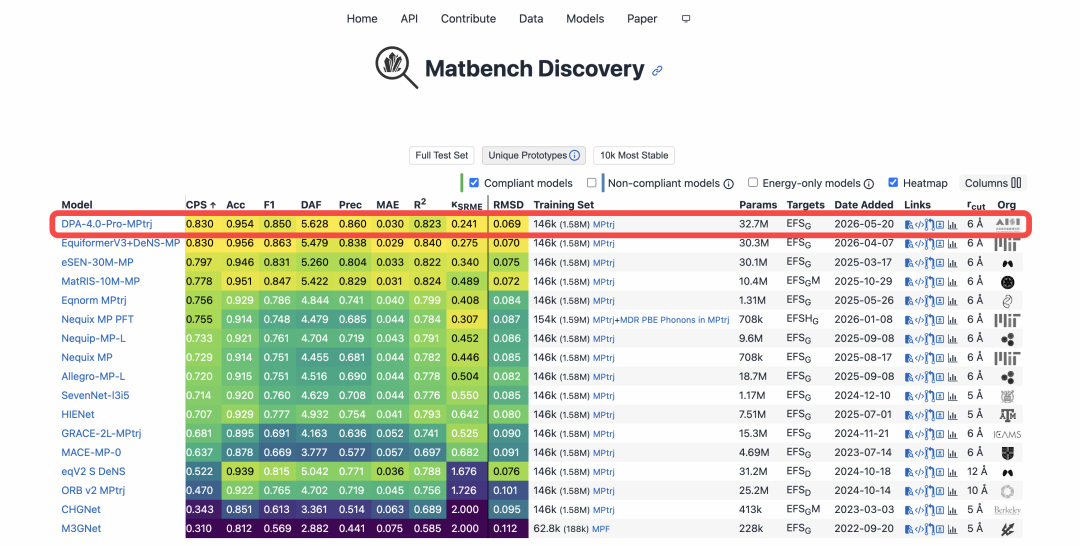
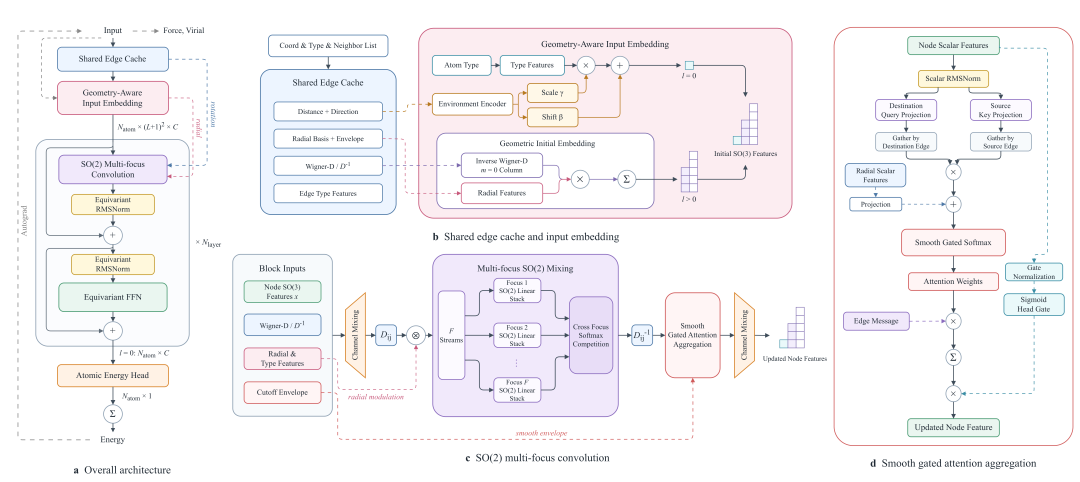
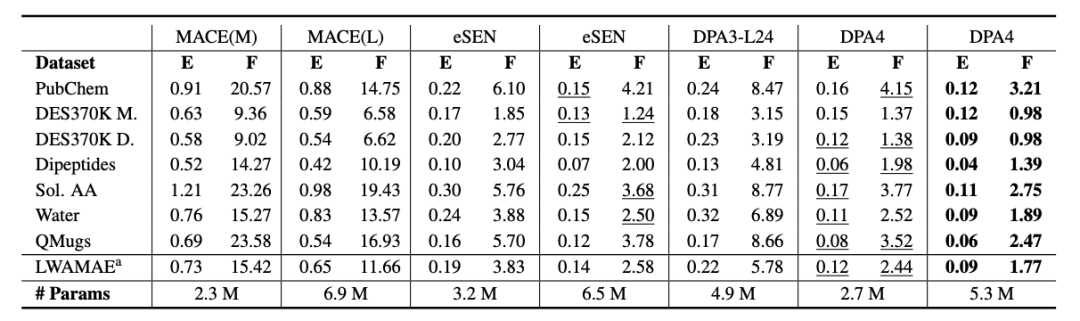
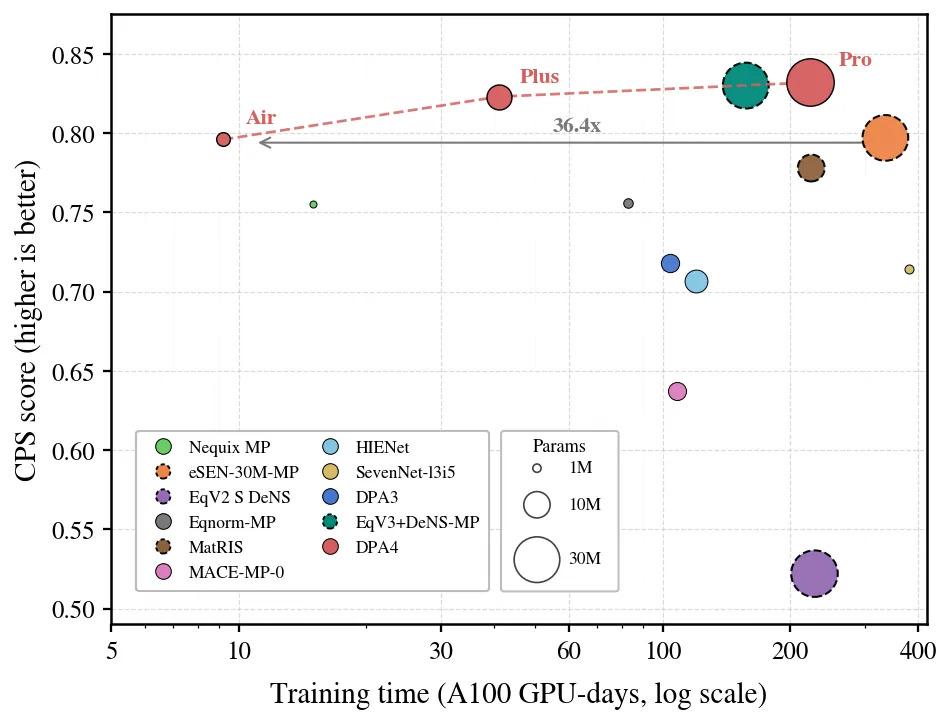
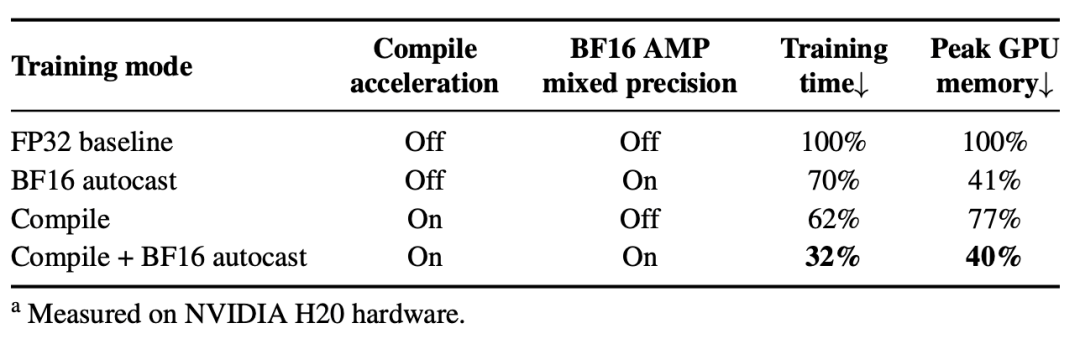
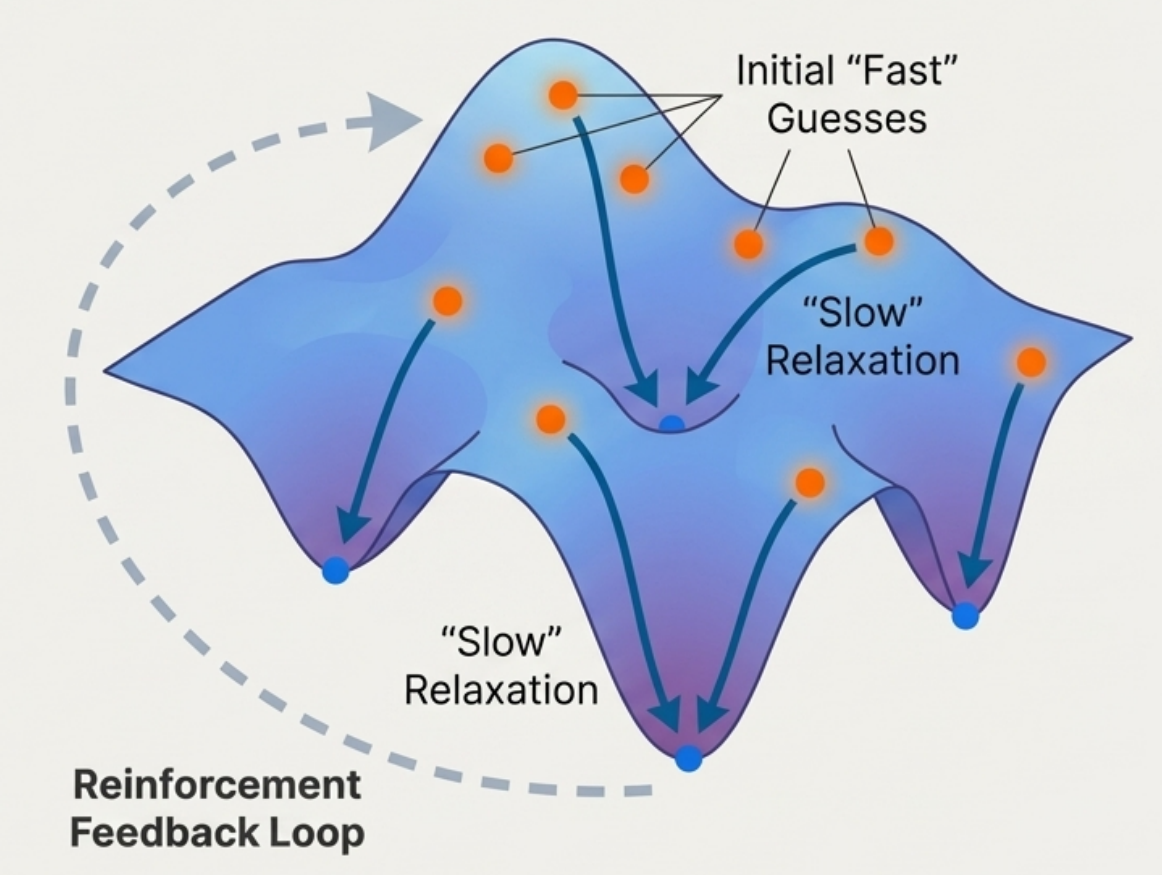
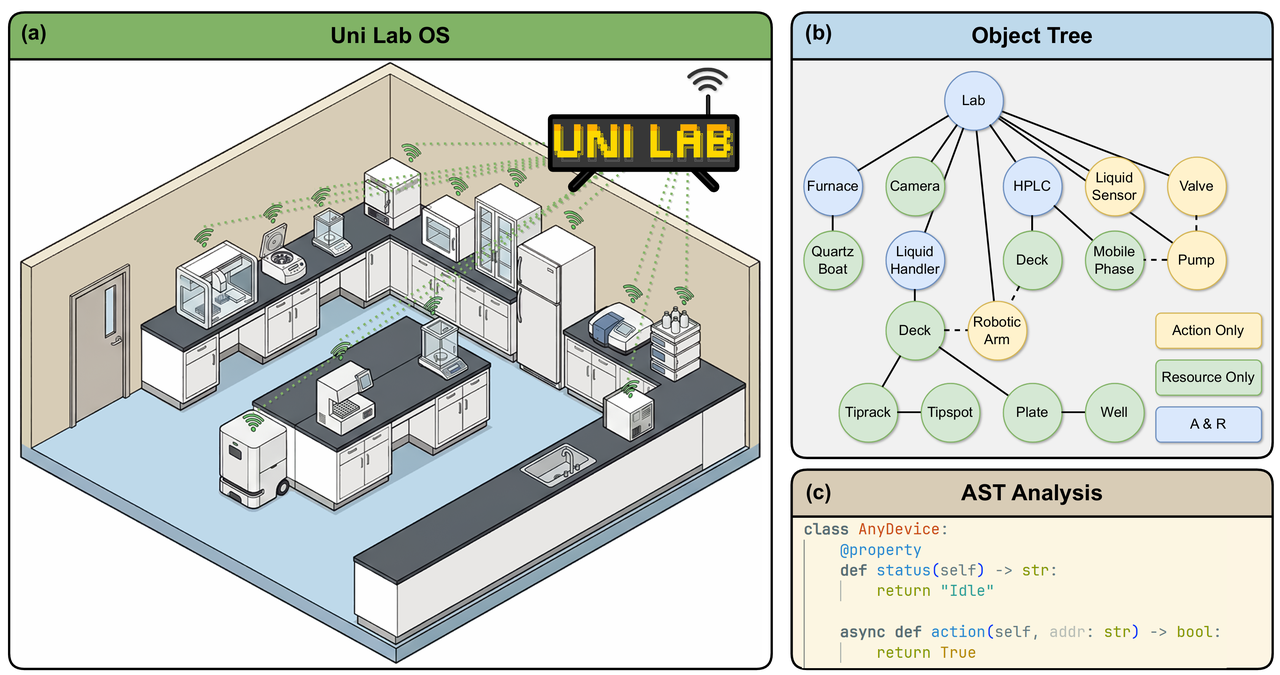
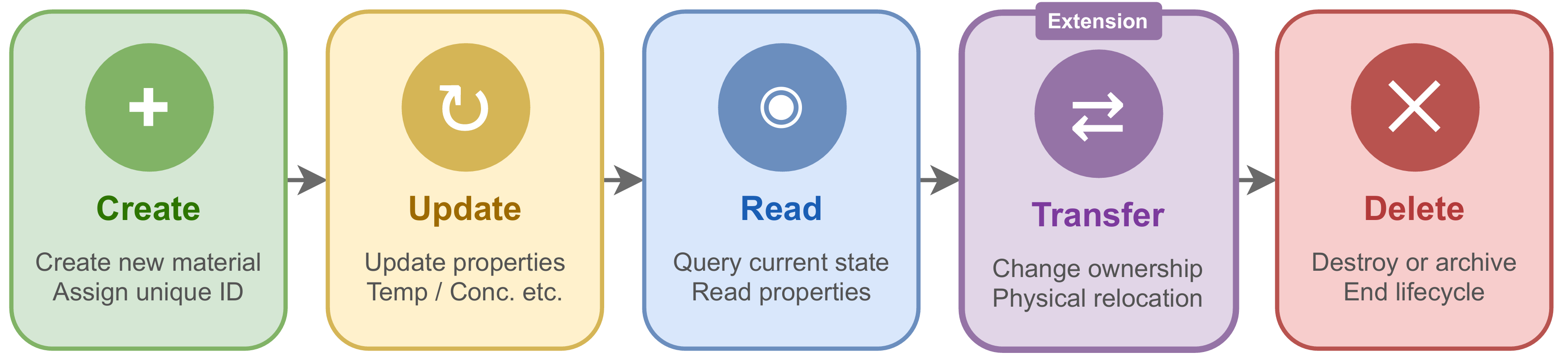
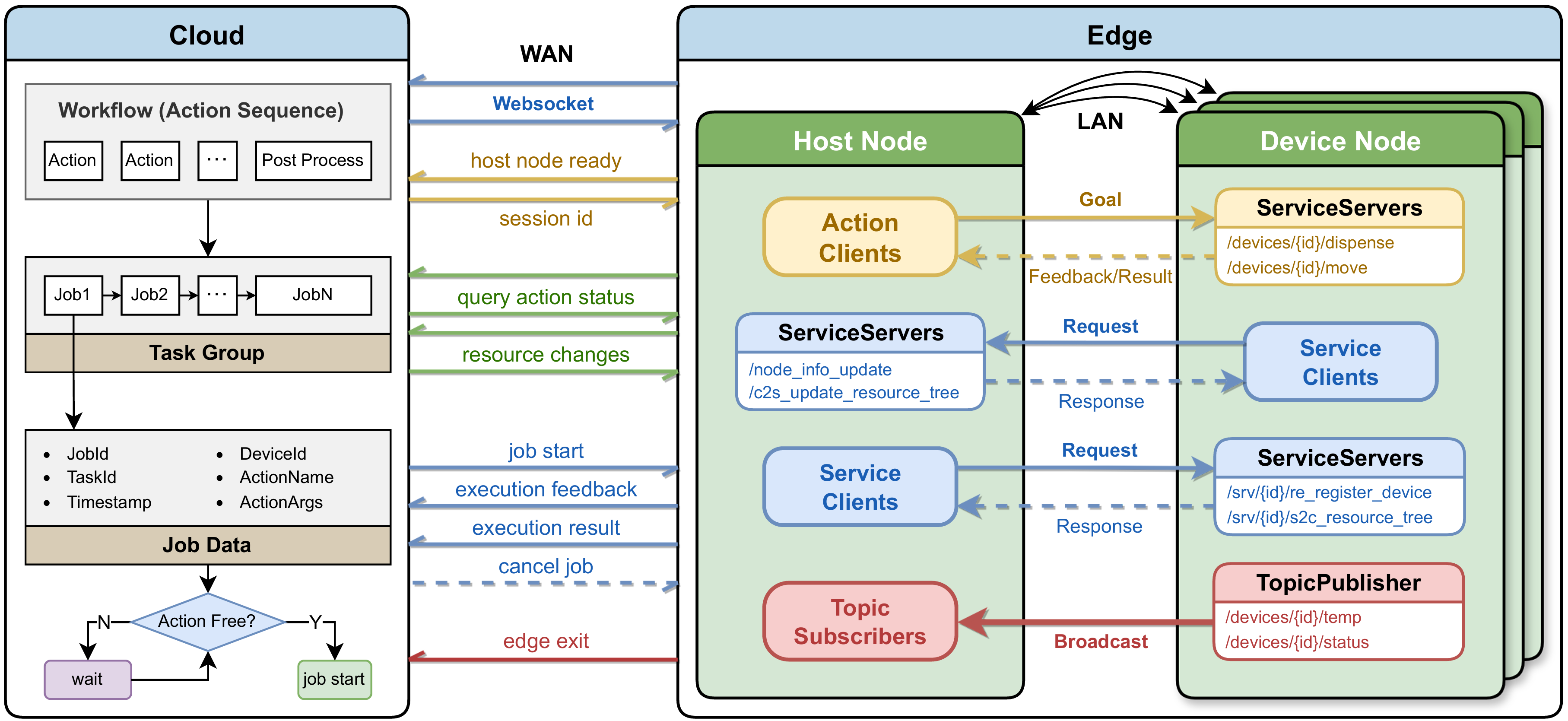
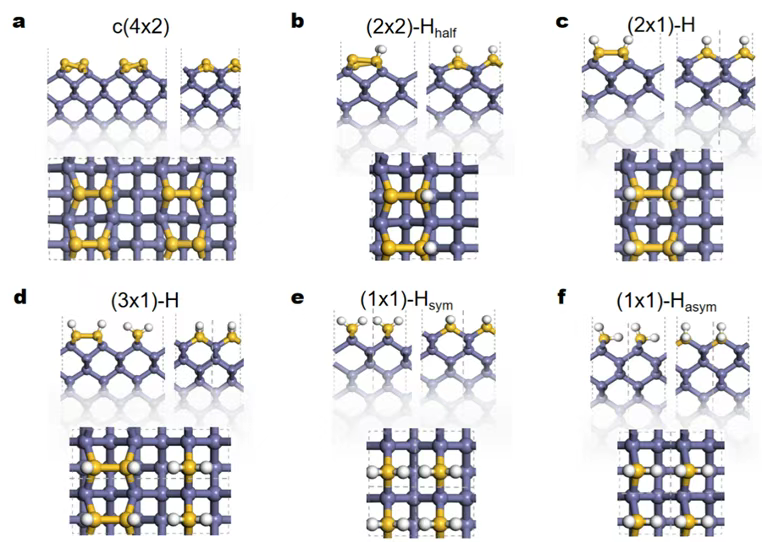
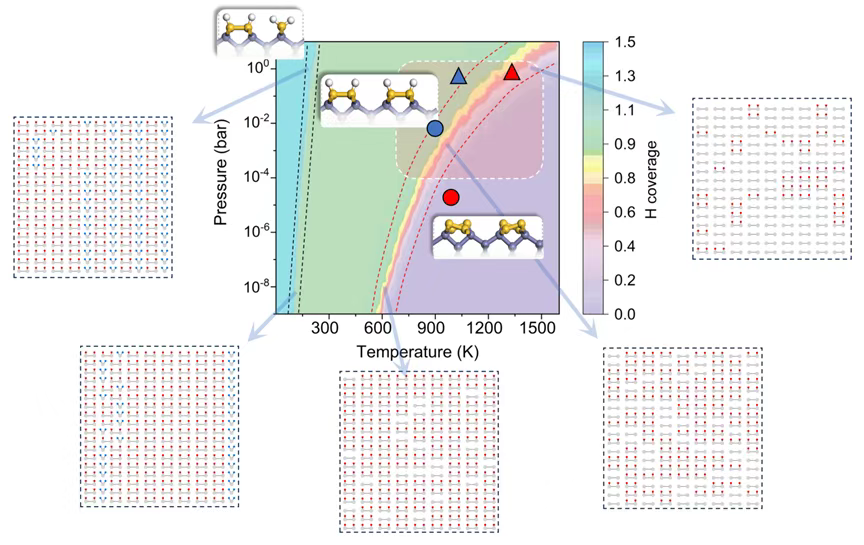
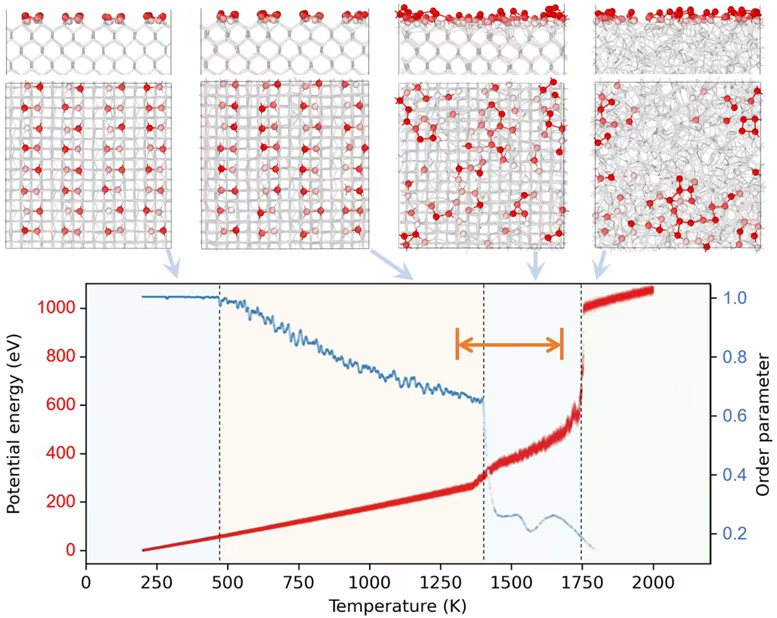
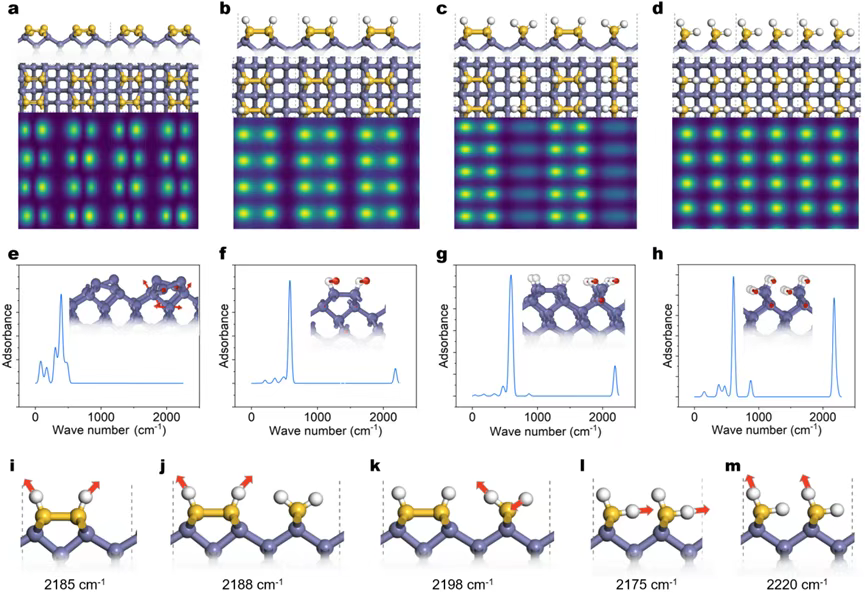
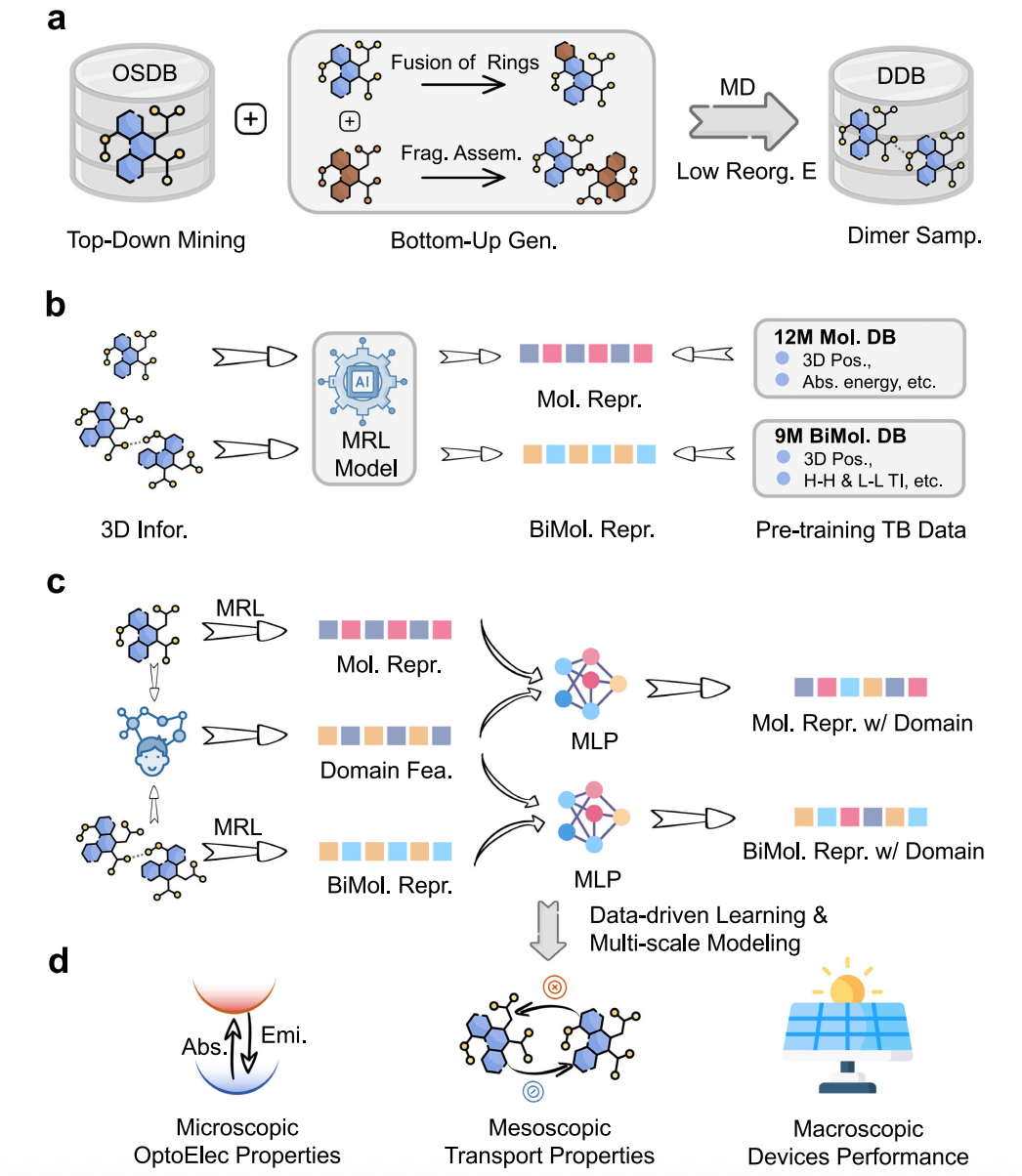
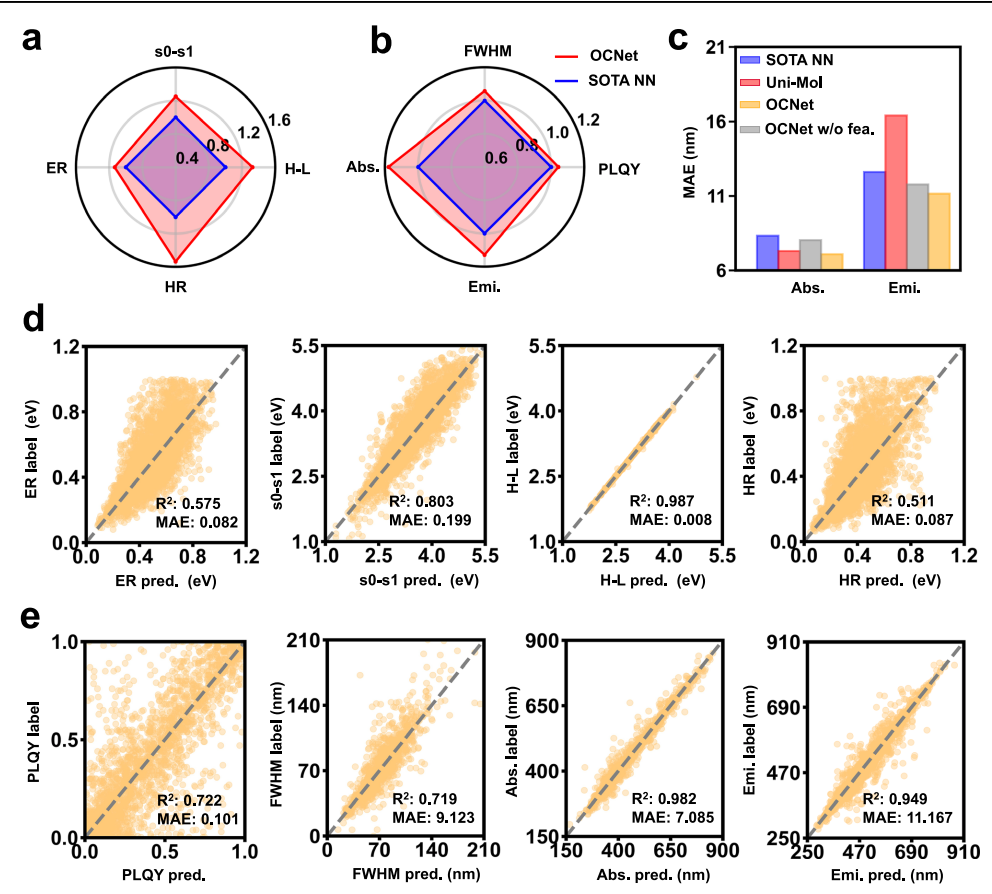
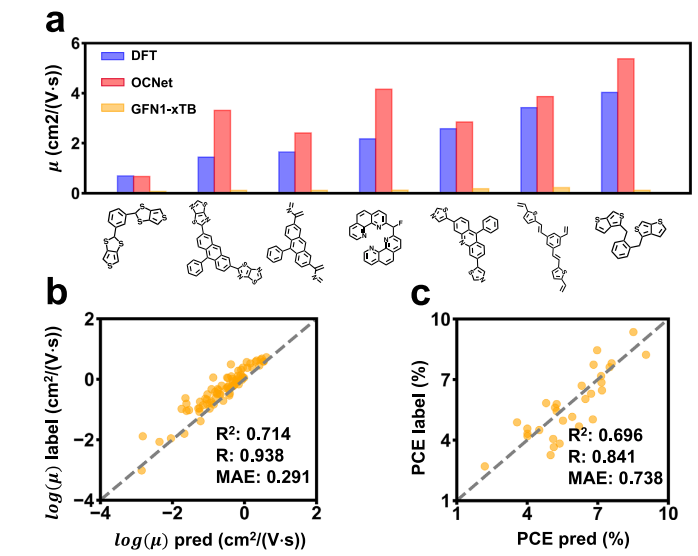
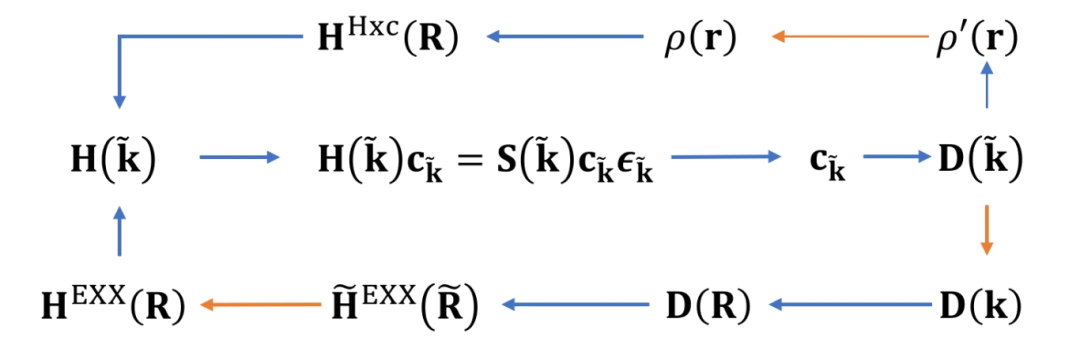
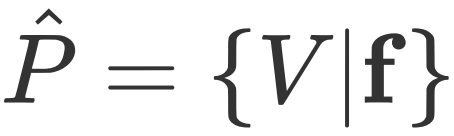 are:
are: